

BestGamerPicks is reader-supported. As an Amazon Associate we earn from qualifying purchases. This does not change our recommendations. Learn more.
The best ergonomic keyboard and mouse combo keeps your wrists straighter and your forearms more relaxed during long gaming and work sessions.
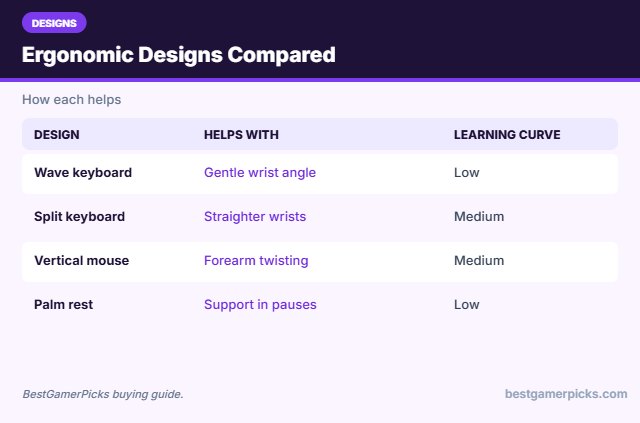
Ergonomic designs include wave and split keyboards, palm rests and vertical mice. We compared comfort, learning curve and owner feedback to find the best ergonomic keyboard and mouse combo.

Quick Answer: The Best Ergonomic Keyboard and Mouse Combo
- Best Overall: Logitech Wave Keys & Lift Vertical Mouse Ergonomic Wireless Combo
- Best Split Keyboard: Logitech Ergo K860 Wireless Ergonomic Split Keyboard with Wrist Rest
- Best Budget Wave: Logitech MK550 Wireless Wave Keyboard and Mouse Combo
- Best Budget Split + Vertical: MEETION Ergonomic Split Keyboard and Vertical Mouse Combo
- Best Palm Rest Combo: Logitech MK345 Full Size Wireless Keyboard and Mouse Combo
- Best Ergonomic Gaming Mouse: Razer Basilisk V3 Ergonomic Wired Gaming Mouse
- Best Pink Ergonomic: Logitech Wave Keys & Lift Vertical Mouse Ergonomic Wireless Combo – Rose
The Logitech Wave Keys + Lift Combo is the best ergonomic keyboard and mouse combo for most people. The Logitech Ergo K860 is the most ergonomic keyboard and the MEETION split combo is the budget option.
Best Ergonomic Keyboard and Mouse Combo Comparison Table
| Product | Best For | Type | Key Feature | Buy |
|---|---|---|---|---|
| Logitech Wave Keys + Lift Combo | Best Overall | Ergonomic combo | Wave keyboard + vertical mouse | Check Price |
| Logitech Ergo K860 | Best Split Keyboard | Split ergonomic keyboard | Curved split design | Check Price |
| Logitech MK550 Wave Combo | Best Budget Wave | Ergonomic wave combo | Wave layout, long battery | Check Price |
| MEETION Split Ergonomic Combo | Best Budget Split + Vertical | Split ergonomic combo | Split keyboard + vertical mouse | Check Price |
| Logitech MK345 Combo | Best Palm Rest Combo | Wireless office combo | Palm rest, full size | Check Price |
| Razer Basilisk V3 | Best Ergonomic Gaming Mouse | Wired gaming mouse | 11 programmable buttons | Check Price |
| Logitech Wave Keys + Lift (Rose) | Best Pink Ergonomic | Pink ergonomic combo | Rose ergonomic set | Check Price |
The 7 Best Ergonomic Keyboard and Mouse Combos
Each best ergonomic keyboard and mouse combo pick reduces wrist strain.

Logitech Wave Keys & Lift Vertical Mouse Ergonomic Wireless Combo
1Logitech’s Wave Keys and Lift combo pairs a wave keyboard with a vertical mouse for comfort.
👍 Pros & Cons
Pros
- Very comfortable
- Reduces wrist twisting
- Logitech quality
Cons
- Vertical mouse takes adjustment
- Pricier
📄 Detailed Review
- Keyboard: Wave Keys with palm rest
- Mouse: Lift vertical
- Connection: Bluetooth / Logi Bolt
A top ergonomic choice for long sessions.
Best ergonomic combo.

Logitech Ergo K860 Wireless Ergonomic Split Keyboard with Wrist Rest
2Ergo K860 is a curved split keyboard that keeps wrists straighter.
👍 Pros & Cons
Pros
- Excellent ergonomics
- Great for coders
- Wrist rest
Cons
- Learning curve
- Keyboard only
📄 Detailed Review
- Design: Curved split
- Rest: Pillowed wrist rest
- Connection: Bluetooth / receiver
Great for programmers who type all day.
Best ergonomic keyboard.

Logitech MK550 Wireless Wave Keyboard and Mouse Combo
3MK550 offers an affordable wave keyboard with a comfortable full-size mouse.
👍 Pros & Cons
Pros
- Comfortable wave shape
- Programmable keys
- Affordable
Cons
- Large
- No backlight
📄 Detailed Review
- Keyboard: Wave K350
- Mouse: Full size
- Battery: Long life
A budget ergonomic option.
Value ergonomic.

MEETION Ergonomic Split Keyboard and Vertical Mouse Combo
4MEETION’s split combo is an affordable ergonomic keyboard and vertical mouse set.
👍 Pros & Cons
Pros
- Ergonomic for less
- Vertical mouse included
- Palm rest
Cons
- Learning curve
- Mixed reviews
📄 Detailed Review
- Keyboard: Split design
- Mouse: Vertical
- Connection: Wireless
A budget path to better posture.
Budget ergonomic.

Logitech MK345 Full Size Wireless Keyboard and Mouse Combo
5Logitech MK345 is a reliable full-size wireless combo with a palm rest.
👍 Pros & Cons
Pros
- Huge review base
- Comfortable palm rest
- Long battery
Cons
- Not for competitive gaming
- No backlight
📄 Detailed Review
- Connection: 2.4GHz USB receiver
- Keyboard: Full size with palm rest
- Mouse: Right-hand contoured
A dependable choice for laptops and family PCs.
Reliable everyday combo.

Razer Basilisk V3 Ergonomic Wired Gaming Mouse
6Basilisk V3 is a highly rated ergonomic mouse with 11 programmable buttons.
👍 Pros & Cons
Pros
- Excellent ergonomics
- Free-spin scroll wheel
- Highly rated
Cons
- Mouse only
- Wired
📄 Detailed Review
- Buttons: 11 programmable
- Wheel: HyperScroll tilt
- Lighting: Chroma RGB
Its free-spin wheel is great for building games like Minecraft.
Top wired mouse.

Logitech Wave Keys & Lift Vertical Mouse Ergonomic Wireless Combo – Rose
7The rose Wave Keys and Lift combo is a pink ergonomic option.
👍 Pros & Cons
Pros
- Comfortable
- Pretty rose color
- Quiet
Cons
- Pricier
- Vertical mouse adjustment
📄 Detailed Review
- Color: Rose
- Keyboard: Wave Keys
- Mouse: Lift vertical
Comfort plus color.
Pink ergonomic pick.
How We Chose the Best Ergonomic Keyboard and Mouse Combo
To choose the best ergonomic keyboard and mouse combo, we compared wave, split and vertical designs on comfort and owner feedback.
For official guidance on keyboard height, wrist posture and placement, see the OSHA Computer Workstations eTool on keyboards.
Product details in this guide are based on manufacturer specifications and verified owner feedback, not in-house lab testing. Read more on our How We Test page.
Buying Guide: How to Choose the Best Ergonomic Keyboard and Mouse Combo
Keep these factors in mind when shopping for the best ergonomic keyboard and mouse combo.
Wrist position and wrist rests
Keep wrists straight and relaxed, with the keyboard and mouse at elbow height. A wrist rest supports the palm during pauses; avoid planting your wrists while typing.
Wave, split and vertical designs
Wave keyboards curve gently, split keyboards angle each half for straighter wrists, and vertical mice put your hand in a handshake position to reduce forearm twisting.
Gaming with ergonomic gear
Vertical mice are less precise for fast shooters. Many gamers use an ergonomic keyboard with a well-shaped gaming mouse instead.
Wired, 2.4GHz or Bluetooth?
Wired sets have zero battery worries and the lowest latency. 2.4GHz wireless with a USB receiver is nearly as fast and is the best choice for wireless gaming. Bluetooth is convenient for laptops, tablets and handhelds but adds a little delay.
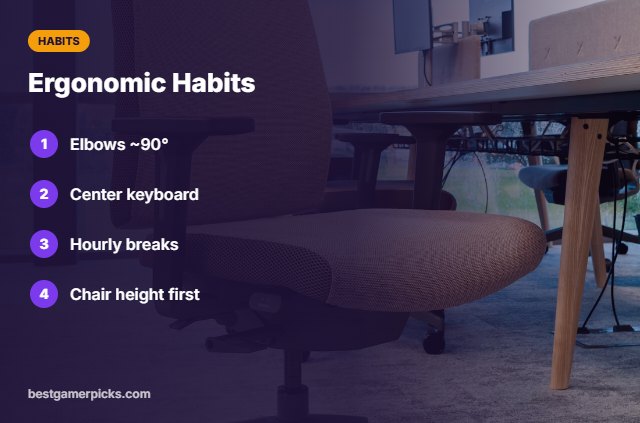
Ergonomic Habits
Beyond gear:
- Keep elbows near 90°.
- Center the keyboard on your body.
- Take breaks every hour.
- Adjust chair height first.
Here are quick answers about the best ergonomic keyboard and mouse combo.
Frequently Asked Questions
What is the best ergonomic keyboard and mouse combo?
The Logitech Wave Keys + Lift Combo is the best ergonomic keyboard and mouse combo for most people, with the Logitech Ergo K860 as the most ergonomic keyboard.
Are vertical mice good for gaming?
They are less precise for fast aim.
How long to adapt?
Usually a week or two.
Do ergonomic combos prevent injury?
They can reduce strain; habits matter too.
Final Verdict
Our final pick for the best ergonomic keyboard and mouse combo is the Logitech Wave Keys + Lift Combo. Choose the Logitech Ergo K860 if you want a split keyboard, or the Logitech MK550 Wave Combo on a budget.
Related Guides
More keyboard and mouse guides:
- Best Keyboard Mouse and Headset Combo
- Best Keyboard and Mouse Combo for Laptop
- Best Keyboard and Mouse Combo with Wrist Rest
- Best Keyboard and Mouse Combo for Mac Gaming
- Best Couch Gaming Setup for PC
- Best RGB Wall Lights for Gaming Room
Product details are based on manufacturer specifications at the time of writing. Prices and availability change often, so check Amazon for the latest price.










Write Your Review
No reviews yet. Be the first to share your experience!