

BestGamerPicks is reader-supported. As an Amazon Associate we earn from qualifying purchases. This does not change our recommendations. Learn more.
The best keyboard and mouse combo for laptop setups gives you a full-size or comfortable typing experience and a real mouse, so your laptop works like a desktop.
Laptop users care about ports, portability and multi-device switching. We compared connection, size and owner feedback to find the best keyboard and mouse combo for laptop gaming and work.

Quick Answer: The Best Keyboard and Mouse Combo for Laptop
- Best Overall: Logitech Pebble 2 Silent Compact Wireless Keyboard and Mouse Combo
- Best Full-Size: Logitech MK345 Full Size Wireless Keyboard and Mouse Combo
- Best for Laptop Gaming: Redragon S101M-KS Wireless Gaming Keyboard and Mouse, Tri-Mode
- Best Budget Bluetooth: Logitech MK250 Compact Wireless Bluetooth Keyboard and Mouse Combo
- Best Compact Budget: TECKNET Wireless Keyboard and Mouse Combo, 2.4G Mini
- Best Slim Numpad: Lenovo 510 Wireless Combo, Slim Full Size Keyboard
- Best Portable: Portable Foldable Keyboard and Mouse Combo, Bluetooth + USB
The Logitech Pebble 2 Combo is the best keyboard and mouse combo for laptop use thanks to Bluetooth and a slim design. The Logitech MK345 is the full-size pick and the Redragon S101M-KS suits laptop gamers.
Best Keyboard and Mouse Combo for Laptop Comparison Table
| Product | Best For | Type | Key Feature | Buy |
|---|---|---|---|---|
| Logitech Pebble 2 Combo | Best Overall | Slim silent combo | Silent clicks, Bluetooth | Check Price |
| Logitech MK345 Combo | Best Full-Size | Wireless office combo | Palm rest, full size | Check Price |
| Redragon S101M-KS Wireless Combo | Best for Laptop Gaming | Wireless gaming combo | Tri-mode: wired, 2.4GHz, Bluetooth | Check Price |
| Logitech MK250 Bluetooth Combo | Best Budget Bluetooth | Compact Bluetooth combo | Bluetooth, compact | Check Price |
| TECKNET Mini Wireless Combo | Best Compact Budget | Compact wireless combo | Small footprint | Check Price |
| Lenovo 510 Wireless Combo | Best Slim Numpad | Slim wireless combo | Slim full-size with numpad | Check Price |
| Foldable Travel Keyboard and Mouse | Best Portable | Foldable travel combo | Folds for travel | Check Price |
The 7 Best Keyboard and Mouse Combos for Laptops
Each best keyboard and mouse combo for laptop pick works with Windows laptops and MacBooks.

Logitech Pebble 2 Silent Compact Wireless Keyboard and Mouse Combo
1Pebble 2 Combo is a slim, silent Bluetooth set for laptops and tablets.
👍 Pros & Cons
Pros
- Very quiet
- Slim and portable
- Multi-device
Cons
- Not for competitive gaming
- No backlight
📄 Detailed Review
- Connection: Bluetooth, multi-device
- Mouse: Silent clicks
- Design: Slim, compact
Great for travel and quiet rooms.
Silent compact pick.

Logitech MK345 Full Size Wireless Keyboard and Mouse Combo
2Logitech MK345 is a reliable full-size wireless combo with a palm rest.
👍 Pros & Cons
Pros
- Huge review base
- Comfortable palm rest
- Long battery
Cons
- Not for competitive gaming
- No backlight
📄 Detailed Review
- Connection: 2.4GHz USB receiver
- Keyboard: Full size with palm rest
- Mouse: Right-hand contoured
A dependable choice for laptops and family PCs.
Reliable everyday combo.

Redragon S101M-KS Wireless Gaming Keyboard and Mouse, Tri-Mode
3The Redragon S101M-KS is a tri-mode wireless combo that works over 2.4GHz, Bluetooth or USB.
👍 Pros & Cons
Pros
- Three connection modes
- Rechargeable
- Huge review base
Cons
- Mouse DPI modest
- Bluetooth adds latency
📄 Detailed Review
- Connection: Wired, 2.4GHz, Bluetooth
- Keyboard: RGB backlit
- Mouse: Up to 4800 DPI
Use 2.4GHz for gaming and Bluetooth for tablets or laptops.
A versatile wireless pick.

Logitech MK250 Compact Wireless Bluetooth Keyboard and Mouse Combo
4MK250 is a compact Bluetooth combo for laptops, tablets and Macs.
👍 Pros & Cons
Pros
- No receiver needed
- Compact
- Affordable
Cons
- Bluetooth adds latency
- Not for competitive games
📄 Detailed Review
- Connection: Bluetooth
- Layout: Compact
- Use: Laptops, tablets, Mac
No USB receiver needed.
Bluetooth value pick.

TECKNET Wireless Keyboard and Mouse Combo, 2.4G Mini
5TECKNET’s mini combo is a cheap, compact wireless set.
👍 Pros & Cons
Pros
- Small and cheap
- Large review base
- Plug and play
Cons
- No backlight
- Basic mouse
📄 Detailed Review
- Connection: 2.4GHz
- Layout: Compact
- Use: Laptop, PC
Good for small desks and kids.
Compact budget pick.

Lenovo 510 Wireless Combo, Slim Full Size Keyboard
6Lenovo 510 is a slim, reliable wireless combo with a number pad.
👍 Pros & Cons
Pros
- Reliable brand
- Numpad
- Slim
Cons
- Not for gaming
- No backlight
📄 Detailed Review
- Connection: 2.4GHz
- Layout: Full size
- Design: Slim
Good for work-first desks.
Reliable slim pick.

Portable Foldable Keyboard and Mouse Combo, Bluetooth + USB
7This foldable keyboard and mouse set packs into a bag for travel.
👍 Pros & Cons
Pros
- Very portable
- Multi-device
- Works with handhelds
Cons
- Small keys
- Not for long typing
📄 Detailed Review
- Design: Foldable
- Connection: Bluetooth x2, USB-A, USB-C
- Use: Tablets, phones, handhelds
Handy with Steam Deck and tablets.
Travel pick.
How We Chose the Best Keyboard and Mouse Combo for Laptop
To choose the best keyboard and mouse combo for laptop, we compared combos on Bluetooth versus receiver use, portability and comfort.
For official guidance on keyboard height, wrist posture and placement, see the OSHA Computer Workstations eTool on keyboards.
Product details in this guide are based on manufacturer specifications and verified owner feedback, not in-house lab testing. Read more on our How We Test page.
Buying Guide: How to Choose the Best Keyboard and Mouse Combo for Laptop
Keep these factors in mind when shopping for the best keyboard and mouse combo for laptop.
Wired, 2.4GHz or Bluetooth?
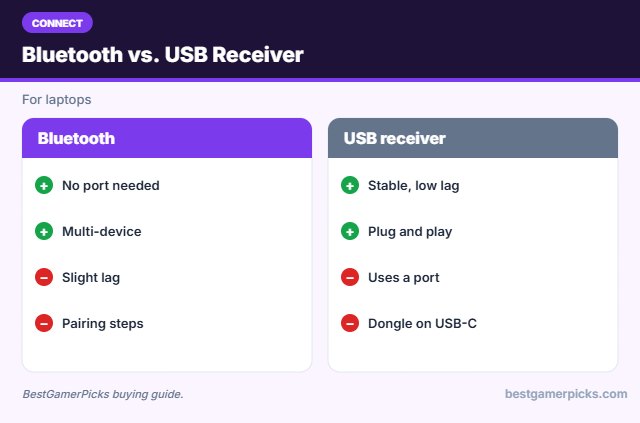
Wired sets have zero battery worries and the lowest latency. 2.4GHz wireless with a USB receiver is nearly as fast and is the best choice for wireless gaming. Bluetooth is convenient for laptops, tablets and handhelds but adds a little delay.
Ports: USB-A, USB-C or Bluetooth
Many new laptops only have USB-C. Bluetooth combos avoid adapters, while USB receivers may need a USB-C dongle.
Use a laptop stand
Raising the laptop screen to eye level with an external keyboard and mouse improves posture.
Wrist position and wrist rests
Keep wrists straight and relaxed, with the keyboard and mouse at elbow height. A wrist rest supports the palm during pauses; avoid planting your wrists while typing.
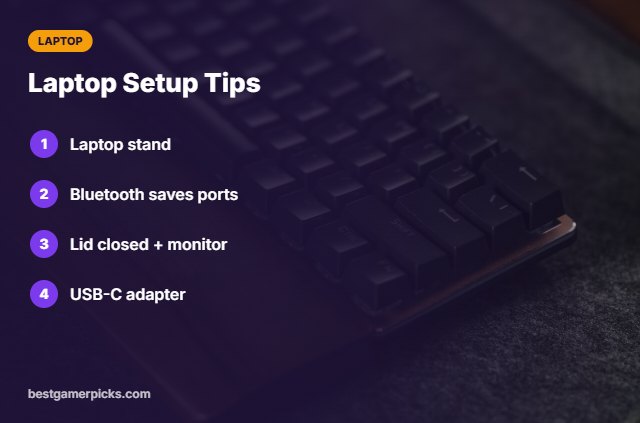
Laptop Setup Tips
Work like a desktop:
- Raise the laptop on a stand.
- Use Bluetooth to save ports.
- Close the lid with an external monitor.
- Keep a USB-C adapter handy.
Here are quick answers about the best keyboard and mouse combo for laptop.
Frequently Asked Questions
What is the best keyboard and mouse combo for laptop use?
The Logitech Pebble 2 Combo is the best keyboard and mouse combo for laptop use, with the Logitech MK345 for full-size typing.
Bluetooth or receiver?
Bluetooth saves ports; receivers are more stable.
Does it work with MacBook?
Yes, most combos work on macOS.
Can I game on a laptop with a combo?
Yes, a 2.4GHz gaming set works best.
Final Verdict
Our final pick for the best keyboard and mouse combo for laptop is the Logitech Pebble 2 Combo. Choose the Logitech MK345 Combo if you want full-size typing, or the Redragon S101M-KS Wireless Combo for laptop gaming.
Related Guides
More keyboard and mouse guides:
- Best Ergonomic Keyboard and Mouse Combo
- Best Keyboard and Mouse Combo for Mac Gaming
- Best Keyboard Mouse and Headset Combo
- Best Keyboard and Mouse Combo for Kids
- Best Budget Desktop Speakers for PC Gaming
- Best RGB Lights for Gaming Room
Product details are based on manufacturer specifications at the time of writing. Prices and availability change often, so check Amazon for the latest price.










Write Your Review
No reviews yet. Be the first to share your experience!