

BestGamerPicks is reader-supported. As an Amazon Associate we earn from qualifying purchases. This does not change our recommendations. Learn more.
The best mixamp for console gaming lets you balance game audio and party chat so teammates are never drowned out by explosions.
The classic MixAmp is now hard to find new, so we looked at current mixers, controller adapters and gaming DACs with game-chat balance. We compared controls and owner feedback to find the best MixAmp for console gaming.
Quick Answer: The Best Mixamp for Console Gaming
- Best for PlayStation and Switch: Creative Sound Blaster G3 USB-C External Gaming USB DAC and Amp for PS4, Nintendo Switch, GameVoice Mix
- Best for Xbox: Stereo Headset Adapter for Xbox One & Xbox Series X|S Controller, Game/Chat Balance, Volume
- Best DAC/Amp Upgrade: Sound BlasterX G6 Hi-Res 130dB 32bit/384kHz Gaming DAC, External USB Sound Card with Xamp Headphone Amp, Dolby Digital
- Best Value DAC: Fosi Audio K5 Pro Gaming DAC Headphone Amp 1000mW with Mic Input, Bass Treble Control, USB-C/Optical
- Best with PEQ: Topping DX1 II Gaming DAC Headphone AMP Combo for PC/PS5/Switch, USB-C, Mic Input, 1000mW x2 Fully Balanced
- Best Premium (PC): EPOS GSX 1000 2nd Edition Gaming DAC Amp, External USB Sound Card with 7.1 Surround Sound, Side Tone
- Best for Streamers: HyperX Audio Mixer, Audio Interface
The Sound Blaster G3 is the best MixAmp for console gaming on PlayStation and Switch thanks to its GameVoice Mix. The Xbox controller headset adapter is the easy Xbox pick, and the Sound BlasterX G6 adds a stronger DAC/amp.
Best Mixamp for Console Gaming Comparison Table
| Product | Best For | Type | Key Feature | Buy |
|---|---|---|---|---|
| Sound Blaster G3 | Best for PlayStation and Switch | Portable gaming DAC | USB-C, GameVoice Mix | Check Price |
| Xbox Controller Headset Adapter | Best for Xbox | Xbox controller adapter | Game/chat balance on the pad | Check Price |
| Sound BlasterX G6 | Best DAC/Amp Upgrade | Gaming DAC/amp | Optical in, mic, virtual 7.1 | Check Price |
| Fosi Audio K5 Pro | Best Value DAC | Gaming DAC/amp | Mic input + bass/treble knobs | Check Price |
| Topping DX1 II | Best with PEQ | Gaming DAC/amp | Mic input + 10-band PEQ | Check Price |
| EPOS GSX 1000 2nd Edition | Best Premium (PC) | Gaming DAC/amp | 7.1 surround + sidetone | Check Price |
| HyperX Audio Mixer | Best for Streamers | Audio mixer | Mixer for streaming setups | Check Price |
The 7 Best MixAmps and Game-Chat Mixers for Consoles
Each best MixAmp for console gaming pick helps you balance or improve game and chat audio.

Creative Sound Blaster G3 USB-C External Gaming USB DAC and Amp for PS4, Nintendo Switch, GameVoice Mix
1The Sound Blaster G3 is a compact USB-C gaming DAC/amp with a GameVoice Mix control for chat and game balance.
👍 Pros & Cons
Pros
- Compact
- Game/voice balance
- Console friendly
Cons
- Older model
- Modest power
📄 Detailed Review
- Connection: USB-C (USB-A adapter)
- Feature: GameVoice Mix
- Use: Switch, PlayStation, PC
It suits Switch, PlayStation and PC players who want a small add-on.
A small console DAC.

Stereo Headset Adapter for Xbox One & Xbox Series X|S Controller, Game/Chat Balance, Volume
2This stereo headset adapter plugs into an Xbox controller and adds volume and game/chat balance controls.
👍 Pros & Cons
Pros
- Cheap
- Adds game/chat balance
- Works with any 3.5mm headset
Cons
- Third-party adapter
- Basic sound
📄 Detailed Review
- Connection: Xbox controller port
- Controls: Volume, game/chat balance
- Jack: 3.5mm
It is the simplest Xbox audio upgrade for wired headsets.
Simple Xbox upgrade.

Sound BlasterX G6 Hi-Res 130dB 32bit/384kHz Gaming DAC, External USB Sound Card with Xamp Headphone Amp, Dolby Digital
3The Sound BlasterX G6 is an external gaming DAC/amp with optical input, mic input, Xamp headphone amp and virtual 7.1.
👍 Pros & Cons
Pros
- Works with PC, PS5 and Switch
- Optical input
- Mic input and monitoring
Cons
- Software needed for some features
- Plastic shell
📄 Detailed Review
- Inputs: USB, optical
- Features: Virtual 7.1, Scout Mode, mic in
- DAC: 32-bit/384kHz (listed)
It has thousands of reviews and works with PC, PS5 and Switch.
The best all-round gaming DAC.

Fosi Audio K5 Pro Gaming DAC Headphone Amp 1000mW with Mic Input, Bass Treble Control, USB-C/Optical
4The Fosi Audio K5 Pro is a gaming DAC/amp with a mic input, bass and treble controls and USB-C or optical input.
👍 Pros & Cons
Pros
- Mic input for headsets
- Bass and treble knobs
- Works with PC and PS5
Cons
- Bass and treble can color the sound
- Plastic-feel knobs
📄 Detailed Review
- Inputs: USB-C, optical
- Mic: 3.5mm mic input
- Power: Up to 1000mW (listed)
It is one of the most reviewed budget gaming DACs and pairs well with headsets and studio headphones.
The best value gaming DAC.

Topping DX1 II Gaming DAC Headphone AMP Combo for PC/PS5/Switch, USB-C, Mic Input, 1000mW x2 Fully Balanced
5The Topping DX1 II is a compact gaming DAC/amp with a mic input, 10-band parametric EQ and balanced 4.4mm output.
👍 Pros & Cons
Pros
- Mic input
- Parametric EQ
- Works with PC, PS5 and Switch
Cons
- Newer model
- Small knob
📄 Detailed Review
- Mic: Mic input
- EQ: 10-band parametric EQ
- Outputs: 3.5mm, 4.4mm balanced
It is listed for PC, PS5 and Switch, making it a tidy single box for headset users.
A modern gaming DAC with EQ.

EPOS GSX 1000 2nd Edition Gaming DAC Amp, External USB Sound Card with 7.1 Surround Sound, Side Tone
6The EPOS GSX 1000 2nd Edition is a premium gaming DAC/amp with 7.1 surround and sidetone mic monitoring.
👍 Pros & Cons
Pros
- Sidetone for mic monitoring
- Touch controls
- Surround tuned for games
Cons
- Premium price
- PC focused
📄 Detailed Review
- Connection: USB
- Features: 7.1 surround, sidetone
- Inputs: Headset and speaker outputs
It lets you switch between headset and speakers from the desk.
Premium PC gaming audio.

7The HyperX Audio Mixer is a desktop mixer and audio interface for PC gaming and streaming.
👍 Pros & Cons
Pros
- Mixer-style controls
- Good for streaming
- HyperX ecosystem
Cons
- PC focused
- Not a console MixAmp
📄 Detailed Review
- Type: Audio mixer/interface
- Use: PC streaming
- Brand: HyperX
It gives physical faders for game, chat and mic levels.
A streamer’s mixer.
How We Chose the Best Mixamp for Console Gaming
To choose the best mixamp for console gaming, we compared mixers, adapters and gaming DACs on game-chat control, console support and owner feedback.
Loud gaming sessions add up, so keep safe listening levels in mind; read the NIDCD guide to noise-induced hearing loss.
Product details in this guide are based on manufacturer specifications and verified owner feedback, not in-house lab testing. Read more on our How We Test page.
Buying Guide: How to Choose the Best Mixamp for Console Gaming
Keep these factors in mind when shopping for the best mixamp for console gaming.
What a MixAmp does
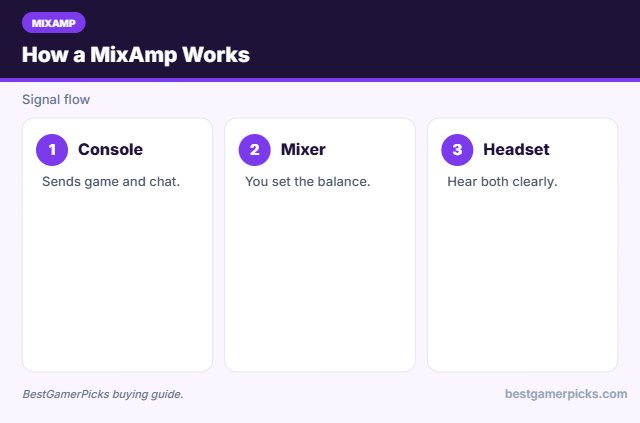
A MixAmp sits between your console and headset, giving you physical controls for volume and the balance between game audio and voice chat.
Using a DAC with consoles
PS5 accepts many USB audio devices that follow the USB Audio Class standard. Xbox does not support most USB DACs, so Xbox players usually need an optical input, the controller jack, or a licensed Xbox device.
Mic input and monitoring
Gaming DACs with a mic input let you plug in a headset or clip-on mic. Sidetone or mic monitoring feeds your own voice back so you do not shout in party chat.
Virtual surround and EQ
Many gaming DACs add virtual 7.1 surround, footstep EQ or parametric EQ. These features can help in shooters, but stereo with good headphones is often just as clear. Try both.
Game-Chat Mix Tips
Hear your squad:
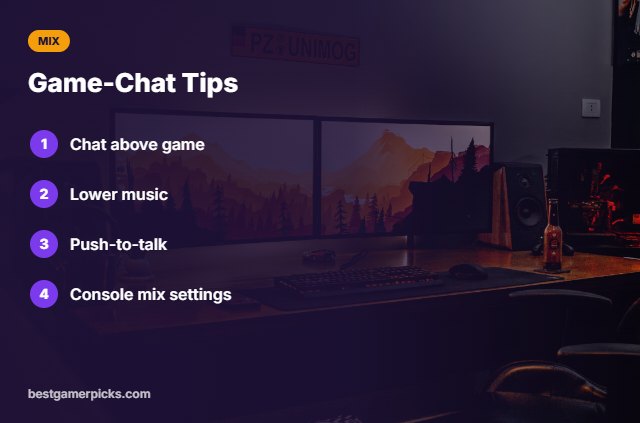
- Set chat slightly above game.
- Lower in-game music.
- Use push-to-talk in noisy rooms.
- Check console chat mix settings.
Here are quick answers about the best mixamp for console gaming.
Frequently Asked Questions
What is the best MixAmp for console gaming?
The Sound Blaster G3 is the best MixAmp for console gaming on PlayStation and Switch, with an Xbox controller adapter for Xbox.
Is the Astro MixAmp still sold?
New units are hard to find; check availability.
Can PS5 balance chat itself?
Yes, PS5 has a chat audio balance setting.
Does Xbox support USB mixers?
Only licensed devices; controller adapters are easiest.
Final Verdict
Our final pick for the best mixamp for console gaming is the Sound Blaster G3. Choose the Xbox Controller Headset Adapter if you want easy Xbox setup, or the Sound BlasterX G6 for a stronger DAC/amp.
Related Guides
More DAC and headphone amp guides:
- Best Headphone Amp with Mic Input
- Best Portable Dac for Gaming
- Best Headphone Amp for PS5
- Best Portable Dac for Steam Deck
- Best Monitor Arm for Bed Gaming
- Best TV Wall Mount for Gaming Room
Product details are based on manufacturer specifications at the time of writing. Prices and availability change often, so check Amazon for the latest price.





Write Your Review
No reviews yet. Be the first to share your experience!