

BestGamerPicks is reader-supported. As an Amazon Associate we earn from qualifying purchases. This does not change our recommendations. Learn more.
Our best quiet laptop cooling pad picks use slower or larger fans to move air without adding a loud whine to your setup.
A quieter pad usually cools less at its lowest speed, so speed control is useful. We compared noise, fan design, size support and owner feedback to find the best quiet laptop cooling pad.
Quick Answer: The Best Quiet Laptop Cooling Pad
- Best Overall: KLIM Ultimate RGB Laptop Cooling Pad with LED Rim, Up to 17 Inch, 200mm Fan at 750 RPM
- Best Slim: havit HV-F2056 Laptop Cooling Pad for 15.6-17 Inch Laptops, 3 Quiet Fans
- Best Value: Kootek Laptop Cooling Pad Cooler Stand with 5 Quiet Fans for 12″-17″ Laptops
- Best Budget: Amazon Basics Laptop Cooling Pad Stand with 6 Quiet Fans, Height Adjustable
- Best Thin: TECKNET Laptop Cooling Pad, Portable Slim Laptop Cooler for 12″-17″ Laptops, Whisper-Quiet
- Best Big Fan: Cooler Master NotePal CMC3 Laptop Cooling Pad, Silent 200mm Fan, 700RPM, up to 15.6″ Laptops
- Best Quiet Stand: YICOSUN Adjustable Laptop Cooling Stand with 2 Quiet Fans and RGB Lighting, Aluminum Alloy, Foldable
The KLIM Ultimate RGB is our top pick. Also consider the havit HV-F2056 (Best Slim) and the Kootek 5-Fan Cooling Pad (Best Value).
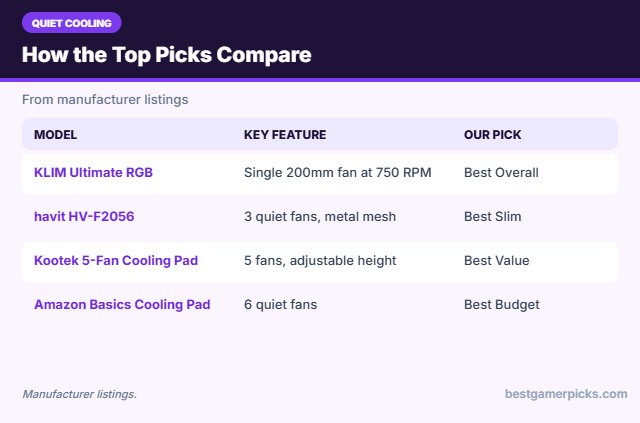
Best Quiet Laptop Cooling Pad Comparison Table
| Product | Best For | Type | Key Feature | Buy |
|---|---|---|---|---|
| KLIM Ultimate RGB | Best Overall | Quiet RGB cooling pad | Single 200mm fan at 750 RPM | Check Price |
| havit HV-F2056 | Best Slim | Slim cooling pad | 3 quiet fans, metal mesh | Check Price |
| Kootek 5-Fan Cooling Pad | Best Value | Multi-fan cooling pad | 5 fans, adjustable height | Check Price |
| Amazon Basics Cooling Pad | Best Budget | Budget cooling pad | 6 quiet fans | Check Price |
| TECKNET Slim Cooling Pad | Best Thin | Slim quiet pad | Whisper-quiet design | Check Price |
| Cooler Master NotePal CMC3 | Best Big Fan | Quiet cooling pad | Silent 200mm fan at 700 RPM | Check Price |
| YICOSUN Cooling Laptop Stand | Best Quiet Stand | Laptop stand with fans | Aluminum stand with 2 fans and RGB | Check Price |
The 7 Best Quiet Laptop Cooling Pads
Each best quiet laptop cooling pad pick below is known for low fan noise.

KLIM Ultimate RGB Laptop Cooling Pad with LED Rim, Up to 17 Inch, 200mm Fan at 750 RPM
1The KLIM Ultimate uses one large 200mm fan at a slow 750 RPM, plus an RGB rim with five effects.
👍 Pros & Cons
Pros
- Very quiet large fan
- RGB rim
- Metal grid and long warranty
Cons
- Less airflow than turbo pads
- Larger footprint
📄 Detailed Review
- Fan: 200mm, 750 RPM (listed)
- Fit: Up to 17.3 in (listed)
- Lighting: RGB rim, 5 effects
It is a good match if you want quiet cooling and a bit of lighting.
Best quiet RGB pad.

havit HV-F2056 Laptop Cooling Pad for 15.6-17 Inch Laptops, 3 Quiet Fans
2The havit HV-F2056 is a slim, metal-mesh cooling pad with three quiet fans for 15.6 to 17-inch laptops.
👍 Pros & Cons
Pros
- Huge owner base
- Slim and portable
- Quiet fans
Cons
- Modest cooling
- Only two heights
📄 Detailed Review
- Fans: 3 quiet fans
- Fit: 15.6-17 in (listed)
- Extras: 2 heights, USB port
It is one of the best-selling pads thanks to its low noise and portability.
Best slim pad.

Kootek Laptop Cooling Pad Cooler Stand with 5 Quiet Fans for 12″-17″ Laptops
3The Kootek cooling pad uses five fans and adjustable height for laptops from 12 to 17 inches.
👍 Pros & Cons
Pros
- Cheap
- Many fan options
- Adjustable height
Cons
- Can be noisy at max
- Plastic build
📄 Detailed Review
- Fans: 5 quiet fans
- Fit: 12-17 in (listed)
- Extras: Adjustable height, LED
It is a popular budget pick that doubles as a stand.
Popular budget pad.

Amazon Basics Laptop Cooling Pad Stand with 6 Quiet Fans, Height Adjustable
4The Amazon Basics cooling pad uses six quiet fans and adjustable height.
👍 Pros & Cons
Pros
- Cheap
- Quiet fans
- Adjustable height
Cons
- Newer with fewer reviews
- Basic build
📄 Detailed Review
- Fans: 6 quiet fans
- Adjustment: Height adjustable
- Brand: Amazon Basics
It is a simple, low-cost option for everyday gaming.
Budget quiet pad.

TECKNET Laptop Cooling Pad, Portable Slim Laptop Cooler for 12″-17″ Laptops, Whisper-Quiet
5The TECKNET slim pad is a quiet, portable cooler for 12 to 17-inch laptops.
👍 Pros & Cons
Pros
- Quiet
- Portable
- Cheap
Cons
- Modest cooling
- Basic build
📄 Detailed Review
- Fit: 12-17 in (listed)
- Design: Slim, portable
- Noise: Whisper-quiet (listed)
It suits players who want a little extra airflow without much noise.
Quiet portable pad.

Cooler Master NotePal CMC3 Laptop Cooling Pad, Silent 200mm Fan, 700RPM, up to 15.6″ Laptops
6The Cooler Master NotePal CMC3 uses one silent 200mm fan spinning at 700 RPM for laptops up to 15.6 inches.
👍 Pros & Cons
Pros
- Very quiet
- Known PC brand
- Simple
Cons
- Not for 17-inch laptops
- Modest cooling
📄 Detailed Review
- Fan: 200mm, 700 RPM (listed)
- Fit: Up to 15.6 in (listed)
- Brand: Cooler Master
It is a quiet choice for smaller gaming laptops.
Quiet pick for 15-inch laptops.

YICOSUN Adjustable Laptop Cooling Stand with 2 Quiet Fans and RGB Lighting, Aluminum Alloy, Foldable
7The YICOSUN stand combines an adjustable aluminum riser with two fans and RGB lighting.
👍 Pros & Cons
Pros
- Stand and cooler in one
- Adjustable height
- RGB accent
Cons
- Only two fans
- Fewer reviews than bigger brands
📄 Detailed Review
- Fans: 2 quiet fans
- Material: Aluminum alloy
- Extras: RGB, foldable, adjustable
It raises the screen like a stand while blowing air at the bottom of the laptop.
Best stand with built-in fans.
How We Chose the Best Quiet Laptop Cooling Pad
To choose the best quiet laptop cooling pad, we compared noise, fan design, size support and owner feedback.
For guidance on room temperature, lighting and the space around your desk, see the OSHA workstation environment guide.
Product details in this guide are based on manufacturer specifications and verified owner feedback, not in-house lab testing. Read more on our How We Test page.
Buying Guide: How to Choose the Best Quiet Laptop Cooling Pad
Keep these factors in mind when shopping for the best quiet laptop cooling pad.
Fan noise and power
More fans and faster fans move more air but make more noise. Pads with speed control let you run quietly for light games and turn them up for heavy ones. Most pads are USB-powered from the laptop.
How much do cooling pads help?
Cooling pads push extra air into the laptop’s bottom intakes. Results depend on where your laptop’s vents are: models that pull air from the bottom benefit most. Expect a modest drop in temperatures, more on sealed turbo pads, less on slim pads.
Match the pad to your laptop size
Check the supported screen size and make sure the pad covers your laptop’s intake vents. 17 and 18-inch gaming laptops are wide and heavy, so look for a pad listed for that size with a sturdy frame and lip stoppers.
Stand, riser or cooling pad?
A fixed or adjustable stand raises the screen and opens airflow. A cooling pad adds fans under the laptop. If heat is the main problem, pick a cooling pad; if posture is the main problem, pick a tall adjustable stand.
Quiet cooling tips
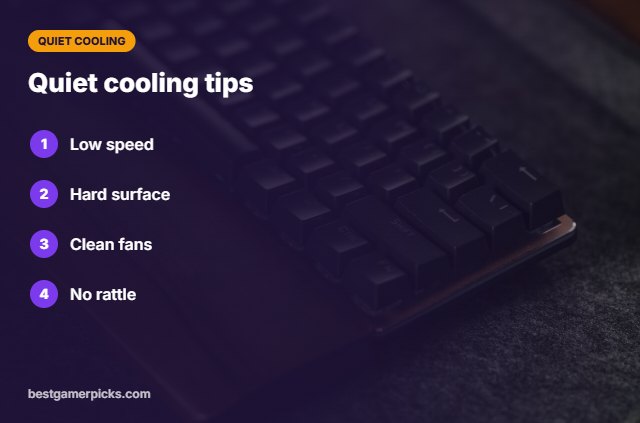
Keep it quiet:
- Use the lowest fan speed that helps.
- Put the pad on a hard surface.
- Clean dust from fans.
- Check that the laptop is not touching the fans.
Here are quick answers about the best quiet laptop cooling pad.
Frequently Asked Questions
What is the best quiet laptop cooling pad?
Our pick for the best quiet laptop cooling pad is the KLIM Ultimate RGB, followed by the havit HV-F2056 (Best Slim).
Are large fans quieter?
Yes, large fans can move air at lower speeds.
Does a quiet pad still help?
It helps a little; more at higher speed.
Why is my pad rattling?
Check it sits flat and nothing touches the fans.
Final Verdict
Our final pick for the best quiet laptop cooling pad is the KLIM Ultimate RGB. Choose the havit HV-F2056 if you want a slim quiet pad, or the Kootek 5-Fan Cooling Pad on a budget.
Related Guides
More gaming laptop accessory guides:
- Best Laptop Stand for Gaming Laptop
- Best RGB Laptop Cooling Pad
- Best Laptop Cooling Pad with RGB
- Best Laptop Cooling Pad under 30
- Best Keyboard and Mouse Combo for Laptop
- Best Keyboard Mouse and Headset Combo
Product details are based on manufacturer specifications at the time of writing. Prices and availability change often, so check Amazon for the latest price.










Write Your Review
No reviews yet. Be the first to share your experience!