

BestGamerPicks is reader-supported. As an Amazon Associate we earn from qualifying purchases. This does not change our recommendations. Learn more.
Our best usb c hub for gaming laptop picks add HDMI, extra USB ports, Ethernet and card readers in a pocket-size adapter you can take anywhere.
A hub is smaller and cheaper than a dock, which makes it ideal for travel. We compared ports, display output, data speed and owner feedback to find the best usb c hub for gaming laptop.

Quick Answer: The Best USB C Hub for Gaming Laptop
- Best Overall: UGREEN Revodok Pro USB-C Hub 6 in 1, 10Gbps, 4K 60Hz HDMI, 100W PD
- Best 4K 60Hz Value: Anker USB C Hub, 7-in-1, 4K 60Hz HDMI, 85W PD, 2 USB-A and 1 USB-C Data Ports, SD
- Best with Ethernet: UGREEN Revodok 6 in 1 USB C Hub, Gigabit Ethernet, 4K HDMI, 100W PD
- Best Dual HDMI: Anker 7-in-1 USB-C Hub, Dual Monitor Dual HDMI, 85W Max, 10Gbps Data
- Best Budget: UGREEN USB C Hub 5 in 1, 4K HDMI, 100W Power Delivery, 3 USB-A Data Ports
- Best Cheap Data Hub: Amazon Basics USB 3.2 Gen 2 Multiport USB C Hub, 10Gbps
The UGREEN Revodok Pro 6-in-1 is our top pick. Also consider the Anker 7-in-1 USB-C Hub (Best 4K 60Hz Value) and the UGREEN Revodok 6-in-1 with Ethernet (Best with Ethernet).
Best USB C Hub for Gaming Laptop Comparison Table
| Product | Best For | Type | Key Feature | Buy |
|---|---|---|---|---|
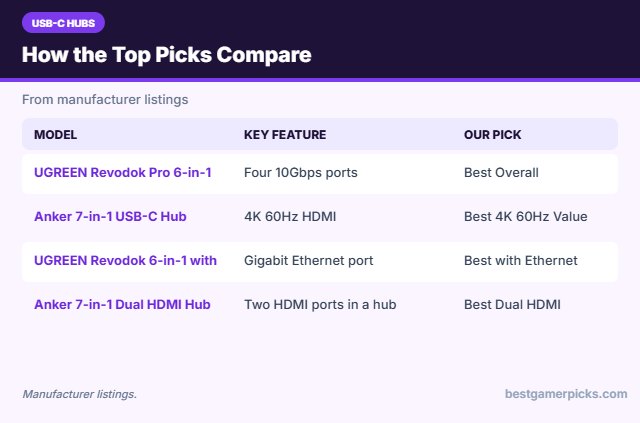
| UGREEN Revodok Pro 6-in-1 | Best Overall | 10Gbps USB-C hub | Four 10Gbps ports | Check Price |
| Anker 7-in-1 USB-C Hub | Best 4K 60Hz Value | USB-C hub | 4K 60Hz HDMI | Check Price |
| UGREEN Revodok 6-in-1 with Ethernet | Best with Ethernet | USB-C hub with Ethernet | Gigabit Ethernet port | Check Price |
| Anker 7-in-1 Dual HDMI Hub | Best Dual HDMI | Dual HDMI hub | Two HDMI ports in a hub | Check Price |
| UGREEN 5-in-1 USB-C Hub | Best Budget | Mini USB-C hub | 4K HDMI + 3 USB-A | Check Price |
| Amazon Basics 10Gbps USB-C Hub | Best Cheap Data Hub | Budget USB-C hub | 10Gbps data | Check Price |
The 6 Best USB-C Hubs for Gaming Laptops
Each best usb c hub for gaming laptop pick below is a small USB-C hub.

UGREEN Revodok Pro USB-C Hub 6 in 1, 10Gbps, 4K 60Hz HDMI, 100W PD
1The UGREEN Revodok Pro adds four 10Gbps ports and 4K 60Hz HDMI to a USB-C laptop.
👍 Pros & Cons
Pros
- Fast 10Gbps ports
- 4K 60Hz HDMI
- Aluminum body
Cons
- No Ethernet
- Single display
📄 Detailed Review
- Data: 2x USB-C + 2x USB-A, 10Gbps
- Display: HDMI 4K 60Hz
- Charging: 100W PD in, 85W pass-through (listed)
It is a great hub for fast external SSDs with your game library.
Best fast-data hub.
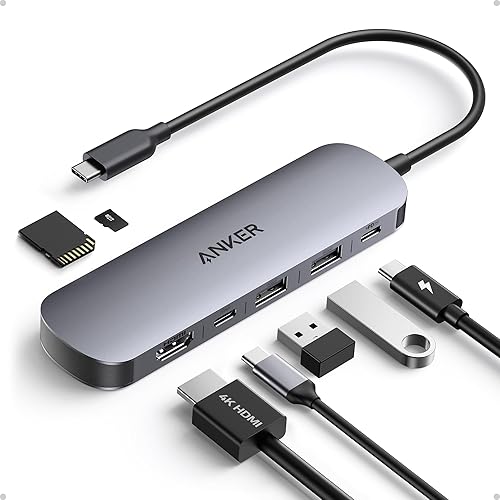
Anker USB C Hub, 7-in-1, 4K 60Hz HDMI, 85W PD, 2 USB-A and 1 USB-C Data Ports, SD
2The Anker 7-in-1 hub adds 4K 60Hz HDMI, three 5Gbps data ports, SD slots and 85W pass-through charging.
👍 Pros & Cons
Pros
- 4K 60Hz HDMI
- Small and light
- Trusted brand
Cons
- 5Gbps ports
- Single display
📄 Detailed Review
- Display: HDMI 4K 60Hz
- Data: 2x USB-A + 1x USB-C, 5Gbps
- Charging: 85W PD (listed)
It is a great travel hub for gaming laptops with few ports.
Best travel hub.

UGREEN Revodok 6 in 1 USB C Hub, Gigabit Ethernet, 4K HDMI, 100W PD
3The UGREEN Revodok 6-in-1 adds Gigabit Ethernet, HDMI and USB ports.
👍 Pros & Cons
Pros
- Wired Ethernet for lower ping
- 4K HDMI
- Cheap
Cons
- Data ports are not the fastest
- Single display
📄 Detailed Review
- Network: Gigabit Ethernet
- Display: 4K HDMI
- Charging: 100W PD (listed)
Wired Ethernet is a simple way to stabilize ping on laptops without a LAN port.
Best hub with Ethernet.

Anker 7-in-1 USB-C Hub, Dual Monitor Dual HDMI, 85W Max, 10Gbps Data
4This Anker hub adds two HDMI outputs and 10Gbps data in a compact body.
👍 Pros & Cons
Pros
- Two screens from a hub
- 10Gbps data
- Compact
Cons
- Dual display needs MST on Windows
- Gets warm
📄 Detailed Review
- Displays: Dual HDMI
- Data: 10Gbps
- Charging: 85W (listed)
It suits travelers who want two displays without a full dock.
Compact dual-display hub.

UGREEN USB C Hub 5 in 1, 4K HDMI, 100W Power Delivery, 3 USB-A Data Ports
5The UGREEN 5-in-1 hub adds HDMI, three USB-A ports and USB-C power input in a tiny body.
👍 Pros & Cons
Pros
- Very cheap
- Huge owner base
- Tiny
Cons
- 4K at 30Hz on some models
- Fewer ports
📄 Detailed Review
- Display: 4K HDMI
- Data: 3x USB-A
- Charging: 100W PD input (listed)
It is a cheap spare hub for travel.
Cheapest travel hub.
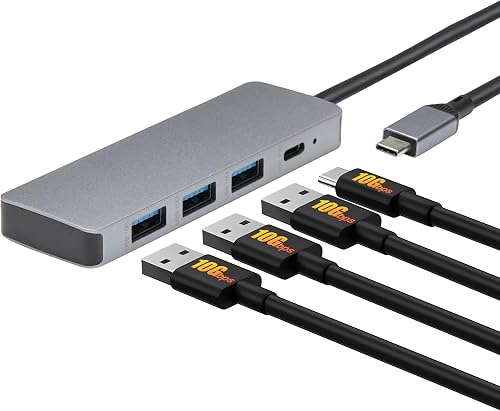
Amazon Basics USB 3.2 Gen 2 Multiport USB C Hub, 10Gbps
6The Amazon Basics 10Gbps hub is a very cheap way to add fast USB ports.
👍 Pros & Cons
Pros
- Very cheap
- 10Gbps data
- Simple
Cons
- Fewer ports
- No display output on some models
📄 Detailed Review
- Data: 10Gbps (listed)
- Brand: Amazon Basics
- Use: Travel
It is a backup hub for travel bags.
Cheap fast hub.
How We Chose the Best USB C Hub for Gaming Laptop
To choose the best usb c hub for gaming laptop, we compared ports, display output, data speed and owner feedback.
For the official Thunderbolt 4 and Thunderbolt 5 speed and charging specs, see the Intel Thunderbolt overview.
Product details in this guide are based on manufacturer specifications and verified owner feedback, not in-house lab testing. Read more on our How We Test page.
Buying Guide: How to Choose the Best USB C Hub for Gaming Laptop
Keep these factors in mind when shopping for the best usb c hub for gaming laptop.
Hub or dock?
A hub is small and bus-powered, good for travel. A dock has its own power supply, more ports and better multi-monitor support, which suits a permanent desk setup.
Dual monitors from one port
Windows laptops can run two screens from one USB-C port using MST or DisplayLink docks. Macs do not support MST, so they need Thunderbolt or DisplayLink for two external screens. Check your laptop’s port supports DisplayPort Alt Mode.
Charging gaming laptops from a dock
Most gaming laptops need their barrel or high-wattage charger for full performance. A dock’s USB-C power delivery (often 85 to 140W) can top up the battery or run light tasks, but plug in the original charger for gaming.
Wi-Fi 6, Wi-Fi 7 and wired ports
Newer Wi-Fi standards help in busy hotels, but the hotel connection is still the limit. Plugging your laptop or console into the router’s Ethernet port gives the most stable ping.
Hub tips
Get the most from it:
- Plug the hub into a USB-C port with video support.
- Use the pass-through only for light charging.
- Use Ethernet for online games.
- Avoid stacking hubs.
Here are quick answers about the best usb c hub for gaming laptop.

Frequently Asked Questions
What is the best usb c hub for gaming laptop?
Our pick for the best usb c hub for gaming laptop is the UGREEN Revodok Pro 6-in-1, followed by the Anker 7-in-1 USB-C Hub (Best 4K 60Hz Value).
Can a USB-C hub run a gaming monitor?
Yes, usually one HDMI display; check the refresh rate.
Do hubs need power?
Most are bus-powered and can pass power through.
Hub or dock?
A hub is for travel; a dock suits a desk.
Final Verdict
Our final pick for the best usb c hub for gaming laptop is the UGREEN Revodok Pro 6-in-1. Choose the Anker 7-in-1 USB-C Hub if you want 4K 60Hz HDMI for less, or the UGREEN Revodok 6-in-1 with Ethernet if you want wired Ethernet.
Related Guides
More gaming laptop accessory guides:
- Best USB C Dock for Gaming Laptop
- Best Thunderbolt Dock for Gaming Laptop
- Best Thunderbolt 5 Dock
- Best Laptop Docking Station for Dual Monitors
- Best Monitor Arm for 34 Inch Ultrawide
- Best Monitor Arm for Oled Monitor Weight
Product details are based on manufacturer specifications at the time of writing. Prices and availability change often, so check Amazon for the latest price.








Write Your Review
No reviews yet. Be the first to share your experience!