

BestGamerPicks is reader-supported. As an Amazon Associate we earn from qualifying purchases. This does not change our recommendations. Learn more.
Our best headset stand with charging for steelseries picks keep a SteelSeries Arctis headset charged and stored, whether it charges over USB-C or swaps batteries in a base station.
Arctis Nova Pro Wireless charges a spare battery in its base station, while models like the Nova 7 charge over USB-C. We compared SteelSeries fit, charging, build and owner feedback to find the best headset stand with charging for steelseries.
Quick Answer: The Best Headset Stand with Charging for SteelSeries
- Best for Arctis Nova Pro: BRAINWAVZ Headphone Stand Designed for SteelSeries Arctis Nova Pro Wireless Headsets with Dock for the Wireless Base Station (HPS01)
- Best USB-C Stand: New Bee RGB Headphone Stand with 2 USB-C and 1 USB Charging Ports, 7 Light Modes, Non-Slip Rubber Base
- Best for Two Headsets: KAFRI RGB Dual Headphone Stand with USB C Charger, 3 USB Charging Ports and 2 Outlets
- Best with Power Strip: TROND Headphone Stand with USB C, Desk Gaming Headset Holder with 3 AC Outlets, 2 USB-A and 1 USB-C
- Best Base Station Mount: BRAINWAVZ Under Desk Mount for SteelSeries Arctis Nova Pro, Elite and Pro Omni Wireless Base Station
- Best Dongle Extension: SteelSeries USB-C to USB-A Extension Cable, Compatible with Arctis Nova 3/7/7X/7P Headset and Dongle (5ft)
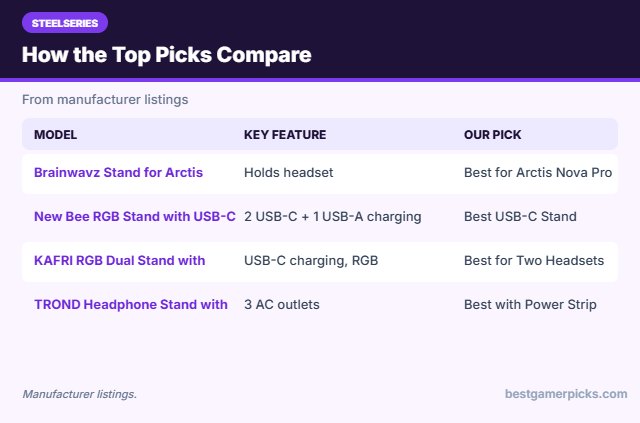
The Brainwavz Stand for Arctis Nova Pro is our top pick. Also consider the New Bee RGB Stand with USB-C (Best USB-C Stand) and the KAFRI RGB Dual Stand with USB-C (Best for Two Headsets).
Best Headset Stand with Charging for SteelSeries Comparison Table
| Product | Best For | Type | Key Feature | Buy |
|---|---|---|---|---|
| Brainwavz Stand for Arctis Nova Pro | Best for Arctis Nova Pro | Stand with base-station dock | Holds headset and base station | Check Price |
| New Bee RGB Stand with USB-C | Best USB-C Stand | RGB stand with USB-C ports | 2 USB-C + 1 USB-A charging | Check Price |
| KAFRI RGB Dual Stand with USB-C | Best for Two Headsets | RGB dual stand with USB-C | USB-C charging, RGB | Check Price |
| TROND Headphone Stand with Power Strip | Best with Power Strip | Stand with power strip | 3 AC outlets, 2 USB-A, 1 USB-C | Check Price |
| Brainwavz Under Desk Base Station Mount | Best Base Station Mount | Under-desk base station mount | Mounts the Arctis base station | Check Price |
| SteelSeries USB-C Dongle Extension | Best Dongle Extension | Official SteelSeries extension | USB-C dongle to USB-A, 5 ft | Check Price |
The 6 Best Headset Stands with Charging for SteelSeries
Each best headset stand with charging for steelseries pick below suits SteelSeries Arctis charging.

BRAINWAVZ Headphone Stand Designed for SteelSeries Arctis Nova Pro Wireless Headsets with Dock for the Wireless Base Station (HPS01)
1The Brainwavz HPS01 stand is designed for the SteelSeries Arctis Nova Pro, Elite and Pro Omni Wireless, with a dock for the wireless base station.
👍 Pros & Cons
Pros
- Made for Arctis Nova Pro
- Docks the base station
- Keeps spare battery handy
Cons
- Only for specific SteelSeries models
- Pricier than basic stands
📄 Detailed Review
- Fits: Arctis Nova Pro, Elite, Pro Omni Wireless (listed)
- Holds: Headset + wireless base station
- Model: HPS01
The base station charges the spare battery, so your setup stays tidy.
Best for Arctis Nova Pro Wireless.

New Bee RGB Headphone Stand with 2 USB-C and 1 USB Charging Ports, 7 Light Modes, Non-Slip Rubber Base
2This New Bee stand adds two USB-C and one USB-A charging ports with seven RGB light modes.
👍 Pros & Cons
Pros
- Two USB-C charging ports
- RGB lighting
- Cheap
Cons
- Charging ports only, not data
- Plastic build
📄 Detailed Review
- Ports: 2 USB-C + 1 USB-A charging
- Lighting: 7 light modes
- Base: Non-slip rubber
It is a cheap way to charge a USB-C headset or controller at the desk.
Best budget USB-C stand.

KAFRI RGB Dual Headphone Stand with USB C Charger, 3 USB Charging Ports and 2 Outlets
3The KAFRI RGB dual stand holds two headsets, adds RGB lighting and offers USB-C and USB-A charging plus two AC outlets.
👍 Pros & Cons
Pros
- Two headsets plus RGB
- USB-C charging port
- AC outlets
Cons
- Needs a wall outlet
- Busy look
📄 Detailed Review
- Capacity: Two headsets
- Power: 3 USB ports incl. USB-C + 2 outlets
- Lighting: 9 RGB modes
It suits shared gaming desks.
Best RGB dual stand.
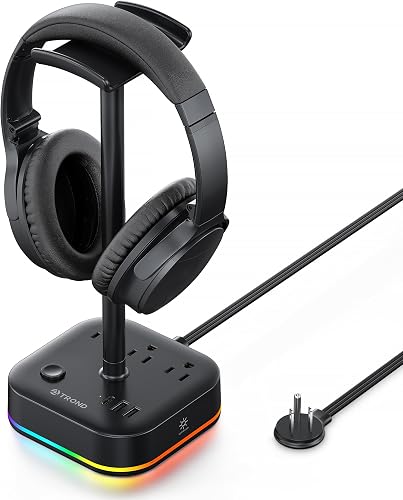
TROND Headphone Stand with USB C, Desk Gaming Headset Holder with 3 AC Outlets, 2 USB-A and 1 USB-C
4The TROND stand combines a headset holder with a power strip: three AC outlets plus USB-A and USB-C charging.
👍 Pros & Cons
Pros
- Built-in power strip
- USB-C charging
- RGB modes
Cons
- Large base
- Not a data hub
📄 Detailed Review
- Outlets: 3 AC
- USB: 2 USB-A + 1 USB-C
- Cord: 5 ft flat extension (listed)
It is ideal if your desk is short on outlets.
Best stand with power strip.
Check TROND Headphone Stand with Power Strip Price on Amazon

BRAINWAVZ Under Desk Mount for SteelSeries Arctis Nova Pro, Elite and Pro Omni Wireless Base Station
5This Brainwavz mount holds the SteelSeries Arctis Nova Pro, Elite or Pro Omni wireless base station under your desk.
👍 Pros & Cons
Pros
- Frees desk space
- Secure fit
- Made for the base station
Cons
- Needs screws
- Only for specific models
📄 Detailed Review
- Fits: Arctis Nova Pro / Elite / Pro Omni base station
- Install: Screws
- Use: Under desk
Pair it with an under-desk headset hook for a clean setup.
Best base station mount.
Check Brainwavz Under Desk Base Station Mount Price on Amazon

SteelSeries USB-C to USB-A Extension Cable, Compatible with Arctis Nova 3/7/7X/7P Headset and Dongle (5ft)
6This SteelSeries cable extends USB-C dongles such as the Arctis Nova 7 to a USB-A port, 5 ft away.
👍 Pros & Cons
Pros
- Made for Arctis Nova dongles
- Official part
- USB-C dongle support
Cons
- SteelSeries focus
- 5 ft only
📄 Detailed Review
- Length: 5 ft
- Connectors: USB-C female to USB-A
- Fits: Arctis Nova dongles (listed)
It is ideal for Arctis Nova owners.
Best for USB-C dongles.
How We Chose the Best Headset Stand with Charging for SteelSeries
To choose the best headset stand with charging for steelseries, we compared SteelSeries fit, charging, build and owner feedback.
For desk height, legroom and layout guidance, see the OSHA Computer Workstations eTool on desks.
Product details in this guide are based on manufacturer specifications and verified owner feedback, not in-house lab testing. Read more on our How We Test page.
Buying Guide: How to Choose the Best Headset Stand with Charging for SteelSeries
Keep these factors in mind when shopping for the best headset stand with charging for steelseries.
Charging stands
Some stands charge a wireless headset through a USB cable or a dock contact. Wireless charger stands charge a phone or earbuds with Qi pads, not the headset itself, unless the headset supports it.
Moving the wireless dongle closer
Wireless headset dongles work best with a clear path to the headset. A short USB extension cable lets you put the dongle on the desk instead of behind the PC.
Stands with USB hubs and audio
Some stands add USB ports or a built-in USB sound card. A USB hub saves trips to the back of your PC, and a built-in sound card can add a headphone jack with virtual surround.
Stability and size
Heavy gaming headsets can tip light stands. Look for a weighted or rubber-lined base, a wide hook that matches your headband and enough height that the ear cups do not touch the desk.
SteelSeries charging tips
Keep it topped up:
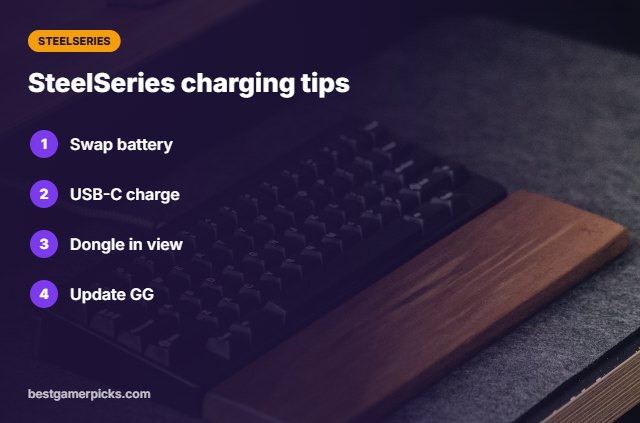
- On Nova Pro Wireless, keep the spare battery in the base station.
- On Nova 7, use a USB-C port on the stand or PC.
- Keep the dongle in clear line of sight.
- Update SteelSeries GG for firmware fixes.
Here are quick answers about the best headset stand with charging for steelseries.
Frequently Asked Questions
What is the best headset stand with charging for steelseries?
Our pick for the best headset stand with charging for steelseries is the Brainwavz Stand for Arctis Nova Pro, followed by the New Bee RGB Stand with USB-C (Best USB-C Stand).
Does SteelSeries sell a charging stand?
The Nova Pro Wireless base station charges a spare battery.
Can I charge an Arctis Nova 7 on a stand?
Yes, through a USB-C port on the stand.
Will the dongle work from a stand?
Use an extension so the dongle sits near you.
Final Verdict
Our final pick for the best headset stand with charging for steelseries is the Brainwavz Stand for Arctis Nova Pro. Choose the New Bee RGB Stand with USB-C if you want a cheap stand with two USB-C ports, or the KAFRI RGB Dual Stand with USB-C for two headsets.
Related Guides
More gaming headset accessory guides:
- Best Headset Stand with USB C
- Best Headset Stand with Wireless Charger
- Best Headset Charging Dock
- Best Headphone Stand with USB Audio
- Best Anti Theft Gaming Laptop Backpack
- Best Iem for Streaming
Product details are based on manufacturer specifications at the time of writing. Prices and availability change often, so check Amazon for the latest price.






Write Your Review
No reviews yet. Be the first to share your experience!