

BestGamerPicks is reader-supported. As an Amazon Associate we earn from qualifying purchases. This does not change our recommendations. Learn more.
Our best clicky keyboard picks use clicky switches for a crisp click and tactile bump on every keypress.
Clicky boards are loud, so they suit solo rooms more than shared offices. We compared click feel, build, features and owner feedback to find the best clicky keyboard.

Quick Answer: The Best Clicky Keyboard
- Best for Gaming: Logitech G PRO Mechanical TKL Gaming Keyboard (Clicky)
- Best Wireless: Logitech G915 X Lightspeed Wireless Gaming Keyboard (Clicky)
- Best Hot-Swap: Keychron K8 Pro QMK/VIA Wireless Mechanical Keyboard, Hot-Swappable TKL
- Best Retro Style: Camiysn Typewriter Style Mechanical Gaming Keyboard, Pink, Blue Switch
- Best Typewriter Feel: Logitech Alto Keys K98M Wireless Mechanical Gasket Keyboard – Off White
- Best Budget Alternative: Redragon K552 Mechanical Keyboard, LED Gaming Keyboard with Red Switches
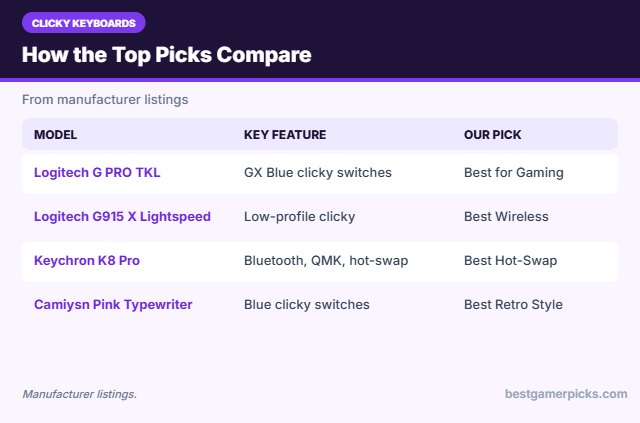
The Logitech G PRO TKL is our top pick. Also consider the Logitech G915 X Lightspeed (Best Wireless) and the Keychron K8 Pro (Best Hot-Swap).
Best Clicky Keyboard Comparison Table
| Product | Best For | Type | Key Feature | Buy |
|---|---|---|---|---|
| Logitech G PRO TKL | Best for Gaming | Mechanical TKL keyboard | GX Blue clicky switches | Check Price |
| Logitech G915 X Lightspeed | Best Wireless | Low-profile wireless keyboard | Low-profile clicky, Lightspeed | Check Price |
| Keychron K8 Pro | Best Hot-Swap | Wireless TKL keyboard | Bluetooth, QMK, hot-swap | Check Price |
| Camiysn Pink Typewriter Keyboard | Best Retro Style | Clicky retro keyboard | Blue clicky switches | Check Price |
| Logitech Alto Keys K98M | Best Typewriter Feel | Wireless gasket keyboard | UniCushion gasket mount | Check Price |
| Redragon K552 Kumara | Best Budget Alternative | Budget TKL mechanical | Very cheap mechanical | Check Price |
The 6 Best Clicky Keyboards
Each best clicky keyboard pick below uses clicky switches or offers a clicky version.

Logitech G PRO Mechanical TKL Gaming Keyboard (Clicky)
1Logitech G PRO TKL is an esports-grade mechanical keyboard with a detachable cable.
👍 Pros & Cons
Pros
- Esports-grade
- Compact
- Detachable cable
Cons
- Clicky is loud
- Keyboard only
📄 Detailed Review
- Switches: GX Blue clicky
- Layout: Tenkeyless
- Cable: Detachable
Great for travel and LAN setups.
Pro mechanical pick.

Logitech G915 X Lightspeed Wireless Gaming Keyboard (Clicky)
2The Logitech G915 X Lightspeed is a slim wireless full-size keyboard, available with clicky low-profile switches.
👍 Pros & Cons
Pros
- Slim premium build
- Lightspeed wireless
- Clicky option
Cons
- Expensive
- Low profile
📄 Detailed Review
- Layout: Full size
- Switches: Low-profile clicky
- Connection: Lightspeed, Bluetooth, USB
It is a premium clicky option.
Premium clicky wireless.

Keychron K8 Pro QMK/VIA Wireless Mechanical Keyboard, Hot-Swappable TKL
3The Keychron K8 Pro is a wireless TKL keyboard with QMK/VIA and hot-swap sockets.
👍 Pros & Cons
Pros
- Wireless
- Mac-friendly
- Hot-swappable
Cons
- Bluetooth only wireless
- Tall profile
📄 Detailed Review
- Layout: TKL (87 keys)
- Connection: Bluetooth + wired
- Software: QMK/VIA
It is a versatile desk board.
Best wireless TKL for Mac.

Camiysn Typewriter Style Mechanical Gaming Keyboard, Pink, Blue Switch
4The Camiysn keyboard pairs a pink typewriter style with clicky blue switches.
👍 Pros & Cons
Pros
- Real clicky feel
- Cute style
- Cheap
Cons
- Loud
- Round keycaps
📄 Detailed Review
- Layout: Full size (104 keys)
- Switches: Blue clicky
- Style: Typewriter
It is loud and fun.
Best clicky cute keyboard.

Logitech Alto Keys K98M Wireless Mechanical Gasket Keyboard – Off White
5The Logitech Alto Keys K98M is a wireless 98-key gasket keyboard with a soft, cushioned feel.
👍 Pros & Cons
Pros
- Gasket feel from a big brand
- Wireless
- Number pad
Cons
- Not gaming-focused
- Pricier
📄 Detailed Review
- Layout: 98 keys
- Mount: Gasket (UniCushion)
- Connection: Wireless
It is a comfortable typing board.
Best gasket typing board.

Redragon K552 Mechanical Keyboard, LED Gaming Keyboard with Red Switches
6The Redragon K552 Kumara is a very cheap tenkeyless mechanical keyboard with linear red switches.
👍 Pros & Cons
Pros
- Very cheap
- Sturdy
- Huge owner base
Cons
- ABS keycaps
- No hot-swap
📄 Detailed Review
- Layout: TKL (87 keys)
- Switches: Linear red
- Build: Metal plate
It is a classic first mechanical board.
Classic budget TKL.
How We Chose the Best Clicky Keyboard
To choose the best clicky keyboard, we compared click feel, build, features and owner feedback.
For official guidance on keyboard height, wrist posture and placement, see the OSHA Computer Workstations eTool on keyboards.
Product details in this guide are based on manufacturer specifications and verified owner feedback, not in-house lab testing. Read more on our How We Test page.
Buying Guide: How to Choose the Best Clicky Keyboard
Keep these factors in mind when shopping for the best clicky keyboard.
Linear, tactile or clicky switches
Linear switches press smoothly and suit fast gaming. Tactile switches have a bump you can feel, which many typists like. Clicky switches add a loud click and are best when noise does not matter.
Creamy, thocky and clicky sound
Creamy and thocky boards sound deep and muted thanks to lubed linear switches, foam and gasket mounts. Clicky boards use switches with a click jacket or bar for a sharp, high-pitched sound.
Hot-swappable switches
Hot-swap sockets let you pull switches out and try new ones without soldering. It is the easiest way to change the feel of a keyboard later.
Keyboard sizes explained
A 60% board drops the number pad, function row and arrow keys. 65% adds arrows, 75% adds the function row in a compact block, TKL keeps a full layout without the number pad, and 96% or 1800 layouts squeeze in a number pad with little wasted space.
Sound tuning tips
Make it sound better:
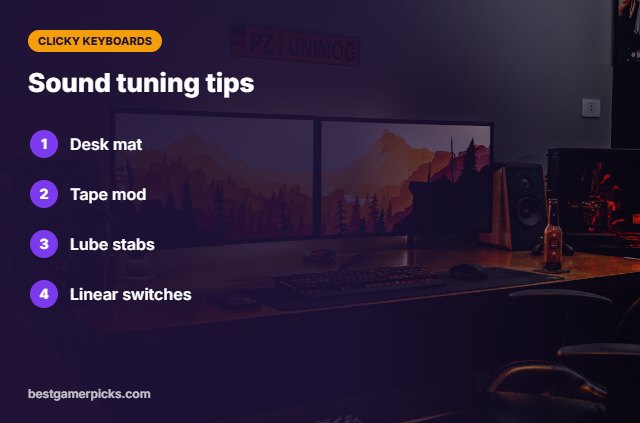
- Add a desk mat to soften bottom-out sound.
- Try a tape mod on the back of the PCB.
- Lube stabilizers if the space bar rattles.
- Try lighter or pre-lubed linear switches.
Here are quick answers about the best clicky keyboard.
Frequently Asked Questions
What is the best clicky keyboard?
Our pick for the best clicky keyboard is the Logitech G PRO TKL, followed by the Logitech G915 X Lightspeed (Best Wireless).
What makes a keyboard clicky?
Switches with a click jacket or bar create a sharp sound.
Are clicky keyboards good for gaming?
They work, but linear switches reset more cleanly.
Are clicky keyboards too loud for offices?
Often yes; try tactile switches instead.
Final Verdict
Our final pick for the best clicky keyboard is the Logitech G PRO TKL. Choose the Logitech G915 X Lightspeed if you want slim premium wireless, or the Keychron K8 Pro if you want to swap switches.
Related Guides
More gaming keyboard guides:
- Best Compact Keyboard for Small Desk
- Best Corsair Keyboard
- Best Corsair Keyboard for FPS
- Best Corsair Wireless Keyboard
- Best Balanced DAC Amp
- Best Headset Case for Razer
Product details are based on manufacturer specifications at the time of writing. Prices and availability change often, so check Amazon for the latest price.










Write Your Review
No reviews yet. Be the first to share your experience!