

BestGamerPicks is reader-supported. As an Amazon Associate we earn from qualifying purchases. This does not change our recommendations. Learn more.
Our best 24 inch monitor for cs2 picks give CS2 players the motion clarity and frame rates needed to win duels and hold angles.
CS2 runs at very high frame rates on good PCs, so 240Hz to 400Hz screens make a difference. We compared refresh rate, motion clarity, input lag and owner feedback to find the best 24 inch monitor for cs2.
Quick Answer: The Best 24 Inch Monitor for CS2
- Best Overall: BenQ Zowie XL2546X+ 24.1 DyAc 2 280Hz Fast TN Gaming Monitor for Esports
- Best 400Hz: BenQ Zowie XL2566X+ 24.1 DyAc 2 400Hz Fast TN Gaming Monitor for Esports
- Best IPS: Alienware 25 Gaming Monitor AW2523HF 24.5 IPS Full HD 360Hz, FreeSync, Height/Tilt/Swivel/Pivot
- Best Value Zowie: BenQ Zowie XL2540X+ 24.1 280Hz Fast TN Gaming Monitor for Esports
- Best Budget: ASUS TUF Gaming VG259QMR5A 25 Inch 1080p 310Hz G-SYNC Gaming Monitor
- Budget 400Hz: KTC 24.5 Inch 400Hz Gaming Monitor, 1080P Fast IPS, H25X7
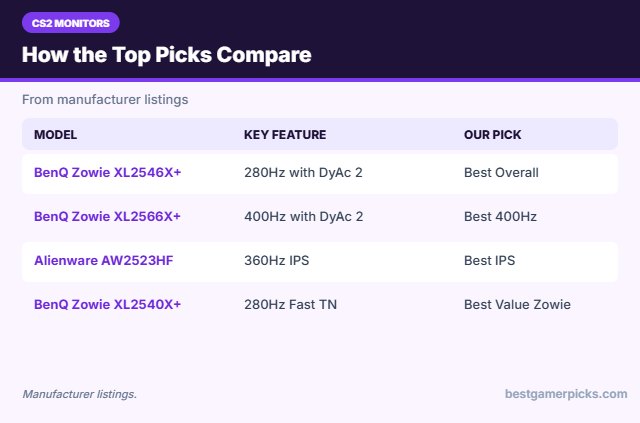
The BenQ Zowie XL2546X+ is our top pick. Also consider the BenQ Zowie XL2566X+ (Best 400Hz) and the Alienware AW2523HF (Best IPS).
Best 24 Inch Monitor for CS2 Comparison Table
| Product | Best For | Type | Key Feature | Buy |
|---|---|---|---|---|
| BenQ Zowie XL2546X+ | Best Overall | 24-inch esports monitor with DyAc 2 | 280Hz with DyAc 2 | Check Price |
| BenQ Zowie XL2566X+ | Best 400Hz | 400Hz esports monitor | 400Hz with DyAc 2 | Check Price |
| Alienware AW2523HF | Best IPS | 24.5-inch 360Hz IPS monitor | 360Hz IPS | Check Price |
| BenQ Zowie XL2540X+ | Best Value Zowie | 24-inch esports monitor | 280Hz Fast TN | Check Price |
| ASUS TUF Gaming VG259QMR5A | Best Budget | 24.5-inch 310Hz monitor | 310Hz (OC) Fast IPS | Check Price |
| KTC H25X7 | Budget 400Hz | 24.5-inch 400Hz monitor | 400Hz Fast IPS | Check Price |
The 6 Best 24-Inch Monitors for CS2
Each best 24 inch monitor for cs2 pick below suits Counter-Strike 2.

BenQ Zowie XL2546X+ 24.1 DyAc 2 280Hz Fast TN Gaming Monitor for Esports
1The BenQ Zowie XL2546X+ adds DyAc 2 motion clarity to a 280Hz Fast TN panel.
👍 Pros & Cons
Pros
- DyAc 2 clarity
- Esports stand
- Low input lag
Cons
- Expensive for 1080p
- TN colors
📄 Detailed Review
- Size: 24.1 in
- Refresh: 280Hz
- Feature: DyAc 2 motion clarity
It is a favorite for CS2 and Valorant.
Best motion clarity.

BenQ Zowie XL2566X+ 24.1 DyAc 2 400Hz Fast TN Gaming Monitor for Esports
2The BenQ Zowie XL2566X+ is a 400Hz Fast TN monitor with DyAc 2 for top-level esports.
👍 Pros & Cons
Pros
- 400Hz speed
- DyAc 2 clarity
- Pro-level stand
Cons
- Very expensive
- Needs a high-end PC
📄 Detailed Review
- Size: 24.1 in
- Refresh: 400Hz
- Feature: DyAc 2
It suits players who can push extreme frame rates.
Fastest esports pick.

Alienware 25 Gaming Monitor AW2523HF 24.5 IPS Full HD 360Hz, FreeSync, Height/Tilt/Swivel/Pivot
3The Alienware AW2523HF is a 24.5-inch IPS monitor with a 360Hz refresh rate and a fully adjustable stand.
👍 Pros & Cons
Pros
- 360Hz IPS
- Fully adjustable stand
- Premium build
Cons
- Pricey
- 1080p only
📄 Detailed Review
- Size: 24.5 in
- Resolution: 1920 x 1080
- Refresh: 360Hz
It is a premium esports screen.
Best 360Hz IPS.

BenQ Zowie XL2540X+ 24.1 280Hz Fast TN Gaming Monitor for Esports
4The BenQ Zowie XL2540X+ is a 24.1-inch Fast TN esports monitor with a 280Hz refresh rate.
👍 Pros & Cons
Pros
- Esports-grade motion clarity
- Pro-friendly stand
- Trusted by pros
Cons
- TN colors
- Pricey for 1080p
📄 Detailed Review
- Size: 24.1 in
- Resolution: 1920 x 1080
- Refresh: 280Hz
It is built for competitive shooters.
Best esports pick.
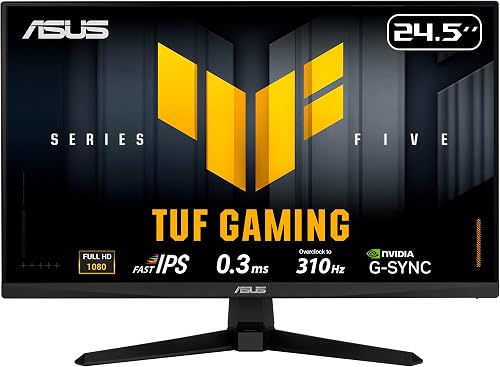
ASUS TUF Gaming VG259QMR5A 25 Inch 1080p 310Hz G-SYNC Gaming Monitor
5The ASUS TUF VG259QMR5A is a 24.5-inch Fast IPS monitor that overclocks to 310Hz.
👍 Pros & Cons
Pros
- Over 300Hz for little money
- Fast IPS
- G-Sync Compatible
Cons
- Basic stand
- Average HDR
📄 Detailed Review
- Size: 24.5 in
- Resolution: 1920 x 1080
- Refresh: 310Hz (OC)
It is a great value high-refresh screen.
Best value 300Hz+.

KTC 24.5 Inch 400Hz Gaming Monitor, 1080P Fast IPS, H25X7
6The KTC H25X7 is a 24.5-inch Fast IPS monitor with a 400Hz refresh rate.
👍 Pros & Cons
Pros
- 400Hz for less
- Fast IPS
- HDR400
Cons
- Lesser-known brand
- Needs huge frame rates
📄 Detailed Review
- Size: 24.5 in
- Resolution: 1920 x 1080
- Refresh: 400Hz
It is the cheapest path to 400Hz.
Budget 400Hz.
How We Chose the Best 24 Inch Monitor for CS2
To choose the best 24 inch monitor for cs2, we compared refresh rate, motion clarity, input lag and owner feedback.
For official guidance on monitor distance, height and viewing angle, see the OSHA Computer Workstations eTool on monitors.
Product details in this guide are based on manufacturer specifications and verified owner feedback, not in-house lab testing. Read more on our How We Test page.
Buying Guide: How to Choose the Best 24 Inch Monitor for CS2
Keep these factors in mind when shopping for the best 24 inch monitor for cs2.
What makes an esports monitor
Esports monitors focus on speed: 240Hz to 400Hz or more, fast panels, motion blur reduction and stands that let you set height and angle exactly. Color and HDR matter less.
Response time explained
Response time is how fast pixels change color. GtG is the real pixel speed, while MPRT figures often rely on backlight strobing. OLED panels are the fastest, followed by Fast IPS and Fast TN.
How much refresh rate do you need?
144Hz is a big step up from 60Hz for any game. 165Hz to 180Hz is now the budget standard. 240Hz and above mainly helps competitive shooters, and only if your PC can push frame rates close to the refresh rate.
Match the monitor to your graphics card
High refresh rates only help when your PC can reach those frame rates. A mid-range card is ideal for 1440p at 144Hz to 180Hz, while 4K at high refresh needs a high-end card or upscaling.
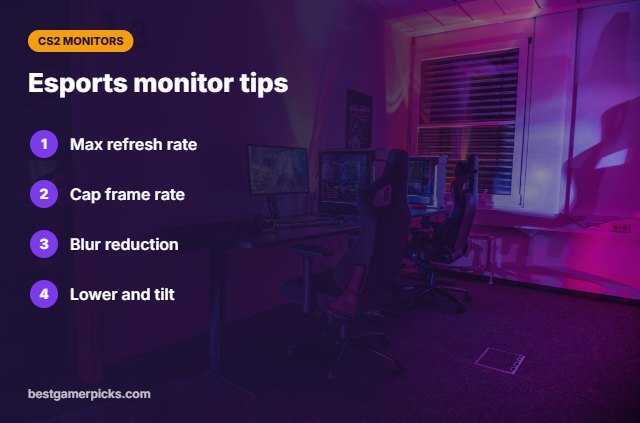
Esports monitor tips
Tune it for competition:
- Set the refresh rate to maximum in Windows and in-game.
- Cap frame rates just below the refresh rate with adaptive sync.
- Try the motion blur reduction mode for shooters.
- Lower the screen and tilt it slightly back.
Here are quick answers about the best 24 inch monitor for cs2.
Frequently Asked Questions
What is the best 24 inch monitor for cs2?
Our pick for the best 24 inch monitor for cs2 is the BenQ Zowie XL2546X+, followed by the BenQ Zowie XL2566X+ (Best 400Hz).
What monitor do CS2 pros use?
Many use 24-inch BenQ Zowie Fast TN monitors.
Is 1080p fine for CS2?
Yes; many pros even use lower resolutions.
How many FPS do I need?
Aim for frame rates at or above your refresh rate.
Final Verdict
Our final pick for the best 24 inch monitor for cs2 is the BenQ Zowie XL2546X+. Choose the BenQ Zowie XL2566X+ if you want 400Hz with DyAc 2, or the Alienware AW2523HF if you prefer IPS color.
Related Guides
More gaming monitor guides:
- Best 24 Inch Gaming Monitor
- Best 24 Inch Monitor for FPS
- Best 24 Inch Esports Monitor
- Best 240Hz 1080p Monitor
- Best Headphone Amp for PS5
- Best Soundbar for Xbox Series X
Product details are based on manufacturer specifications at the time of writing. Prices and availability change often, so check Amazon for the latest price.



Write Your Review
No reviews yet. Be the first to share your experience!