

BestGamerPicks is reader-supported. As an Amazon Associate we earn from qualifying purchases. This does not change our recommendations. Learn more.
Our best 27 inch monitor for ps5 picks make PS5 games look sharp at 1440p or 4K and smooth at up to 120Hz.
For PS5, HDMI 2.1 lets 4K monitors run at 120Hz and enables VRR. We compared PS5 support, resolution, HDMI version and owner feedback to find the best 27 inch monitor for ps5.
Quick Answer: The Best 27 Inch Monitor for PS5
- Best 1440p: LG 27GR83Q-B 27-inch Ultragear QHD IPS Gaming Monitor, 240Hz, 1ms, DisplayHDR 400, HDMI 2.1
- Best OLED: LG 27GS93QE 27-inch Ultragear OLED Gaming Monitor QHD 240Hz, HDMI 2.1, DisplayHDR True Black 400
- Best 4K: LG 27G810A-B 27-inch Ultragear 4K UHD IPS Gaming Monitor, Dual Mode UHD 180Hz or FHD 360Hz, DisplayHDR 400
- Best 4K Value: Dell 27 Monitor S2725QS, 4K UHD IPS, 120Hz, FreeSync Premium
- Best Smart 4K: Samsung 27 Odyssey G7 (G70D) 4K UHD IPS 144Hz Smart Gaming Monitor, G-Sync Compatible
- Best Budget: Samsung 27 Odyssey G5 (G51F) Series QHD (1440P) Gaming Monitor
The LG UltraGear 27GR83Q is our top pick. Also consider the LG UltraGear 27GS93QE (Best OLED) and the LG UltraGear 27G810A (Best 4K).
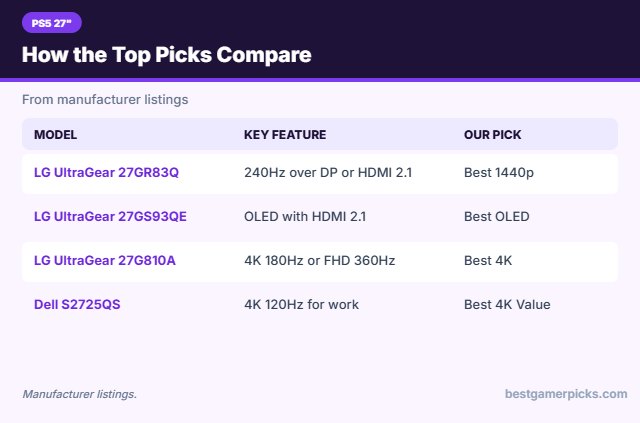
Best 27 Inch Monitor for PS5 Comparison Table
| Product | Best For | Type | Key Feature | Buy |
|---|---|---|---|---|
| LG UltraGear 27GR83Q | Best 1440p | 27-inch 1440p 240Hz monitor | 240Hz over DP or HDMI 2.1 | Check Price |
| LG UltraGear 27GS93QE | Best OLED | 27-inch 1440p 240Hz OLED | OLED with HDMI 2.1 | Check Price |
| LG UltraGear 27G810A | Best 4K | 27-inch 4K 180Hz monitor | 4K 180Hz or FHD 360Hz | Check Price |
| Dell S2725QS | Best 4K Value | 27-inch 4K 120Hz monitor | 4K 120Hz for work and console | Check Price |
| Samsung Odyssey G7 G70D 27-inch | Best Smart 4K | 27-inch 4K 144Hz smart monitor | 4K IPS with smart apps | Check Price |
| Samsung Odyssey G5 G51F | Best Budget | 27-inch 1440p gaming monitor | QHD with HDR10 | Check Price |
The 6 Best 27-Inch Monitors for PS5
Each best 27 inch monitor for ps5 pick below is a 27-inch monitor that works well with PS5.

LG 27GR83Q-B 27-inch Ultragear QHD IPS Gaming Monitor, 240Hz, 1ms, DisplayHDR 400, HDMI 2.1
1The LG UltraGear 27GR83Q is a 27-inch QHD IPS monitor with 240Hz over DisplayPort or HDMI 2.1.
👍 Pros & Cons
Pros
- 240Hz over HDMI 2.1
- Great for PC and console
- DisplayHDR 400
Cons
- Pricier than budget 240Hz
- IPS glow
📄 Detailed Review
- Size: 27 in
- Resolution: 2560 x 1440
- Ports: HDMI 2.1, DisplayPort
It works well with PC and current consoles.
Best 1440p for PC and console.

LG 27GS93QE 27-inch Ultragear OLED Gaming Monitor QHD 240Hz, HDMI 2.1, DisplayHDR True Black 400
2The LG UltraGear 27GS93QE is a 27-inch QHD OLED with 240Hz and HDMI 2.1.
👍 Pros & Cons
Pros
- HDMI 2.1 for consoles
- 240Hz OLED
- Adjustable stand
Cons
- Burn-in care needed
- Matte coating dulls blacks slightly
📄 Detailed Review
- Size: 27 in
- Refresh: 240Hz
- Ports: HDMI 2.1, DisplayPort
It is a strong OLED for PC and console.
Best OLED for console.

LG 27G810A-B 27-inch Ultragear 4K UHD IPS Gaming Monitor, Dual Mode UHD 180Hz or FHD 360Hz, DisplayHDR 400
3The LG UltraGear 27G810A is a 27-inch 4K IPS monitor that runs 180Hz in 4K or 360Hz in Full HD.
👍 Pros & Cons
Pros
- 4K at 180Hz
- Dual mode
- G-Sync
Cons
- Needs a strong GPU
- Pricier than 160Hz 4K
📄 Detailed Review
- Size: 27 in
- Modes: 4K 180Hz / FHD 360Hz
- HDR: DisplayHDR 400
It is a fast, sharp all-rounder.
Best 27-inch 4K.
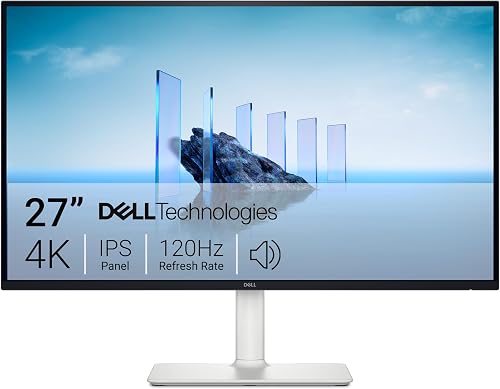
Dell 27 Monitor S2725QS, 4K UHD IPS, 120Hz, FreeSync Premium
4The Dell S2725QS is a 27-inch 4K IPS monitor with 120Hz and FreeSync Premium.
👍 Pros & Cons
Pros
- Sharp 4K for work
- 120Hz
- ComfortView Plus
Cons
- 5ms response
- Not for esports
📄 Detailed Review
- Size: 27 in
- Resolution: 3840 x 2160
- Refresh: 120Hz
It is a sharp work-and-console screen.
Best 4K for work.

Samsung 27 Odyssey G7 (G70D) 4K UHD IPS 144Hz Smart Gaming Monitor, G-Sync Compatible
5The Samsung Odyssey G7 G70D is a 27-inch 4K IPS smart monitor with 144Hz.
👍 Pros & Cons
Pros
- Smart TV apps built in
- 4K IPS
- Adjustable stand
Cons
- Pricey
- 144Hz not 160Hz+
📄 Detailed Review
- Size: 27 in
- Resolution: 3840 x 2160
- Refresh: 144Hz
It doubles as a small smart TV.
Best smart 4K.

Samsung 27 Odyssey G5 (G51F) Series QHD (1440P) Gaming Monitor
6The Samsung Odyssey G5 G51F is a 27-inch QHD gaming monitor with HDR10.
👍 Pros & Cons
Pros
- Samsung build
- QHD sharpness
- Good price
Cons
- Basic stand
- Entry HDR
📄 Detailed Review
- Size: 27 in
- Resolution: 2560 x 1440
- HDR: HDR10
It is a solid branded 1440p choice.
Branded budget 1440p.
How We Chose the Best 27 Inch Monitor for PS5
To choose the best 27 inch monitor for ps5, we compared PS5 support, resolution, HDMI version and owner feedback.
For official guidance on monitor distance, height and viewing angle, see the OSHA Computer Workstations eTool on monitors.
Product details in this guide are based on manufacturer specifications and verified owner feedback, not in-house lab testing. Read more on our How We Test page.
Buying Guide: How to Choose the Best 27 Inch Monitor for PS5
Keep these factors in mind when shopping for the best 27 inch monitor for ps5.
Using a monitor with PS5 or Xbox
PS5 and Xbox Series X support 1440p at 120Hz, and HDMI 2.1 monitors can also take 4K at 120Hz. Check that the monitor lists HDMI 2.1 or 120Hz over HDMI, and that it supports VRR if you want smoother frame rates.
1080p, 1440p or 4K?
1080p is cheapest and easiest to drive at high frame rates, and it looks sharpest on 24-inch screens. 1440p is the sweet spot for 27-inch gaming monitors. 4K looks best on 27 to 32 inches but needs a strong graphics card or a console to make use of it.
DisplayPort vs. HDMI
Many budget high-refresh monitors only reach their top refresh rate over DisplayPort, with HDMI capped lower. Use DisplayPort for a PC, and check the HDMI version for consoles.
HDR on gaming monitors
Basic HDR10 or HDR400 support mostly adds a wider color mode. Real HDR impact needs high brightness and local dimming, or an OLED panel with true blacks.
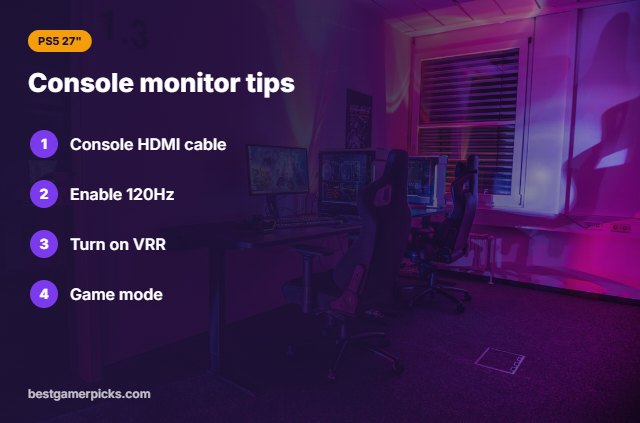
Console monitor tips
Set it up for console:
- Use the HDMI cable that came with your console.
- Turn on 120Hz output in the console video settings.
- Enable VRR on the console if the monitor supports it.
- Switch the monitor to its game or low-latency mode.
Here are quick answers about the best 27 inch monitor for ps5.
Frequently Asked Questions
What is the best 27 inch monitor for ps5?
Our pick for the best 27 inch monitor for ps5 is the LG UltraGear 27GR83Q, followed by the LG UltraGear 27GS93QE (Best OLED).
1440p or 4K for PS5 at 27 inches?
4K is sharper; 1440p 120Hz is smoother in supported games.
Does PS5 support 4K 120Hz on monitors?
Yes, with HDMI 2.1.
Do I need speakers?
Many monitors lack good speakers, so use a headset or the controller audio.
Final Verdict
Our final pick for the best 27 inch monitor for ps5 is the LG UltraGear 27GR83Q. Choose the LG UltraGear 27GS93QE if you want OLED with HDMI 2.1, or the LG UltraGear 27G810A if you want 4K.
Related Guides
More gaming monitor guides:
- Best 144Hz Monitor for PS5
- Best 1440p Monitor for PS5 VRR
- Best 1440p Monitor for PS5
- Best 1440p Monitor for GTA 6 on PS5
- Best 27 Inch Monitor under 200
- Best 60 Percent Keyboard under 50
Product details are based on manufacturer specifications at the time of writing. Prices and availability change often, so check Amazon for the latest price.

Write Your Review
No reviews yet. Be the first to share your experience!