

BestGamerPicks is reader-supported. As an Amazon Associate we earn from qualifying purchases. This does not change our recommendations. Learn more.
Our best touchscreen portable monitor picks add touch input to a second screen, which is handy for Windows tablets, Android phones, notes and casual games.
Touch works best with Windows and Android over USB-C; macOS support is limited. We compared touch support, panel, battery and build to find the best touchscreen portable monitor.
Quick Answer: The Best Touchscreen Portable Monitor
- Best Overall: ASUS ZenScreen Touch MB16AMTR 15.6-inch 1080p Touchscreen USB-C Portable Monitor with 7800mAh Battery
- Best Value: cocopar 15.6-inch Touchscreen Portable Monitor, 1080p FHD, Metal Build with Kickstand
- Best with Pen: ASUS ZenScreen Ink MB14AHD 14-inch 1080p Portable Touchscreen Monitor with ASUS Pen
- Best Premium 14-Inch: Lenovo ThinkVision M14t Gen 2 14-inch 2240×1400 Touch Portable Monitor
- Best Battery: UPERFECT 15.6-inch Touchscreen Portable Monitor with 10800mAh Battery, 120Hz
- Best OLED: INNOCN PU15 15.6-inch 4K OLED Touchscreen Portable Monitor with Built-in Battery
- Best Design: espresso Displays 15-inch Touch Portable Monitor
The ASUS ZenScreen Touch MB16AMTR is our top pick. Also consider the cocopar 15.6″ Touch (Best Value) and the ASUS ZenScreen Ink MB14AHD (Best with Pen).
Best Touchscreen Portable Monitor Comparison Table
| Product | Best For | Type | Key Feature | Buy |
|---|---|---|---|---|
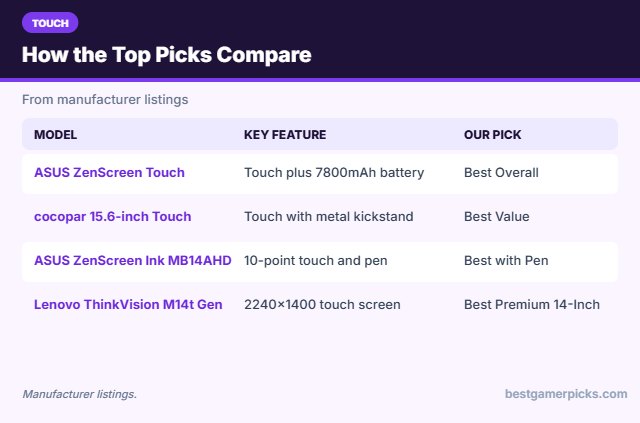
| ASUS ZenScreen Touch MB16AMTR | Best Overall | 15.6″ touch battery portable monitor | Touch plus 7800mAh battery | Check Price |
| cocopar 15.6″ Touch | Best Value | 15.6″ touch portable monitor | Touch with metal kickstand | Check Price |
| ASUS ZenScreen Ink MB14AHD | Best with Pen | 14″ touch portable monitor | 10-point touch and pen | Check Price |
| Lenovo ThinkVision M14t Gen 2 | Best Premium 14-Inch | 14″ touch portable monitor | 2240×1400 touch screen | Check Price |
| UPERFECT 15.6″ Touch Battery 120Hz | Best Battery | 15.6″ touch battery portable monitor | 10800mAh battery, touch, 120Hz | Check Price |
| INNOCN PU15 4K OLED Touch | Best OLED | 15.6″ 4K OLED touch portable monitor | 4K OLED, touch and battery | Check Price |
| espresso 15 Touch | Best Design | 15″ touch portable monitor | Premium touch display | Check Price |
The 7 Best Touchscreen Portable Monitors
Each best touchscreen portable monitor pick below is a touchscreen portable monitor.
ASUS ZenScreen Touch MB16AMTR 15.6-inch 1080p Touchscreen USB-C Portable Monitor with 7800mAh Battery
1The ASUS ZenScreen Touch MB16AMTR is a 15.6-inch 1080p touchscreen portable monitor with a listed 7800mAh battery.
👍 Pros & Cons
Pros
- Touch and battery
- Trusted brand
- Slim and light
Cons
- 60Hz
- Touch best on Windows/Android
📄 Detailed Review
- Size: 15.6 in IPS
- Touch: Yes
- Battery: 7800mAh (listed)
It is a premium all-rounder for touch and travel.
Best touch pick.
cocopar 15.6-inch Touchscreen Portable Monitor, 1080p FHD, Metal Build with Kickstand
2The cocopar 15.6-inch touchscreen portable monitor uses a metal frame with a kickstand.
👍 Pros & Cons
Pros
- Affordable touch
- Metal build
- Kickstand
Cons
- Refresh rate not listed as high
- Touch best on Windows/Android
📄 Detailed Review
- Size: 15.6 in
- Touch: Yes
- Build: Metal frame, kickstand
It is a good-value touch screen.
Best value touch.
ASUS ZenScreen Ink MB14AHD 14-inch 1080p Portable Touchscreen Monitor with ASUS Pen
3The ASUS ZenScreen Ink MB14AHD is a 14-inch 1080p touchscreen portable monitor with 10-point touch and an ASUS Pen.
👍 Pros & Cons
Pros
- Pen and touch
- Compact
- Trusted brand
Cons
- 60Hz
- Small for gaming
📄 Detailed Review
- Size: 14 in IPS
- Touch: 10-point
- Extras: ASUS Pen
It suits drawing, notes and casual touch games.
Best touch with pen.
Lenovo ThinkVision M14t Gen 2 14-inch 2240×1400 Touch Portable Monitor
4The Lenovo ThinkVision M14t Gen 2 is a 14-inch 2240×1400 touch portable monitor.
👍 Pros & Cons
Pros
- Sharp 16:10-style resolution
- Business build
- Touch
Cons
- Pricey
- Work-focused
📄 Detailed Review
- Size: 14 in
- Resolution: 2240 x 1400
- Touch: Yes
It is a premium travel touch screen.
Premium touch pick.
UPERFECT 15.6-inch Touchscreen Portable Monitor with 10800mAh Battery, 120Hz
5The UPERFECT 15.6-inch portable monitor combines touch, 120Hz and a listed 10800mAh battery.
👍 Pros & Cons
Pros
- Big battery (listed)
- Touch
- 120Hz
Cons
- Heavier with battery
- Pricier
📄 Detailed Review
- Size: 15.6 in
- Battery: 10800mAh (listed)
- Refresh: 120Hz, touch
It is a strong pick for cars and travel.
Best battery for gaming.
INNOCN PU15 15.6-inch 4K OLED Touchscreen Portable Monitor with Built-in Battery
6The INNOCN PU15 is a 15.6-inch 4K OLED portable monitor with touch and a listed 5000mAh battery.
👍 Pros & Cons
Pros
- Touch plus OLED
- Built-in battery
- 4K
Cons
- Pricier
- Touch is best on Windows/Android
📄 Detailed Review
- Size: 15.6 in OLED
- Resolution: 4K
- Extras: Touch, 5000mAh battery (listed)
It is the most feature-packed OLED here.
Best OLED with touch.
espresso Displays 15-inch Touch Portable Monitor
7The espresso Displays 15 is a premium touch portable monitor.
👍 Pros & Cons
Pros
- Premium build
- Touch
- Very thin design
Cons
- Expensive
- Work-focused
📄 Detailed Review
- Size: 15 in
- Touch: Yes
- Design: Premium thin build
It suits MacBook users who want a polished design.
Premium Mac-friendly pick.
How We Chose the Best Touchscreen Portable Monitor
To choose the best touchscreen portable monitor, we compared touch support, panel, battery and build.
For official guidance on monitor distance, height and viewing angle, see the OSHA Computer Workstations eTool on monitors.
Product details in this guide are based on manufacturer specifications and Amazon listing details as of November 2026, not in-house lab testing. Check the current Amazon listing for price and availability. Read more on our How We Test page.
Buying Guide: How to Choose the Best Touchscreen Portable Monitor
Keep these factors in mind when shopping for the best touchscreen portable monitor.
How touchscreen portable monitors work
Touch input travels over a USB-C cable or a separate USB cable. It works best with Windows and Android. macOS treats most touch monitors as a mouse at best, so check the listing if you use a Mac. Consoles do not support touch input.
Built-in battery or not?
A built-in battery lets the monitor run for a few hours without a wall outlet, which helps in cars, trains and dorms. It adds weight and cost, and runtime drops at high brightness and high refresh rates. Without a battery you can still power the monitor from a USB-C power bank that supports Power Delivery.
USB-C or HDMI: how to connect
A single USB-C cable can carry video, power and touch, but only if your laptop or handheld port supports DisplayPort Alt Mode or Thunderbolt. Consoles and older laptops use HDMI, which on most portable monitors is a mini-HDMI port, and then the monitor needs its own USB-C power. Check which cables come in the box.
Portable monitors and MacBooks
MacBooks drive external displays over USB-C or Thunderbolt, but base M-series models have limits on how many external screens they support, so check Apple tech specs for your model. Touch screens usually do not work with macOS touch gestures, and gaming on Mac depends on which games run on macOS.
Travel tips
Pack it smart:
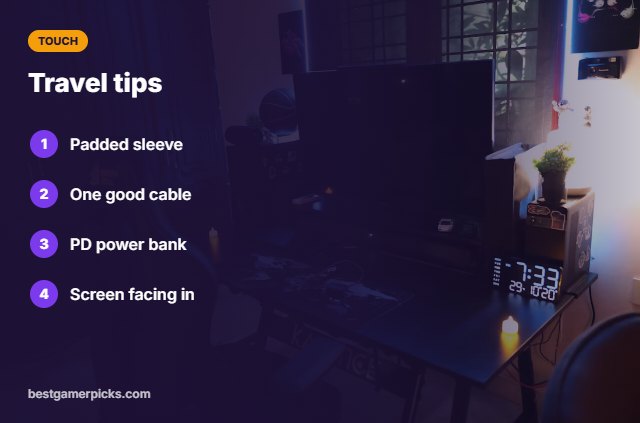
- Carry the monitor in a padded sleeve.
- Pack one USB-C cable that carries video and power.
- Bring a power bank with USB-C Power Delivery.
- Keep the screen facing in, away from chargers.
Here are quick answers about the best touchscreen portable monitor.
Frequently Asked Questions
What is the best touchscreen portable monitor?
Our pick for the best touchscreen portable monitor is the ASUS ZenScreen Touch MB16AMTR, followed by the cocopar 15.6″ Touch (Best Value).
Does touch work over HDMI?
Only if you also connect a USB cable for touch data.
Does touch work on Mac?
Usually not with full gestures.
Can I use touch with consoles?
No; consoles do not support touch on external monitors.
Final Verdict
Our final pick for the best touchscreen portable monitor is the ASUS ZenScreen Touch MB16AMTR. Choose the cocopar 15.6″ Touch if you want a lower price and metal build, or the ASUS ZenScreen Ink MB14AHD if you want a pen.
Related Guides
More portable monitor guides:
- Best Portable Monitor with Touchscreen for Gaming
- Best Portable Monitor with Battery
- Best Portable Monitor with Speakers
- Best Portable Monitor with HDMI and USB C
- Best Desktop Speakers with Headphone Jack
- Best Monitor Light Bar for Ultrawide
Product details are based on manufacturer specifications at the time of writing. Prices and availability change often, so check Amazon for the latest price.









Write Your Review
No reviews yet. Be the first to share your experience!