

BestGamerPicks is reader-supported. As an Amazon Associate we earn from qualifying purchases. This does not change our recommendations. Learn more.
The best soundbar for PC gaming sits under your monitor, connects over USB or optical, and replaces two speakers with one tidy bar.
PC soundbars differ in size, connection, RGB and bass. We compared under-monitor fit, USB audio, Bluetooth and subwoofer options to find the best soundbar for PC gaming.
Quick Answer: The Best Soundbar for Pc Gaming
- Best Overall: Razer Leviathan V2 PC Gaming Soundbar with Subwoofer
- Best Compact USB-C: Razer Leviathan V2 X PC Soundbar with Full-Range Drivers
- Best PC + TV: Creative Sound Blaster Katana V2X RGB Gaming Soundbar
- Best Low-Profile: MEREDO 15.9″ Low-Profile RGB PC Soundbar with Subwoofer
- Best Budget RGB: Nylavee Computer Speakers PC Soundbar with Bluetooth and AUX
- Best Monitor-Mount: Cyber Acoustics CA-2890BT USB and Bluetooth Speaker Bar
- Best Budget with Sub: Saiyin Soundbar with Subwoofer for TV and PC
The Razer Leviathan V2 is the best soundbar for PC gaming thanks to its subwoofer and THX Spatial Audio. The Leviathan V2 X is the best compact USB-C bar and the Creative Katana V2X works with PC and TV.
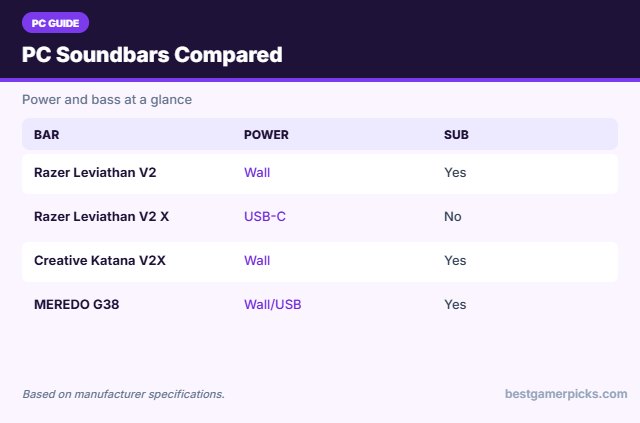
Best Soundbar for Pc Gaming Comparison Table
| Product | Best For | Type | Key Feature | Buy |
|---|---|---|---|---|
| Razer Leviathan V2 | Best Overall | PC soundbar with sub | THX Spatial Audio, sub | Check Price |
| Razer Leviathan V2 X | Best Compact USB-C | Compact PC soundbar | USB-C powered, Chroma RGB | Check Price |
| Creative Katana V2X | Best PC + TV | PC/TV gaming soundbar | 5.1 playback, HDMI ARC, sub | Check Price |
| MEREDO G38 PC Soundbar | Best Low-Profile | Low-profile PC soundbar | 1.6″ tall, RGB, sub | Check Price |
| Nylavee PC Soundbar | Best Budget RGB | Budget RGB PC soundbar | USB powered, 4 RGB modes | Check Price |
| Cyber Acoustics CA-2890BT | Best Monitor-Mount | Monitor-mount speaker bar | Attaches under the monitor | Check Price |
| Saiyin Soundbar + Sub | Best Budget with Sub | Budget soundbar with sub | Deep bass, 3 EQ modes | Check Price |
The 7 Best PC Gaming Soundbars
Each best soundbar for PC gaming pick fits under a typical monitor.

Razer Leviathan V2 PC Gaming Soundbar with Subwoofer
1The Razer Leviathan V2 adds a down-firing subwoofer and THX Spatial Audio to a compact PC soundbar.
👍 Pros & Cons
Pros
- Real subwoofer
- THX Spatial Audio
- Chroma RGB
Cons
- Pricey
- Sub takes floor space
📄 Detailed Review
- Included: Down-firing subwoofer
- Audio: THX Spatial Audio 7.1
- Wireless: Bluetooth 5.2
THX Spatial Audio gives virtual 7.1 positioning for games.
Low-latency Bluetooth 5.2 pairs with your phone.

Razer Leviathan V2 X PC Soundbar with Full-Range Drivers
2The Razer Leviathan V2 X is a compact PC soundbar powered by a single USB-C cable, with Chroma RGB and Bluetooth.
👍 Pros & Cons
Pros
- Runs on one USB-C cable
- Compact under-monitor size
- Chroma RGB
Cons
- Limited deep bass
- No sub
📄 Detailed Review
- Power: Single USB-C cable
- Drivers: 2 full-range + 2 passive radiators
- Extras: Bluetooth 5.0, Chroma RGB
Two full-range drivers and two passive radiators deliver up to 90dB.
It fits neatly under a monitor.

Creative Sound Blaster Katana V2X RGB Gaming Soundbar
3The Creative Sound Blaster Katana V2X is a versatile gaming soundbar with HDMI ARC, USB and a compact subwoofer.
👍 Pros & Cons
Pros
- Works with PC and console
- HDMI ARC
- Customizable RGB
Cons
- Large bar for desks
- Mixed reviews
📄 Detailed Review
- Playback: 5.1 multi-channel, 180W peak
- Connection: USB, HDMI ARC, optical, Bluetooth
- Included: Compact subwoofer
Tri-amplified drivers and 5.1 playback deliver room-filling sound.
Super X-Fi improves headphone audio too.

MEREDO 15.9″ Low-Profile RGB PC Soundbar with Subwoofer
4The MEREDO G38 is a 1.6-inch-tall PC soundbar with a subwoofer and RGB, made to fit under low monitors.
👍 Pros & Cons
Pros
- Fits under low monitors
- Many inputs
- Subwoofer included
Cons
- Lesser-known brand
- RGB basic
📄 Detailed Review
- Size: 15.9″ wide, 1.6″ tall
- Connection: USB audio, AUX, optical, BT 5.3
- Extras: RGB with remote
USB audio, optical, AUX and Bluetooth make it flexible.
A compact pick for small desks.

Nylavee Computer Speakers PC Soundbar with Bluetooth and AUX
5The Nylavee PC soundbar is a cheap USB-powered bar with RGB lighting and Bluetooth.
👍 Pros & Cons
Pros
- Affordable
- RGB lighting
- One-knob control
Cons
- Basic bass
- USB power limits volume
📄 Detailed Review
- Power: USB
- Connection: Bluetooth, 3.5mm AUX
- Lighting: 4 RGB modes
Dual full-range units and bass diaphragms give fuller sound than laptop speakers.
A budget desk upgrade.

Cyber Acoustics CA-2890BT USB and Bluetooth Speaker Bar
6The Cyber Acoustics CA-2890BT clips under your monitor for a clean, budget speaker bar with a speakerphone.
👍 Pros & Cons
Pros
- Mounts under the monitor
- Very cheap
- Mic for calls
Cons
- Low power
- Not for big bass
📄 Detailed Review
- Connection: USB and Bluetooth 5.0
- Power: 5W
- Extras: Built-in speakerphone
USB connects to PC and Bluetooth to your phone at the same time.
A minimal desk pick.

Saiyin Soundbar with Subwoofer for TV and PC
7The Saiyin soundbar with subwoofer is a very affordable way to add bass to a gaming TV or PC.
👍 Pros & Cons
Pros
- Very affordable
- Real subwoofer
- Works with TV and PC
Cons
- No HDMI
- Basic sound
📄 Detailed Review
- Included: Wired subwoofer
- Connection: Optical, AUX, Bluetooth
- Modes: 3 EQ modes
Three EQ modes suit news, movies and music.
A good entry-level pick.
How We Chose the Best Soundbar for Pc Gaming
To choose the best soundbar for pc gaming, we compared PC soundbars on size, USB and Bluetooth support, RGB, bass and owner feedback.
Loud gaming sessions add up, so keep safe listening levels in mind; read the NIDCD guide to noise-induced hearing loss.
Product details in this guide are based on manufacturer specifications and verified owner feedback, not in-house lab testing. Read more on our How We Test page.
Buying Guide: How to Choose the Best Soundbar for PC Gaming
Keep these factors in mind when shopping for the best soundbar for pc gaming.
USB power vs. wall power
USB-powered speakers are simple and tidy but limited in volume and bass. Wall-powered speakers and subwoofers play louder and deeper.
Inputs to look for
USB audio, Bluetooth, optical and a headphone jack make speakers more flexible. A front headphone jack is handy when you switch to a headset at night.
Soundbar height under a monitor
Measure the gap between your desk and the bottom of the monitor. Low-profile bars around 1.5–2.5 inches tall fit under most monitor stands.
RGB lighting and sync
Some speakers sync RGB with software like Logitech G HUB, Razer Synapse or SteelSeries GG. Others use simple onboard modes or a remote.
2.0 vs. 2.1 speakers
2.0 speakers use two speakers only; 2.1 adds a subwoofer for deeper bass. A sub can sit under the desk, freeing space on top.
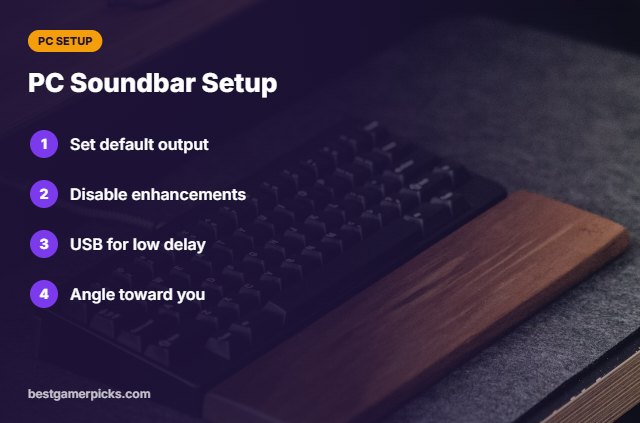
PC Soundbar Setup
Quick wins on Windows:
- Set the bar as default output.
- Disable unneeded enhancements.
- Use USB for lowest delay.
- Angle the bar toward your ears.
Here are quick answers about the best soundbar for pc gaming.
Frequently Asked Questions
What is the best soundbar for PC gaming?
The Razer Leviathan V2 is the best soundbar for PC gaming, with the Leviathan V2 X as the best compact USB-C bar.
Is a soundbar better than PC speakers?
A soundbar saves space; separate speakers usually give wider stereo.
Do PC soundbars need drivers?
Most are plug-and-play over USB.
Can I use a TV soundbar on PC?
Yes, via optical or HDMI, but it may be too large for a desk.
Final Verdict
Our final pick for the best soundbar for pc gaming is the Razer Leviathan V2. Choose the Razer Leviathan V2 X if you want a compact USB-C bar, or the Creative Katana V2X if you want one bar for PC and TV.
Related Guides
More PC audio guides:
- Best Compact Soundbar for PC
- Best RGB Soundbar for PC
- Best Soundbar for Monitor Gaming Setup
- Best HDMI 2.1 AV Receiver
- Best AV Receiver for PS5 and Xbox
Product details are based on manufacturer specifications at the time of writing. Prices and availability change often, so check Amazon for the latest price.









Write Your Review
No reviews yet. Be the first to share your experience!