

BestGamerPicks is reader-supported. As an Amazon Associate we earn from qualifying purchases. This does not change our recommendations. Learn more.
The best computer speakers for PS5 suit desk setups where your PS5 is connected to a gaming monitor rather than a TV.
Most monitors have a 3.5mm headphone output that passes PS5 audio, so AUX-capable speakers work well. We compared inputs and sound to find the best computer speakers for PS5.
Quick Answer: The Best Computer Speakers for Ps5
- Best Overall: SteelSeries Arena 7 RGB 2.1 Gaming Speakers with Subwoofer
- Best Bass: Logitech Z625 THX Certified 2.1 Speaker System with Optical Input
- Best with HDMI ARC: Creative Sound Blaster Katana V2X RGB Gaming Soundbar
- Best Compact 2.1: Logitech Z407 Bluetooth 2.1 Computer Speakers with Wireless Control
- Best Stereo: Edifier R1280DB Powered Bluetooth Bookshelf Speakers with Optical
- Best Budget RGB: Edifier Hecate RGB Gaming Speakers 32W Bluetooth
The SteelSeries Arena 7 is the best computer speakers for PS5 pick with optical and AUX inputs. The Logitech Z625 is the bass-heavy option and the Creative Katana V2X adds HDMI ARC.
Best Computer Speakers for Ps5 Comparison Table
| Product | Best For | Type | Key Feature | Buy |
|---|---|---|---|---|
| SteelSeries Arena 7 | Best Overall | RGB 2.1 gaming speakers | PrismSync RGB, 6.5″ sub | Check Price |
| Logitech Z625 | Best Bass | THX 2.1 speakers | 400W peak, optical input | Check Price |
| Creative Katana V2X | Best with HDMI ARC | PC/TV gaming soundbar | 5.1 playback, HDMI ARC, sub | Check Price |
| Logitech Z407 | Best Compact 2.1 | 2.1 speakers with wireless dial | 80W peak, wireless control dial | Check Price |
| Edifier R1280DB | Best Stereo | Bluetooth bookshelf speakers | Optical, coaxial and Bluetooth | Check Price |
| Edifier Hecate RGB | Best Budget RGB | RGB gaming speakers | 12 RGB effects, USB sound card | Check Price |
The 6 Best Computer Speakers for PS5
Each best computer speakers for PS5 pick has inputs that work with a PS5 desk setup.

SteelSeries Arena 7 RGB 2.1 Gaming Speakers with Subwoofer
1The SteelSeries Arena 7 is a 2.1 set with reactive PrismSync RGB, a 6.5-inch subwoofer and optical input.
👍 Pros & Cons
Pros
- Reactive 4-zone RGB
- Deep 6.5″ sub
- Optical input for consoles
Cons
- Pricey
- Large
📄 Detailed Review
- Drivers: Silk tweeters + organic woofers
- Sub: 6.5″ down-firing
- Inputs: USB, AUX, optical, Bluetooth
Two-way drivers deliver detail, and lighting reacts to on-screen events.
Optical, USB and Bluetooth make it flexible.

Logitech Z625 THX Certified 2.1 Speaker System with Optical Input
2The Logitech Z625 is a THX-certified 2.1 system with optical input, so it connects easily to consoles and TVs too.
👍 Pros & Cons
Pros
- Optical input for consoles/TVs
- Huge bass
- THX certified
Cons
- Large subwoofer
- No Bluetooth
📄 Detailed Review
- Power: 200W RMS / 400W peak
- Certification: THX
- Inputs: Optical, RCA, 3.5mm
200W RMS and a big subwoofer deliver thundering bass.
Controls and a headphone jack sit on the right satellite.

Creative Sound Blaster Katana V2X RGB Gaming Soundbar
3The Creative Sound Blaster Katana V2X is a versatile gaming soundbar with HDMI ARC, USB and a compact subwoofer.
👍 Pros & Cons
Pros
- Works with PC and console
- HDMI ARC
- Customizable RGB
Cons
- Large bar for desks
- Mixed reviews
📄 Detailed Review
- Playback: 5.1 multi-channel, 180W peak
- Connection: USB, HDMI ARC, optical, Bluetooth
- Included: Compact subwoofer
Tri-amplified drivers and 5.1 playback deliver room-filling sound.
Super X-Fi improves headphone audio too.

Logitech Z407 Bluetooth 2.1 Computer Speakers with Wireless Control
4The Logitech Z407 is a compact 2.1 set with Bluetooth, USB and a wireless control dial, excellent value under $150.
👍 Pros & Cons
Pros
- Clever wireless dial
- Clear bass from 20W sub
- Upright or flat speakers
Cons
- Moderate max volume
- Basic EQ
📄 Detailed Review
- Power: 80W peak / 40W RMS
- Inputs: Bluetooth, USB, 3.5mm
- Control: Wireless control dial
80W peak power and a 20W subwoofer with DSP produce clear, full sound.
The wireless dial works from up to 30 meters away.

Edifier R1280DB Powered Bluetooth Bookshelf Speakers with Optical
5The Edifier R1280DB adds Bluetooth and optical/coaxial inputs to Edifier’s classic bookshelf pair.
👍 Pros & Cons
Pros
- Optical input for consoles/TVs
- Bluetooth
- Great value
Cons
- No subwoofer out
- Average bass depth
📄 Detailed Review
- Inputs: Bluetooth, optical, coaxial, 2 x RCA
- Drivers: 4″ bass + silk dome tweeter
- Extras: Remote
Digital inputs connect losslessly to TVs and PCs.
A remote toggles inputs from your chair.

Edifier Hecate RGB Gaming Speakers 32W Bluetooth
6The Edifier Hecate RGB is a compact gaming speaker pair with 12 RGB effects and USB, Bluetooth and AUX inputs.
👍 Pros & Cons
Pros
- RGB that syncs with gameplay
- USB sound card input
- Game/Movie/Music EQ
Cons
- Small drivers
- Modest bass
📄 Detailed Review
- Power: 32W peak
- Inputs: Bluetooth 5.1, USB, 3.5mm
- Lighting: 12 RGB effects
2.75-inch drivers deliver crisp in-game audio.
One-click EQ switches between Game, Movie and Music.
How We Chose the Best Computer Speakers for Ps5
To choose the best computer speakers for ps5, we compared speakers with AUX, optical or HDMI ARC inputs suitable for PS5 monitor setups.
Loud gaming sessions add up, so keep safe listening levels in mind; read the NIDCD guide to noise-induced hearing loss.
Product details in this guide are based on manufacturer specifications and verified owner feedback, not in-house lab testing. Read more on our How We Test page.
Buying Guide: How to Choose the Best Computer Speakers for PS5
Keep these factors in mind when shopping for the best computer speakers for ps5.
Using desktop speakers with a console
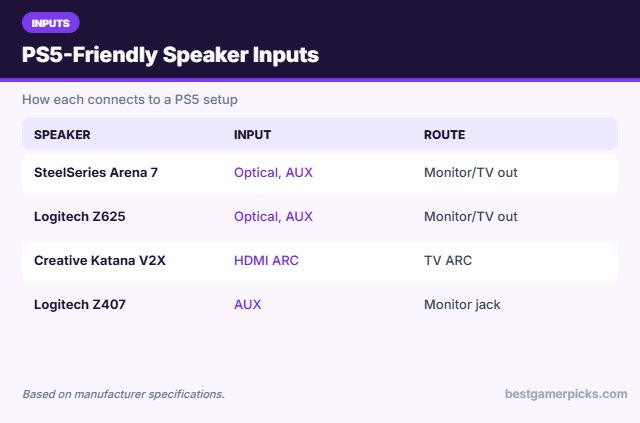
PS5 and Xbox do not output analog audio directly. Use the TV or monitor headphone jack, the controller jack with a splitter, or speakers with optical/HDMI input.
Monitor headphone jack
Gaming monitors pass HDMI audio to their 3.5mm output. Plug speakers into that jack and control volume from the speakers.
Inputs to look for
USB audio, Bluetooth, optical and a headphone jack make speakers more flexible. A front headphone jack is handy when you switch to a headset at night.
Fit the speakers to your desk
Measure the space beside your monitor. Small desks suit compact 2.0 speakers or an under-monitor soundbar; larger desks can fit 4–5 inch bookshelf speakers.
PS5 Monitor Audio Tips
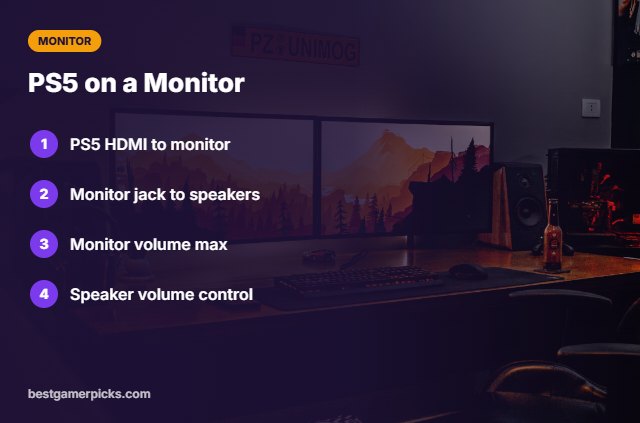
Get sound working:
- PS5 HDMI into the monitor.
- Monitor 3.5mm out to speakers.
- Set monitor volume to max.
- Control volume on speakers.
Here are quick answers about the best computer speakers for ps5.
Frequently Asked Questions
What are the best computer speakers for PS5?
The SteelSeries Arena 7 is the best computer speakers for PS5 pick with optical and AUX, with the Logitech Z625 for bass.
Can I use USB speakers with PS5?
Some USB audio devices work, but AUX via the monitor is more reliable.
Does the PS5 controller jack work?
Yes, with headphones; speakers need power and an adapter.
Why is it quiet?
Set the monitor’s volume to maximum.
Final Verdict
Our final pick for the best computer speakers for ps5 is the SteelSeries Arena 7. Choose the Logitech Z625 if you want powerful THX bass, or the Creative Katana V2X if you want HDMI ARC.
Related Guides
More gaming audio guides:
- Best Desktop Speakers for Gaming
- Best 2.1 Speakers for PC Gaming
- Best Budget Desktop Speakers for PC Gaming
- Best Computer Speakers under 100
- Best Custom Neon Signs for Gaming Room
- Best RGB Lights for PC Case
Product details are based on manufacturer specifications at the time of writing. Prices and availability change often, so check Amazon for the latest price.






Write Your Review
No reviews yet. Be the first to share your experience!