

BestGamerPicks is reader-supported. As an Amazon Associate we earn from qualifying purchases. This does not change our recommendations. Learn more.
The best triple monitor arm holds three screens on one pole for sim racing, flight sims, streaming and productivity.
Triple arms need a deep, wide desk and screens of similar size. We compared screen ranges, weight ratings, extras and owner feedback to find the strongest three-screen mounts.
Quick Answer: The Best Triple Monitor Arm
- Best Overall: HUANUO Triple Monitor Mount for 17 to 32 inch Screens, Gaming Triple Monitor Stand
- Best Budget: HUANUO Triple Monitor Mount for 13-27 inch Screens, Arm Holds 19.8 lbs
- Best with USB: Mount-It! Triple Monitor Desk Stand, USB-A & C, Gas Spring Arms up to 17.6 lbs each, 13-32″
- Best Two Screens + Laptop: MOUNTUP Dual Monitor and Laptop Mount for 2 Max 27″ Screens, Laptop Tray Fits 10-17in
The HUANUO Triple Monitor Mount is the best triple monitor arm for most setups, holding three 17 to 32-inch screens. The HUANUO 13–27 Triple is cheaper for smaller screens and the Mount-It! Triple adds USB ports.
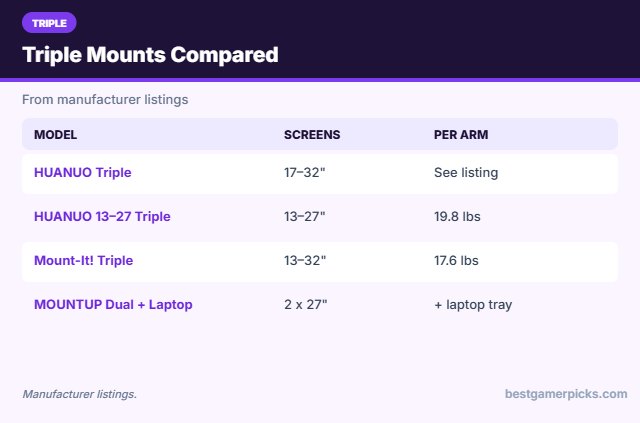
Best Triple Monitor Arm Comparison Table
| Product | Best For | Type | Key Feature | Buy |
|---|---|---|---|---|
| HUANUO Triple Monitor Mount | Best Overall | Triple monitor arm | Three 17–32″ screens | Check Price |
| HUANUO Triple Mount (13–27″) | Best Budget | Triple monitor arm | Three 13–27″ screens | Check Price |
| Mount-It! Triple Arm with USB | Best with USB | Triple monitor arm | USB-A/C, gas springs | Check Price |
| MOUNTUP Dual Monitor + Laptop Mount | Best Two Screens + Laptop | Triple-position mount | Two monitors + laptop | Check Price |
The 4 Best Triple Monitor Arms
Each pick below holds three displays.
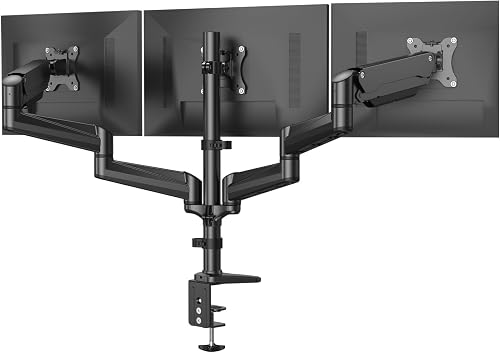
HUANUO Triple Monitor Mount for 17 to 32 inch Screens, Gaming Triple Monitor Stand
1The HUANUO Triple Monitor Mount holds three 17 to 32-inch screens with swivel, tilt and rotation.
👍 Pros & Cons
Pros
- Holds three big screens
- Thousands of reviews
- Good for sim racing
Cons
- Needs a wide, deep desk
- Heavy assembly
📄 Detailed Review
- Screens: 3 x 17–32″
- Motion: Swivel, tilt, rotate
- Mount: Desk
It is a popular choice for racing and flight sim setups.
The best triple arm.

HUANUO Triple Monitor Mount for 13-27 inch Screens, Arm Holds 19.8 lbs
2The HUANUO 13-27 triple mount holds three screens up to 27 inches and 19.8 lbs each.
👍 Pros & Cons
Pros
- Cheaper triple mount
- Full motion
- Good for 24-inch trios
Cons
- 27-inch max
- Needs a wide desk
📄 Detailed Review
- Screens: 3 x 13–27″
- Weight: 19.8 lbs per arm
- Mount: Desk
It is a cheaper triple option for 24 and 27-inch monitors.
Budget triple.

Mount-It! Triple Monitor Desk Stand, USB-A & C, Gas Spring Arms up to 17.6 lbs each, 13-32″
3The Mount-It! Triple Monitor Desk Stand holds three 13 to 32-inch screens on gas spring arms and adds USB-A and USB-C ports.
👍 Pros & Cons
Pros
- USB ports
- Gas spring arms
- Triple setup
Cons
- Expensive
- Needs a deep desk
📄 Detailed Review
- Screens: 3 x 13–32″
- Weight: 17.6 lbs each
- Ports: USB-A and USB-C
It is a premium triple setup with ports at the desk.
Triple with USB.

MOUNTUP Dual Monitor and Laptop Mount for 2 Max 27″ Screens, Laptop Tray Fits 10-17in
4The MOUNTUP mount holds two monitors up to 27 inches plus a 10 to 17-inch laptop tray.
👍 Pros & Cons
Pros
- Two screens plus laptop
- Good value
- Flexible layout
Cons
- 27-inch max
- Assembly time
📄 Detailed Review
- Monitors: 2 x up to 27″
- Laptop: 10–17″ tray
- Mount: Desk
It creates a three-screen setup from two monitors and a laptop.
Two monitors + laptop.
How We Chose the Best Triple Monitor Arm
To choose the best triple monitor arm, we compared triple mounts on screen ranges, weight ratings and owner feedback.
For official guidance on monitor distance, height and viewing angle, see the OSHA Computer Workstations eTool on monitors.
Product details in this guide are based on manufacturer specifications and verified owner feedback, not in-house lab testing. Read more on our How We Test page.
Buying Guide: How to Choose the Best Triple Monitor Arm
Keep these factors in mind when shopping for the best triple monitor arm.
Dual and triple setups
Multi-monitor arms need a strong pole and enough desk depth. Match monitors of similar size and weight so each side balances.
Screen size and arm reach
Larger screens need longer arms and stronger springs. Ultrawides around 34 inches and super ultrawides at 49 inches need heavy-duty arms rated for their weight and width.
Desk thickness and material
Check the clamp range against your desk thickness. Glass, thin particle board and hollow-core desks need a reinforcement plate or a freestanding base.
Sim racing angles
For racing sims, angle the side screens inward so they wrap around your view, and match bezels as closely as possible.
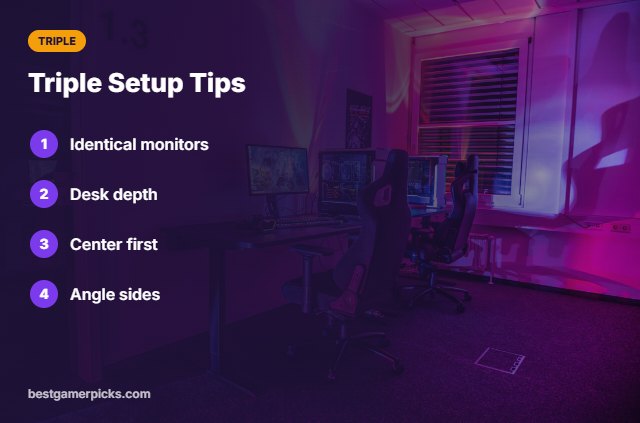
Triple Setup Tips
Build it right:
- Use identical monitors if possible.
- Measure desk depth for the wings.
- Mount the center screen first.
- Angle side screens inward.
Here are quick answers about the best triple monitor arm.
Frequently Asked Questions
What is the best triple monitor arm?
The HUANUO Triple Monitor Mount is our top pick for most setups, with the HUANUO 13–27 Triple as the budget pick.
Do I need identical monitors?
It helps alignment and balance.
Will my desk hold it?
Check depth, thickness and weight.
Can I use ultrawides?
Triple arms are designed for standard screens.
Final Verdict
Our final pick for the best triple monitor arm is the HUANUO Triple Monitor Mount. Choose the HUANUO Triple Mount (13–27″) if you want a lower price, or the Mount-It! Triple Arm with USB for USB ports.
Related Guides
More monitor arm and stand guides:
- Best Swivel TV Mount for Gaming
- Best TV Wall Mount for Gaming Room
- Best Small Gaming Desk with Monitor Stand
- Best Vertical Monitor Stand
- Best HDMI 2.1 AV Receiver
- Best Couch Gaming Setup
Product details are based on manufacturer specifications at the time of writing. Prices and availability change often, so check Amazon for the latest price.









Write Your Review
No reviews yet. Be the first to share your experience!