

BestGamerPicks is reader-supported. As an Amazon Associate we earn from qualifying purchases. This does not change our recommendations. Learn more.
The best vertical monitor stand either rotates a screen to portrait for chat and code, or stacks two screens vertically to save desk width.
Portrait screens are great for Discord, stream chat and long web pages, while stacking keeps your main screen centered. We compared rotation, stacking, stability and owner feedback to find the best vertical monitor stand.
Quick Answer: The Best Vertical Monitor Stand
- Best Portrait Stand: HUANUO Monitor Stand, Freestanding VESA Mount for 13 to 34 Inch Screens, Holds up to 44 lbs, 5 Height Options
- Best Freestanding Stack: VIVO Dual Monitor Desk Stand Free-Standing, Stacked Vertical Position, 2 Ultrawide Screens up to 34 inch
- Best Premium Stack: Ergotron LX Vertical Stacking Dual Monitor Arm, for 2 Monitors up to 40 Inches, 7 to 22 lbs Each
- Best Value Stack: HUANUO Dual Monitor Stand for 13 to 35 Inch, Max Load 44 lbs, Vertical Monitor Mount, Freestanding
- Best Cheap Portrait: WALI Freestanding VESA Monitor Stand for 13-32 inch Screens, up to 22 lbs, Full Motion
- Best Stacked Arm: HUANUO 17-32 Inch Dual Monitor Stand, Stacked Monitor Mount
- Best Rotating Arm: Amazon Basics Adjustable Single Monitor Arm Desk Mount, Holds up to 32″ (38″ Ultrawide) and 22 lbs
The HUANUO Freestanding Monitor Stand is the best vertical monitor stand for portrait use, holding up to 44 lbs. The VIVO Stacked Dual Stand is the best freestanding stack, and the Ergotron LX Vertical Stacking Dual is the premium pick.
Best Vertical Monitor Stand Comparison Table
| Product | Best For | Type | Key Feature | Buy |
|---|---|---|---|---|
| HUANUO Freestanding Monitor Stand | Best Portrait Stand | Freestanding VESA stand | Up to 34″, 44 lbs | Check Price |
| VIVO Stacked Dual Stand | Best Freestanding Stack | Freestanding stacked stand | Vertical stack, up to 34″ | Check Price |
| Ergotron LX Vertical Stacking Dual | Best Premium Stack | Premium stacked dual | Two up to 40″ stacked | Check Price |
| HUANUO Freestanding Vertical Dual | Best Value Stack | Freestanding stacked dual | Vertical stack, 44 lbs | Check Price |
| WALI Freestanding Monitor Stand | Best Cheap Portrait | Freestanding VESA stand | Full motion, no clamp | Check Price |
| HUANUO Stacked Dual Arm | Best Stacked Arm | Stacked dual arm | Vertical stacking | Check Price |
| Amazon Basics Single Monitor Arm | Best Rotating Arm | Single monitor arm | Up to 32″ (38″ ultrawide), 22 lbs | Check Price |
The 7 Best Vertical Monitor Stands
Each best vertical monitor stand pick supports portrait rotation or vertical stacking.

HUANUO Monitor Stand, Freestanding VESA Mount for 13 to 34 Inch Screens, Holds up to 44 lbs, 5 Height Options
1The HUANUO Freestanding Monitor Stand holds 13 to 34-inch screens up to 44 lbs and can rotate to portrait.
👍 Pros & Cons
Pros
- No clamp
- Rotates to portrait
- High weight rating
Cons
- Takes desk space
- Height steps not smooth
📄 Detailed Review
- Screen size: 13–34″
- Weight: Up to 44 lbs
- Height: 5 options
It is a no-clamp option for vertical monitors.
Freestanding portrait.

VIVO Dual Monitor Desk Stand Free-Standing, Stacked Vertical Position, 2 Ultrawide Screens up to 34 inch
2The VIVO stacked dual stand holds two screens up to 34 inches in a vertical stack on a freestanding base.
👍 Pros & Cons
Pros
- Stacks two screens
- No clamp
- Fits ultrawides
Cons
- Tall
- Limited swivel
📄 Detailed Review
- Screens: 2 x up to 34″
- Layout: Stacked vertical
- Base: Freestanding
It is a space-saving way to run a second screen above your main monitor.
Vertical space saver.

Ergotron LX Vertical Stacking Dual Monitor Arm, for 2 Monitors up to 40 Inches, 7 to 22 lbs Each
3The Ergotron LX Vertical Stacking Dual Arm stacks two monitors up to 40 inches.
👍 Pros & Cons
Pros
- Stacks large screens
- Premium build
- Tall pole
Cons
- Very expensive
- Tall setup
📄 Detailed Review
- Screens: 2 x up to 40″
- Weight: 7–22 lbs each
- Layout: Vertical stack
It suits streamers who want a chat screen above the main display.
Premium stack.

HUANUO Dual Monitor Stand for 13 to 35 Inch, Max Load 44 lbs, Vertical Monitor Mount, Freestanding
4The HUANUO Freestanding Vertical Dual Stand stacks two 13 to 35-inch screens.
👍 Pros & Cons
Pros
- No clamp
- Stacks two screens
- Good price
Cons
- Tall
- Base takes space
📄 Detailed Review
- Screens: 2 x 13–35″
- Weight: Up to 44 lbs total
- Layout: Vertical
It suits desks where clamps will not fit.
No-clamp stack.

WALI Freestanding VESA Monitor Stand for 13-32 inch Screens, up to 22 lbs, Full Motion
5The WALI Freestanding Monitor Stand holds 13 to 32-inch screens with full motion and portrait rotation.
👍 Pros & Cons
Pros
- No clamp needed
- Rotates to portrait
- Huge review base
Cons
- Base takes space
- 22-lb limit
📄 Detailed Review
- Screen size: 13–32″
- Weight: Up to 22 lbs
- Motion: Full motion, rotation
It is a cheap way to run a vertical side monitor.
Cheap vertical stand.

HUANUO 17-32 Inch Dual Monitor Stand, Stacked Monitor Mount
6The HUANUO Stacked Dual Monitor Stand can stack two 17 to 32-inch screens vertically.
👍 Pros & Cons
Pros
- Vertical stack saves width
- Flexible layout
- Popular
Cons
- Top screen can be high
- Needs tension tuning
📄 Detailed Review
- Screens: 2 x 17–32″
- Layout: Stacked or side by side
- Mount: Desk
It is great on narrow desks or for a chat screen above the game.
Saves desk width.

Amazon Basics Adjustable Single Monitor Arm Desk Mount, Holds up to 32″ (38″ Ultrawide) and 22 lbs
7The Amazon Basics Adjustable Single Monitor Arm holds screens up to 32 inches (38-inch ultrawide) and 22 lbs with adjustable tension.
👍 Pros & Cons
Pros
- Very affordable
- Adjustable tension
- Clamp and grommet options
Cons
- Basic cable management
- Not for heavy ultrawides
📄 Detailed Review
- Screen size: Up to 32″ (38″ ultrawide)
- Weight: Up to 22 lbs
- Mount: Clamp or grommet
It is a low-cost way to lift a gaming monitor and free up desk space.
A great budget arm.
How We Chose the Best Vertical Monitor Stand
To choose the best vertical monitor stand, we compared stands and arms on portrait rotation, stacking, stability and owner feedback.
For official guidance on monitor distance, height and viewing angle, see the OSHA Computer Workstations eTool on monitors.
Product details in this guide are based on manufacturer specifications and verified owner feedback, not in-house lab testing. Read more on our How We Test page.
Buying Guide: How to Choose the Best Vertical Monitor Stand
Keep these factors in mind when shopping for the best vertical monitor stand.
Arm or stand?
Monitor stands and risers are simple, need no clamp and often add storage. Arms free more desk space and adjust more, but need a compatible desk edge.
Portrait vs. stacked
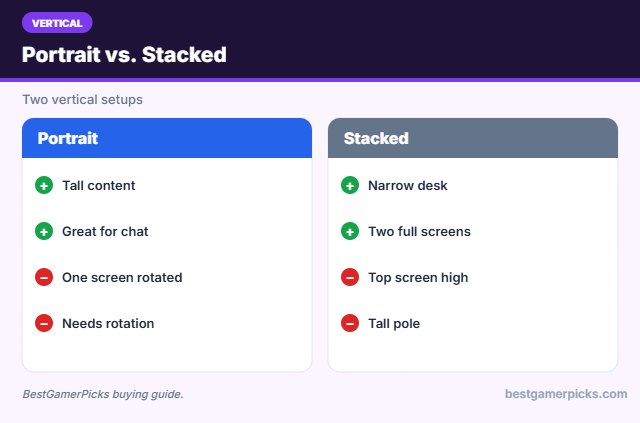
Portrait mode turns one screen 90 degrees for tall content. Stacking puts a second screen above the first, keeping your desk narrow.
Check VESA and weight
Most monitors use a 75×75 or 100×100 mm VESA pattern on the back. Confirm the arm’s weight range covers your monitor, including curved or OLED models that may be heavier than they look.
Set the right monitor height
Place the top of the screen at or slightly below eye level, about an arm’s length away. An arm makes it easy to adjust when you switch between gaming and work.
Vertical Setup Tips
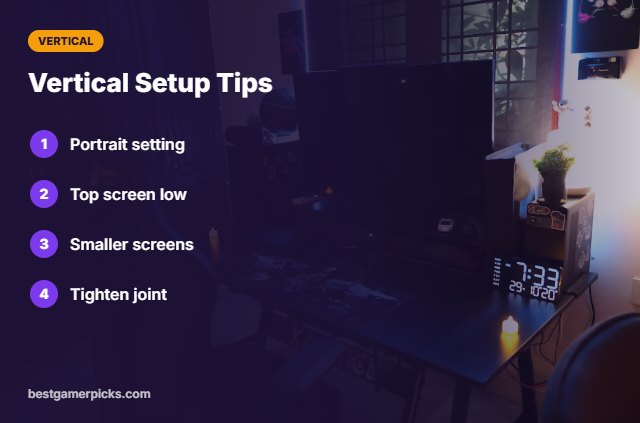
Make it work:
- Rotate display settings to portrait.
- Keep the top screen low.
- Use smaller screens for portrait.
- Tighten the rotation joint.
Here are quick answers about the best vertical monitor stand.
Frequently Asked Questions
What is the best vertical monitor stand?
The HUANUO Freestanding Monitor Stand is the best vertical monitor stand for portrait use, with the VIVO Stacked Dual Stand for stacking.
Can any monitor go portrait?
With VESA and an arm that rotates, most can.
Is stacking bad for the neck?
Keep the top screen for occasional glances.
What size works in portrait?
24 and 27-inch screens are common.
Final Verdict
Our final pick for the best vertical monitor stand is the HUANUO Freestanding Monitor Stand. Choose the VIVO Stacked Dual Stand if you want a freestanding stack, or the Ergotron LX Vertical Stacking Dual for premium build.
Related Guides
More monitor arm and stand guides:
- Best TV Wall Mount for Gaming Room
- Best Wall Mounted Monitor Arm
- Best Triple Monitor Arm
- Best Wall Mounted Monitor for Gaming
- Best Keyboard and Mouse Combo for Laptop
- Best Smart Lights That Sync with Games
Product details are based on manufacturer specifications at the time of writing. Prices and availability change often, so check Amazon for the latest price.









Write Your Review
No reviews yet. Be the first to share your experience!