

BestGamerPicks is reader-supported. As an Amazon Associate we earn from qualifying purchases. This does not change our recommendations. Learn more.
Our best budget mechanical keyboard for typing picks feel comfortable for long typing sessions at a low price.
For typing, tactile switches, good keycaps and solid stabilizers matter most. We compared typing feel, keycaps, sound and owner feedback to find the best budget mechanical keyboard for typing.
Quick Answer: The Best Budget Mechanical Keyboard for Typing
- Best Overall: Keychron V2 Wired Custom Mechanical Keyboard, 65% Layout QMK/VIA, Hot-swappable K Pro Brown
- Best Creamy Sound: AULA F75 Pro Wireless Mechanical Keyboard, 75% Hot Swappable with Knob, Pre-lubed Reaper Switches
- Best PBT Keycaps: Logitech G413 TKL SE Mechanical Gaming Keyboard
- Best with Numpad: Keychron K4 96% Layout 100 Keys Wireless Bluetooth/Wired Mechanical Keyboard
- Best Gasket: RK ROYAL KLUDGE R75 Wired Mechanical Keyboard with Volume Knob, Gasket Mount, Hot Swappable
- Best Keycaps: Akko 5075B Plus 75% RGB Hot-swappable Keyboard with Knob, PBT Double Shot
- Best 60%: RK ROYAL KLUDGE RK61 Wired 60% Mechanical Gaming Keyboard, QMK/VIA, Hot Swappable
The Keychron V2 is our top pick. Also consider the AULA F75 Pro (Best Creamy Sound) and the Logitech G413 TKL SE (Best PBT Keycaps).
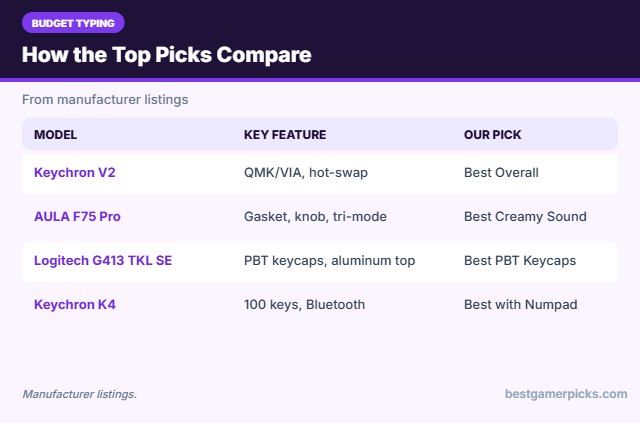
Best Budget Mechanical Keyboard for Typing Comparison Table
| Product | Best For | Type | Key Feature | Buy |
|---|---|---|---|---|
| Keychron V2 | Best Overall | 65% custom keyboard | QMK/VIA, hot-swap | Check Price |
| AULA F75 Pro | Best Creamy Sound | Creamy 75% keyboard | Gasket, knob, tri-mode | Check Price |
| Logitech G413 TKL SE | Best PBT Keycaps | Budget TKL keyboard | PBT keycaps, aluminum top | Check Price |
| Keychron K4 | Best with Numpad | 96% Bluetooth keyboard | 100 keys, Bluetooth | Check Price |
| Royal Kludge R75 | Best Gasket | Budget 75% gasket keyboard | Gasket, knob, hot-swap | Check Price |
| Akko 5075B Plus | Best Keycaps | 75% keyboard with knob | Knob, PBT keycaps | Check Price |
| Royal Kludge RK61 | Best 60% | Budget 60% keyboard | Hot-swap, QMK/VIA | Check Price |
The 7 Best Budget Mechanical Keyboards for Typing
Each best budget mechanical keyboard for typing pick below is comfortable for typing at a budget price.

Keychron V2 Wired Custom Mechanical Keyboard, 65% Layout QMK/VIA, Hot-swappable K Pro Brown
1The Keychron V2 is a 65% custom keyboard with hot-swap sockets, QMK/VIA and Mac/Windows support.
👍 Pros & Cons
Pros
- Great value custom board
- Mac and Windows
- QMK/VIA
Cons
- Wired only
- Plastic case
📄 Detailed Review
- Layout: 65% (67 keys)
- Switches: K Pro, hot-swappable
- Software: QMK/VIA
It is a great entry custom board.
Best value 65% custom board.

AULA F75 Pro Wireless Mechanical Keyboard, 75% Hot Swappable with Knob, Pre-lubed Reaper Switches
2The AULA F75 Pro is a gasket-mounted 75% board with a knob, pre-lubed switches and tri-mode wireless.
👍 Pros & Cons
Pros
- Creamy sound out of the box
- Tri-mode wireless
- Great value
Cons
- Software is basic
- Tall profile
📄 Detailed Review
- Layout: 75% with knob
- Switches: Pre-lubed Reaper, hot-swap
- Connection: 2.4GHz, Bluetooth, USB-C
It is famous for its creamy sound at a low price.
Best value 75%.

Logitech G413 TKL SE Mechanical Gaming Keyboard
3The Logitech G413 TKL SE has PBT keycaps, tactile switches and an aluminum top.
👍 Pros & Cons
Pros
- PBT keycaps
- Aluminum top
- Trusted brand
Cons
- White lighting only
- No hot-swap
📄 Detailed Review
- Layout: TKL
- Keycaps: PBT
- Switches: Tactile mechanical
It is a durable budget TKL.
Best budget TKL.

Keychron K4 96% Layout 100 Keys Wireless Bluetooth/Wired Mechanical Keyboard
4The Keychron K4 is a 100-key 96% keyboard with Bluetooth and wired modes.
👍 Pros & Cons
Pros
- Compact with number pad
- Mac-friendly
- Proven model
Cons
- Bluetooth only wireless
- Older design
📄 Detailed Review
- Layout: 96% (100 keys)
- Connection: Bluetooth + wired
- Switches: Keychron Apex
It is a proven compact full layout.
Proven 96% board.

RK ROYAL KLUDGE R75 Wired Mechanical Keyboard with Volume Knob, Gasket Mount, Hot Swappable
5The Royal Kludge R75 is a wired 75% board with a gasket mount, knob and hot-swap sockets.
👍 Pros & Cons
Pros
- Gasket mount for little money
- Knob
- Hot-swappable
Cons
- Wired only
- MDA keycaps are tall
📄 Detailed Review
- Layout: 75% with knob
- Mount: Gasket
- Keycaps: MDA profile
It is one of the cheapest gasket boards.
Best budget gasket board.

Akko 5075B Plus 75% RGB Hot-swappable Keyboard with Knob, PBT Double Shot
6The Akko 5075B Plus is a 75% board with a knob, PBT double-shot keycaps and hot-swap sockets.
👍 Pros & Cons
Pros
- Great keycaps
- Knob
- Fun themes
Cons
- Theme editions vary
- Software is basic
📄 Detailed Review
- Layout: 75% with knob
- Keycaps: PBT double-shot
- Switches: Hot-swappable
Its themed editions suit fun desk setups.
Best styled 75%.

RK ROYAL KLUDGE RK61 Wired 60% Mechanical Gaming Keyboard, QMK/VIA, Hot Swappable
7The RK61 is a cheap 60% keyboard with hot-swap sockets and QMK/VIA support.
👍 Pros & Cons
Pros
- Very cheap
- Hot-swappable
- QMK/VIA remapping
Cons
- Basic stabilizers
- Plastic case
📄 Detailed Review
- Layout: 60%, 61 keys
- Switches: Hot-swappable
- Software: QMK/VIA (listed)
It is one of the best-value ways to try a 60% layout.
Best budget 60%.
How We Chose the Best Budget Mechanical Keyboard for Typing
To choose the best budget mechanical keyboard for typing, we compared typing feel, keycaps, sound and owner feedback.
For official guidance on keyboard height, wrist posture and placement, see the OSHA Computer Workstations eTool on keyboards.
Product details in this guide are based on manufacturer specifications and verified owner feedback, not in-house lab testing. Read more on our How We Test page.
Buying Guide: How to Choose the Best Budget Mechanical Keyboard for Typing
Keep these factors in mind when shopping for the best budget mechanical keyboard for typing.
Linear, tactile or clicky switches
Linear switches press smoothly and suit fast gaming. Tactile switches have a bump you can feel, which many typists like. Clicky switches add a loud click and are best when noise does not matter.
ABS vs. PBT keycaps
PBT keycaps resist shine and feel slightly textured. ABS keycaps are smoother and can shine over time, but they often allow brighter RGB through the legends.
Gasket mount and sound
Gasket-mounted boards float the plate on soft pads, which softens bottom-out and gives a deeper, more muffled sound. Foam layers inside the case also reduce hollow pinging.
What you get on a budget
Cheap boards now often include hot-swap sockets, pre-lubed switches and foam. Corners are usually cut on keycaps, stabilizers and software.
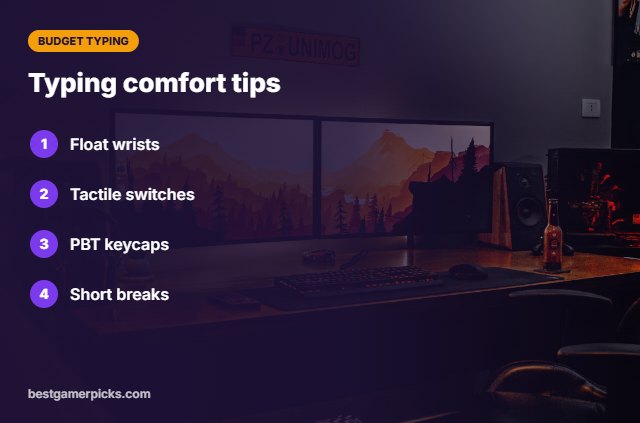
Typing comfort tips
Type more comfortably:
- Keep wrists floating or on a soft rest.
- Pick tactile switches if you like feedback.
- Use PBT keycaps to avoid shine.
- Take short breaks every hour.
Here are quick answers about the best budget mechanical keyboard for typing.
Frequently Asked Questions
What is the best budget mechanical keyboard for typing?
Our pick for the best budget mechanical keyboard for typing is the Keychron V2, followed by the AULA F75 Pro (Best Creamy Sound).
Which switch is best for typing on a budget?
Tactile browns are a safe start; linears suit light typists.
Do I need PBT keycaps?
They resist shine and feel nicer over time.
Is gasket mount good for typing?
Yes; it softens the bottom-out feel.
Final Verdict
Our final pick for the best budget mechanical keyboard for typing is the Keychron V2. Choose the AULA F75 Pro if you want a creamy gasket sound, or the Logitech G413 TKL SE if you want a number pad.
Related Guides
More gaming keyboard guides:
- Best Budget Mechanical Keyboard
- Best Budget Mechanical Keyboard under 50
- Best Budget Hot Swappable Keyboard
- Best Budget TKL Keyboard
- Best Soundbar for PS5 and Xbox
- Best Govee Lights for Gaming Setup
Product details are based on manufacturer specifications at the time of writing. Prices and availability change often, so check Amazon for the latest price.






Write Your Review
No reviews yet. Be the first to share your experience!