

BestGamerPicks is reader-supported. As an Amazon Associate we earn from qualifying purchases. This does not change our recommendations. Learn more.
The best couch keyboard and mouse setup lets you browse, type and game on a TV-connected PC without leaving the sofa.
Couch use needs good wireless range, a compact design and a surface for the mouse. We compared touchpad keyboards, wireless combos and lap desks to find the best couch keyboard and mouse.
Quick Answer: The Best Couch Keyboard and Mouse
- Best for Browsing: Logitech K400 Plus Wireless Touch TV Keyboard
- Best for Gaming: Redragon S101M-KS Wireless Gaming Keyboard and Mouse, Tri-Mode
- Best Lap Desk: Extra Large Lap Desk with Full PU Mouse Pad Gaming Tray, Wrist Rest
- Best Backlit Mini: Fosmon Mini Keyboard with Touchpad, 2.4G + Bluetooth, Backlit
- Best Compact Combo: RedThunder K75 Wireless Keyboard and Mouse Combo, 75% Layout, Tri-Mode
- Best Bluetooth Mini: K808 Mini Bluetooth Keyboard with Touchpad, 7-Color Backlit
- Best Full-Size Wireless: Logitech MK345 Full Size Wireless Keyboard and Mouse Combo
The Logitech K400 Plus is the best couch keyboard and mouse alternative for browsing thanks to its built-in touchpad. For gaming, the Redragon S101M-KS with the Extra Large Mouse Pad Lap Desk is the best combo.
Best Couch Keyboard and Mouse Comparison Table
| Product | Best For | Type | Key Feature | Buy |
|---|---|---|---|---|
| Logitech K400 Plus | Best for Browsing | Keyboard with touchpad | Built-in touchpad for TV PCs | Check Price |
| Redragon S101M-KS Wireless Combo | Best for Gaming | Wireless gaming combo | Tri-mode: wired, 2.4GHz, Bluetooth | Check Price |
| Extra Large Mouse Pad Lap Desk | Best Lap Desk | Gaming lap desk | Full mouse pad surface 22.8 x 14.6 in | Check Price |
| Fosmon Mini Keyboard with Touchpad | Best Backlit Mini | Mini TV keyboard | Backlit, dual mode | Check Price |
| RedThunder K75 Wireless Combo | Best Compact Combo | 75% wireless combo | 75% layout, tri-mode | Check Price |
| K808 Mini Keyboard with Touchpad | Best Bluetooth Mini | Mini Bluetooth keyboard | 7-color backlight | Check Price |
| Logitech MK345 Combo | Best Full-Size Wireless | Wireless office combo | Palm rest, full size | Check Price |
The 7 Best Couch Keyboard and Mouse Setups
Each best couch keyboard and mouse pick works well from the sofa.

Logitech K400 Plus Wireless Touch TV Keyboard
1K400 Plus is the classic living room keyboard with a built-in touchpad.
👍 Pros & Cons
Pros
- Perfect for couch PCs
- Huge review base
- Compact
Cons
- Not for precise aiming
- No backlight
📄 Detailed Review
- Connection: 2.4GHz receiver
- Pointer: Built-in touchpad
- Range: About 10 m
Ideal for controlling a TV-connected PC from the couch.
Best TV keyboard.

Redragon S101M-KS Wireless Gaming Keyboard and Mouse, Tri-Mode
2The Redragon S101M-KS is a tri-mode wireless combo that works over 2.4GHz, Bluetooth or USB.
👍 Pros & Cons
Pros
- Three connection modes
- Rechargeable
- Huge review base
Cons
- Mouse DPI modest
- Bluetooth adds latency
📄 Detailed Review
- Connection: Wired, 2.4GHz, Bluetooth
- Keyboard: RGB backlit
- Mouse: Up to 4800 DPI
Use 2.4GHz for gaming and Bluetooth for tablets or laptops.
A versatile wireless pick.

Extra Large Lap Desk with Full PU Mouse Pad Gaming Tray, Wrist Rest
3This extra-large lap desk turns the entire surface into a mouse pad, ideal for couch keyboard and mouse gaming.
👍 Pros & Cons
Pros
- Whole surface is a mouse pad
- Wide enough for keyboard + mouse
- Well rated
Cons
- Bulky
- Cushion firmness varies
📄 Detailed Review
- Surface: Full PU mouse pad, 22.83″ x 14.57″
- Extras: Wrist rest, phone holder
- Fits: Up to 17.3″ laptops
It is wide enough for a TKL keyboard plus mouse.
Best couch lapboard.

Fosmon Mini Keyboard with Touchpad, 2.4G + Bluetooth, Backlit
4Fosmon’s mini keyboard adds a touchpad and backlight in a handheld size.
👍 Pros & Cons
Pros
- Backlit for dark rooms
- Dual mode
- Handheld
Cons
- Tiny keys
- Not for gaming
📄 Detailed Review
- Connection: 2.4GHz + Bluetooth
- Pointer: Touchpad
- Backlight: Yes
Great for TV PCs and streaming boxes.
Handheld pick.

RedThunder K75 Wireless Keyboard and Mouse Combo, 75% Layout, Tri-Mode
5The RedThunder K75 offers a 75% layout that keeps arrows while saving space.
👍 Pros & Cons
Pros
- Compact with arrow keys
- Tri-mode
- Side-engraved keycaps
Cons
- Newer model
- Membrane switches
📄 Detailed Review
- Layout: 75%
- Connection: BT 5.0, 2.4GHz, wired
- Mouse: Optical gaming mouse
It suits small desks and multi-device users.
Compact and versatile.

K808 Mini Bluetooth Keyboard with Touchpad, 7-Color Backlit
6K808 is a compact Bluetooth keyboard with touchpad and backlight.
👍 Pros & Cons
Pros
- Bluetooth, no dongle
- Colorful backlight
- Compact
Cons
- Small keys
- Few reviews
📄 Detailed Review
- Connection: Bluetooth
- Pointer: Touchpad
- Backlight: 7 colors
Works with TVs, tablets and handhelds.
Bluetooth mini pick.

Logitech MK345 Full Size Wireless Keyboard and Mouse Combo
7Logitech MK345 is a reliable full-size wireless combo with a palm rest.
👍 Pros & Cons
Pros
- Huge review base
- Comfortable palm rest
- Long battery
Cons
- Not for competitive gaming
- No backlight
📄 Detailed Review
- Connection: 2.4GHz USB receiver
- Keyboard: Full size with palm rest
- Mouse: Right-hand contoured
A dependable choice for laptops and family PCs.
Reliable everyday combo.
How We Chose the Best Couch Keyboard and Mouse
To choose the best couch keyboard and mouse, we compared touchpad keyboards, wireless combos and lap desks for sofa use.
For official guidance on keyboard height, wrist posture and placement, see the OSHA Computer Workstations eTool on keyboards.
Product details in this guide are based on manufacturer specifications and verified owner feedback, not in-house lab testing. Read more on our How We Test page.
Buying Guide: How to Choose the Best Couch Keyboard and Mouse
Keep these factors in mind when shopping for the best couch keyboard and mouse.
Touchpad keyboard vs. keyboard and mouse
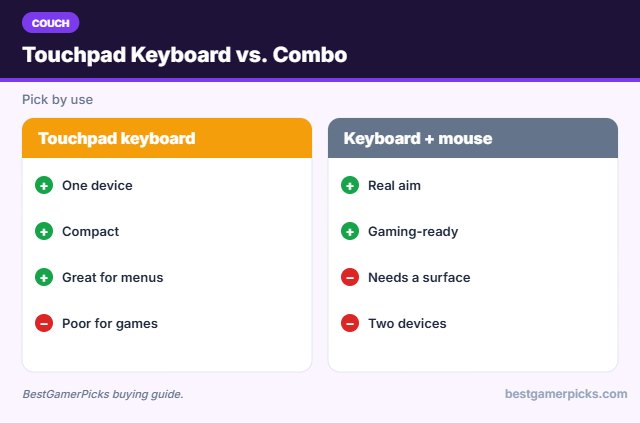
Touchpad keyboards are great for menus and streaming. Real gaming needs a mouse and a flat surface like a lap desk.
Wireless range on the couch
Most 2.4GHz receivers work up to about 10 meters, but walls and metal can cut range. Use a USB extension cable to bring the receiver closer to the couch.
Lapboard size and mouse space
Measure your keyboard. A tenkeyless keyboard plus mouse needs roughly 24 inches of width; a full-size board needs more. Compact 60% or 75% keyboards fit smaller lap desks.
Wired, 2.4GHz or Bluetooth?
Wired sets have zero battery worries and the lowest latency. 2.4GHz wireless with a USB receiver is nearly as fast and is the best choice for wireless gaming. Bluetooth is convenient for laptops, tablets and handhelds but adds a little delay.
Couch Control Tips
Better living room PC:
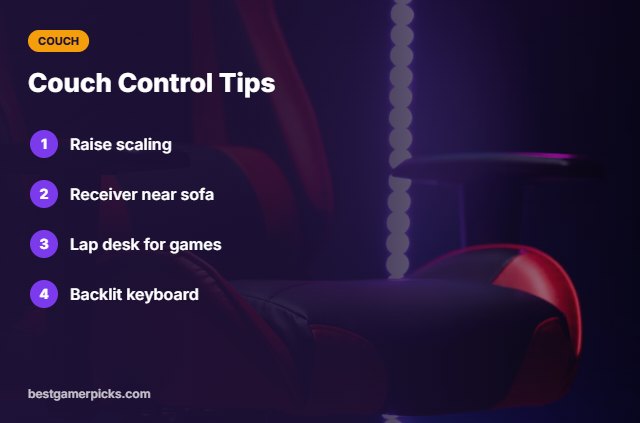
- Raise Windows scaling.
- Place the receiver near the sofa.
- Use a lap desk for mouse games.
- Keep a backlit keyboard for dark rooms.
Here are quick answers about the best couch keyboard and mouse.
Frequently Asked Questions
What is the best couch keyboard and mouse?
The Logitech K400 Plus is the best couch keyboard for browsing, and the Redragon S101M-KS with a mouse pad lap desk is best for gaming.
Do touchpads work for games?
Not well; use a mouse.
How far is the range?
About 10 m for most receivers.
Backlit or not?
Backlit helps in dark rooms.
Final Verdict
Our final pick for the best couch keyboard and mouse is the Logitech K400 Plus. Choose the Redragon S101M-KS Wireless Combo if you want gaming, or the Extra Large Mouse Pad Lap Desk for a lap desk.
Related Guides
More couch gaming guides:
- Best Wireless Lapboard for Gaming
- Best Keyboard and Mouse for Couch PC Gaming
- Best Lapboard for Steam Big Picture
- Best Mini Keyboard and Mouse for TV
- Best TV Backlight That Syncs with HDMI
- Best Home Theater Speakers for PS5 Pro
Product details are based on manufacturer specifications at the time of writing. Prices and availability change often, so check Amazon for the latest price.










Write Your Review
No reviews yet. Be the first to share your experience!