

BestGamerPicks is reader-supported. As an Amazon Associate we earn from qualifying purchases. This does not change our recommendations. Learn more.
Our best headset stand with usb hub picks add USB ports where you can reach them, so you can plug in a mouse, dongle or flash drive without reaching behind the PC.
Some stands add true data ports, while others only add charging ports, so we note the difference. We compared port type, speed, stability and owner feedback to find the best headset stand with usb hub.

Quick Answer: The Best Headset Stand with USB Hub
- Best Overall: Razer Base Station V3 Chroma RGB Headset Stand with USB Hub, Black
- Best with DAC: Razer Base Station V2 Chroma Headphone Headset Stand Holder, Black
- Best Budget Hub: PHNIXGAM RGB Headphone Stand with 3.5mm AUX and 3 Port USB 2.0 Hub, White
- Best Value with Audio: EKSA RGB Headset Stand, Headphone Stands with 7.1 Surround Sound and USB/3.5mm Port, Aluminum Alloy Rod
- Cheapest: KAFRI RGB Headphone Stand with USB Hub, 1 USB 2.0 Extension Port
- Best with Power Strip: TROND Headphone Stand with USB C, Desk Gaming Headset Holder with 3 AC Outlets, 2 USB-A and 1 USB-C
- Best Charging Station: KAFRI RGB Headphone Stand with USB A and C Charger, 3 USB Charging Ports and 2 Outlets
The Razer Base Station V3 Chroma is our top pick. Also consider the Razer Base Station V2 Chroma (Best with DAC) and the PHNIXGAM RGB Stand with USB Hub (Best Budget Hub).
Best Headset Stand with USB Hub Comparison Table
| Product | Best For | Type | Key Feature | Buy |
|---|---|---|---|---|
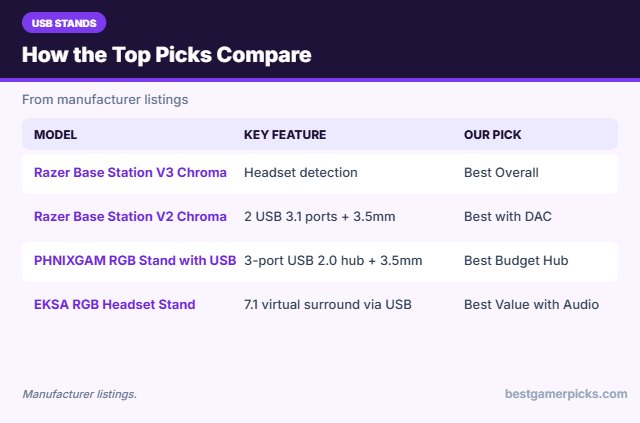
| Razer Base Station V3 Chroma | Best Overall | RGB stand with USB hub and 7.1 | Headset detection, 7.1 audio, dual USB 3.1 | Check Price |
| Razer Base Station V2 Chroma | Best with DAC | RGB stand with USB and 7.1 DAC | 2 USB 3.1 ports + 3.5mm 7.1 DAC | Check Price |
| PHNIXGAM RGB Stand with USB Hub | Best Budget Hub | RGB stand with hub | 3-port USB 2.0 hub + 3.5mm AUX | Check Price |
| EKSA RGB Headset Stand | Best Value with Audio | RGB stand with 7.1 audio | 7.1 virtual surround via USB | Check Price |
| KAFRI RGB Stand with USB Port | Cheapest | Budget RGB stand | RGB with USB extension port | Check Price |
| TROND Headphone Stand with Power Strip | Best with Power Strip | Stand with power strip | 3 AC outlets, 2 USB-A, 1 USB-C | Check Price |
| KAFRI RGB Stand with USB A&C | Best Charging Station | RGB stand with charger | USB-C + 2 USB-A, 2 outlets | Check Price |
The 7 Best Headset Stands with USB Hubs
Each best headset stand with usb hub pick below adds USB ports.

Razer Base Station V3 Chroma RGB Headset Stand with USB Hub, Black
1The Razer Base Station V3 Chroma adds dual USB 3.1 ports, 7.1 surround audio and headset detection that can trigger Synapse profiles.
👍 Pros & Cons
Pros
- Detects when you lift the headset
- 7.1 surround support
- Two USB 3.1 ports
Cons
- Expensive
- Best features need Razer Synapse
📄 Detailed Review
- Ports: Dual USB 3.1
- Audio: 7.1 surround (listed)
- Extras: Headset detection triggers profiles
It is the most feature-rich stand here.
Best premium stand.

Razer Base Station V2 Chroma Headphone Headset Stand Holder, Black
2The Razer Base Station V2 Chroma adds two USB 3.1 ports and a 3.5mm combo jack powered by a built-in 7.1 surround DAC.
👍 Pros & Cons
Pros
- Built-in DAC with 3.5mm jack
- Two USB 3.1 ports
- Chroma RGB
Cons
- Pricey
- Needs Razer Synapse for lighting
📄 Detailed Review
- Ports: 2 USB 3.1 + 3.5mm combo
- Audio: Built-in 7.1 surround DAC
- Lighting: Chroma RGB
It also has a non-slip, detachable base and Chroma RGB.
Best stand with a built-in DAC.

PHNIXGAM RGB Headphone Stand with 3.5mm AUX and 3 Port USB 2.0 Hub, White
3The PHNIXGAM stand adds a three-port USB 2.0 hub and a 3.5mm AUX port with an RGB base.
👍 Pros & Cons
Pros
- Three USB ports
- 3.5mm AUX port
- White color option
Cons
- USB 2.0 speeds
- Lighting modes are limited
📄 Detailed Review
- Ports: 3 USB 2.0 + 3.5mm AUX
- Lighting: RGB base
- Size: 125.6 x 146.4 x 277.8 mm (listed)
It is a cheap hub stand for mice, keyboards and dongles.
Best budget hub stand.

EKSA RGB Headset Stand, Headphone Stands with 7.1 Surround Sound and USB/3.5mm Port, Aluminum Alloy Rod
4The EKSA stand adds 7.1 virtual surround through a USB connection plus 3.5mm and USB ports and RGB lighting.
👍 Pros & Cons
Pros
- Adds 7.1 surround for less
- RGB lighting
- Aluminum rod
Cons
- Fewer reviews
- Software features are basic
📄 Detailed Review
- Audio: 7.1 virtual surround (listed)
- Ports: USB + 3.5mm
- Build: Aluminum alloy rod
It is a cheaper alternative to Razer’s stands.
Best value stand with audio.

KAFRI RGB Headphone Stand with USB Hub, 1 USB 2.0 Extension Port
5The KAFRI RGB stand adds nine lighting modes and a USB 2.0 extension port in a small footprint.
👍 Pros & Cons
Pros
- Very cheap
- RGB lighting
- USB extension port
Cons
- Only one USB port
- Light base
📄 Detailed Review
- Lighting: 9 RGB modes
- Ports: 1 USB 2.0 extension
- Footprint: Small
It is the cheapest RGB stand here.
Cheapest RGB stand.
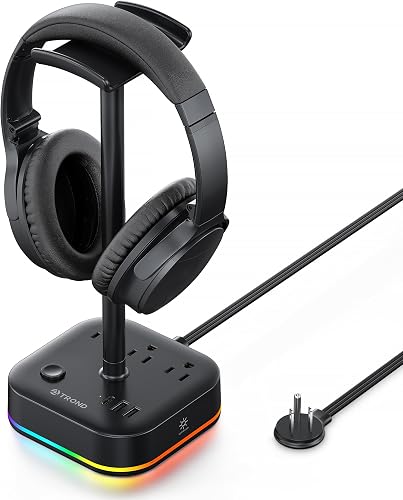
TROND Headphone Stand with USB C, Desk Gaming Headset Holder with 3 AC Outlets, 2 USB-A and 1 USB-C
6The TROND stand combines a headset holder with a power strip: three AC outlets plus USB-A and USB-C charging.
👍 Pros & Cons
Pros
- Built-in power strip
- USB-C charging
- RGB modes
Cons
- Large base
- Not a data hub
📄 Detailed Review
- Outlets: 3 AC
- USB: 2 USB-A + 1 USB-C
- Cord: 5 ft flat extension (listed)
It is ideal if your desk is short on outlets.
Best stand with power strip.
Check TROND Headphone Stand with Power Strip Price on Amazon

KAFRI RGB Headphone Stand with USB A and C Charger, 3 USB Charging Ports and 2 Outlets
7This KAFRI stand adds a USB-C port, two USB-A ports and two AC outlets with RGB lighting.
👍 Pros & Cons
Pros
- USB-C and USB-A charging
- AC outlets
- RGB
Cons
- Needs a wall outlet
- Charging only
📄 Detailed Review
- Power: 1 USB-C + 2 USB-A + 2 AC outlets
- Lighting: 9 RGB modes
- Use: Desk charging station
It turns a headset stand into a charging station.
Best charging-station stand.
How We Chose the Best Headset Stand with USB Hub
To choose the best headset stand with usb hub, we compared port type, speed, stability and owner feedback.
For desk height, legroom and layout guidance, see the OSHA Computer Workstations eTool on desks.
Product details in this guide are based on manufacturer specifications and verified owner feedback, not in-house lab testing. Read more on our How We Test page.
Buying Guide: How to Choose the Best Headset Stand with USB Hub
Keep these factors in mind when shopping for the best headset stand with usb hub.
Stands with USB hubs and audio
Some stands add USB ports or a built-in USB sound card. A USB hub saves trips to the back of your PC, and a built-in sound card can add a headphone jack with virtual surround.
Charging stands
Some stands charge a wireless headset through a USB cable or a dock contact. Wireless charger stands charge a phone or earbuds with Qi pads, not the headset itself, unless the headset supports it.
Stability and size
Heavy gaming headsets can tip light stands. Look for a weighted or rubber-lined base, a wide hook that matches your headband and enough height that the ear cups do not touch the desk.
Moving the wireless dongle closer
Wireless headset dongles work best with a clear path to the headset. A short USB extension cable lets you put the dongle on the desk instead of behind the PC.
Stand with ports tips
Get the most from it:
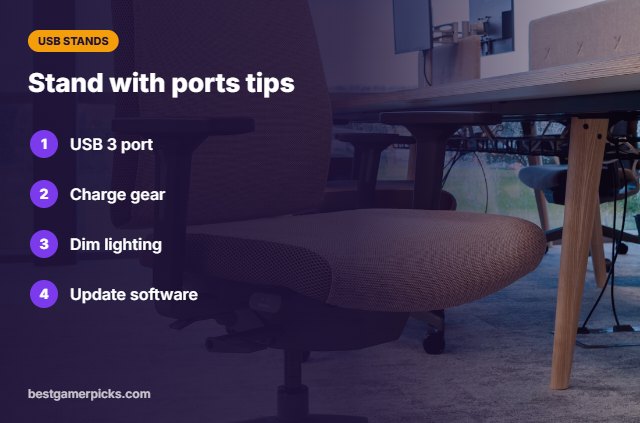
- Plug the stand into a USB 3 port on the PC.
- Use the charging ports for headsets and controllers.
- Turn the lighting down if it distracts you.
- Update the stand’s software if it has any.
Here are quick answers about the best headset stand with usb hub.
Frequently Asked Questions
What is the best headset stand with usb hub?
Our pick for the best headset stand with usb hub is the Razer Base Station V3 Chroma, followed by the Razer Base Station V2 Chroma (Best with DAC).
Are stand USB ports fast?
Razer’s USB 3.1 ports are fast; budget hubs are often USB 2.0.
Can I plug a wireless dongle into the stand?
Yes, and it puts the dongle closer to you.
Do charging ports carry data?
Not always; check the listing.
Final Verdict
Our final pick for the best headset stand with usb hub is the Razer Base Station V3 Chroma. Choose the Razer Base Station V2 Chroma if you want a built-in DAC and 3.5mm jack, or the PHNIXGAM RGB Stand with USB Hub on a budget.
Related Guides
More gaming headset accessory guides:
- Best RGB Headset Stand
- Best Headset Stand with RGB and USB Hub
- Best Controller and Headset Stand Combo
- Best Wooden Headset Stand
- Best Smart Lights That Sync with Games
- Best Lapboard with Mouse Pad
Product details are based on manufacturer specifications at the time of writing. Prices and availability change often, so check Amazon for the latest price.






Write Your Review
No reviews yet. Be the first to share your experience!