

BestGamerPicks is reader-supported. As an Amazon Associate we earn from qualifying purchases. This does not change our recommendations. Learn more.
The best keyboard and mouse for Minecraft makes long building sessions comfortable and gives you quick access to hotbar slots and PvP moves.
Minecraft players value comfort, side buttons, a good scroll wheel and quiet keys for long sessions. We compared those features to find the best keyboard and mouse for Minecraft on PC and other platforms that support it.

Quick Answer: The Best Keyboard and Mouse for Minecraft
- Best Mouse: Razer Basilisk V3 Ergonomic Wired Gaming Mouse
- Best Budget Combo: Redragon S101-3 PRO Gaming Keyboard and Mouse Combo, RGB Backlit
- Best Quiet Keyboard: SteelSeries Apex 3 RGB Gaming Keyboard
- Best for Young Players: Gaming Keyboard and Mouse Combo, Wired Full Size, Backlit
- Best Wireless Combo: Redragon S101M-KS Wireless Gaming Keyboard and Mouse, Tri-Mode
- Best PvP Mouse: HyperX Pulsefire Haste 2 Wired Gaming Mouse, 53g
- Best with Wrist Rest: RedThunder K10 Wired Gaming Keyboard, Mouse and Wrist Rest Combo, RGB
The Razer Basilisk V3 is the best mouse for Minecraft thanks to its free-spin wheel and side buttons. The Redragon S101-3 PRO is the best keyboard and mouse for Minecraft on a budget and the SteelSeries Apex 3 is the quiet keyboard pick.
Best Keyboard and Mouse for Minecraft Comparison Table
| Product | Best For | Type | Key Feature | Buy |
|---|---|---|---|---|
| Razer Basilisk V3 | Best Mouse | Wired gaming mouse | 11 programmable buttons | Check Price |
| Redragon S101-3 PRO Combo | Best Budget Combo | Wired gaming combo | RGB keyboard + programmable mouse | Check Price |
| SteelSeries Apex 3 | Best Quiet Keyboard | Quiet gaming keyboard | IP32 water resistant | Check Price |
| Backlit Gaming Combo for Kids | Best for Young Players | Budget backlit combo | 3-color backlight | Check Price |
| Redragon S101M-KS Wireless Combo | Best Wireless Combo | Wireless gaming combo | Tri-mode: wired, 2.4GHz, Bluetooth | Check Price |
| HyperX Pulsefire Haste 2 | Best PvP Mouse | Lightweight gaming mouse | 53g, 8000Hz polling | Check Price |
| RedThunder K10 Combo with Wrist Rest | Best with Wrist Rest | Wired combo with wrist rest | Detachable wrist rest included | Check Price |
The 7 Best Keyboards and Mice for Minecraft
Each best keyboard and mouse for Minecraft pick suits building or PvP.

Razer Basilisk V3 Ergonomic Wired Gaming Mouse
1Basilisk V3 is a highly rated ergonomic mouse with 11 programmable buttons.
👍 Pros & Cons
Pros
- Excellent ergonomics
- Free-spin scroll wheel
- Highly rated
Cons
- Mouse only
- Wired
📄 Detailed Review
- Buttons: 11 programmable
- Wheel: HyperScroll tilt
- Lighting: Chroma RGB
Its free-spin wheel is great for building games like Minecraft.
Top wired mouse.

Redragon S101-3 PRO Gaming Keyboard and Mouse Combo, RGB Backlit
2The Redragon S101-3 PRO is a best-selling wired combo with an RGB full-size keyboard and a programmable gaming mouse.
👍 Pros & Cons
Pros
- One of the most reviewed gaming combos
- Full-size layout with media keys
- Very affordable
Cons
- Membrane keys, not mechanical
- Wired only
📄 Detailed Review
- Connection: Wired USB
- Keyboard: Full-size, RGB backlit
- Mouse: Programmable gaming mouse
It is a simple plug-and-play starter set for PC gamers, with a huge owner review base.
Great first gaming combo.

SteelSeries Apex 3 RGB Gaming Keyboard
3Apex 3 is a quiet, water-resistant gaming keyboard with a wrist rest.
👍 Pros & Cons
Pros
- Quiet
- Spill resistant
- Magnetic wrist rest
Cons
- Keyboard only
- Large
📄 Detailed Review
- Protection: IP32
- Lighting: 10-zone RGB
- Switches: Whisper-quiet
A family-friendly, durable choice.
Quiet full-size pick.

Gaming Keyboard and Mouse Combo, Wired Full Size, Backlit
4A cheap backlit combo that kids love for Roblox and Minecraft.
👍 Pros & Cons
Pros
- Very cheap
- Fun lighting
- Durable
Cons
- Basic mouse
- Wired
📄 Detailed Review
- Backlight: 3 colors
- Connection: Wired USB
- Anti-ghosting: 19 keys
Durable and simple.
Budget kids gaming.

Redragon S101M-KS Wireless Gaming Keyboard and Mouse, Tri-Mode
5The Redragon S101M-KS is a tri-mode wireless combo that works over 2.4GHz, Bluetooth or USB.
👍 Pros & Cons
Pros
- Three connection modes
- Rechargeable
- Huge review base
Cons
- Mouse DPI modest
- Bluetooth adds latency
📄 Detailed Review
- Connection: Wired, 2.4GHz, Bluetooth
- Keyboard: RGB backlit
- Mouse: Up to 4800 DPI
Use 2.4GHz for gaming and Bluetooth for tablets or laptops.
A versatile wireless pick.

HyperX Pulsefire Haste 2 Wired Gaming Mouse, 53g
6Pulsefire Haste 2 is an ultra-light 53g mouse for fast shooters.
👍 Pros & Cons
Pros
- Ultra light
- Fast polling
- Good value
Cons
- Mouse only
- Small for big hands
📄 Detailed Review
- Weight: 53g
- Polling: Up to 8000Hz
- Connection: Wired
Great for Fortnite and Call of Duty aim.
Light FPS mouse.

RedThunder K10 Wired Gaming Keyboard, Mouse and Wrist Rest Combo, RGB
7The RedThunder K10 wired set adds a wrist rest to an RGB keyboard and gaming mouse.
👍 Pros & Cons
Pros
- Wrist rest included
- Mechanical-feel keys
- Well rated
Cons
- Wired only
- Large footprint
📄 Detailed Review
- Connection: Wired USB
- Extras: Wrist rest
- Lighting: RGB backlit
A comfortable choice for longer sessions.
Comfort-focused value.
How We Chose the Best Keyboard and Mouse for Minecraft
To choose the best keyboard and mouse for minecraft, we compared gear on comfort, side buttons, scroll wheels and noise.
For official guidance on mouse placement and grip, see the OSHA Computer Workstations eTool on pointers and mice.
Product details in this guide are based on manufacturer specifications and verified owner feedback, not in-house lab testing. Read more on our How We Test page.
Buying Guide: How to Choose the Best Keyboard and Mouse for Minecraft
Keep these factors in mind when shopping for the best keyboard and mouse for minecraft.
Building vs. PvP needs
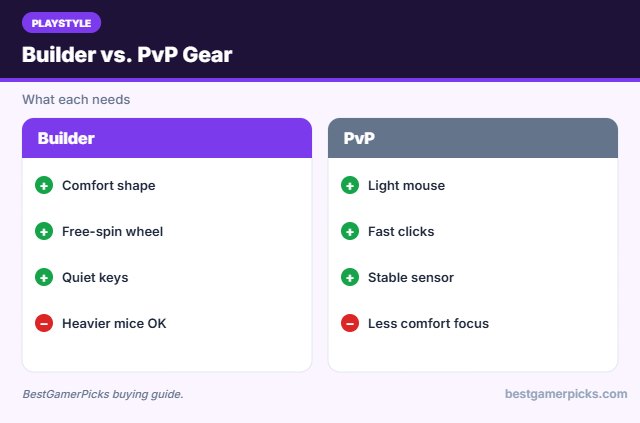
Builders want comfort, a free-spin wheel for hotbars and quiet keys. PvP players want a light mouse with fast clicks and a stable sensor.
Platform support
Minecraft on PC (Java and Bedrock) is built around keyboard and mouse, and Xbox supports it in Bedrock. Support on other consoles varies, so check your platform.
Mouse sensor and DPI
Most players use 800 to 3200 DPI, so a huge DPI number matters less than a consistent sensor, a comfortable shape and good switches. Lighter mice help fast aim in shooters.
Quiet keys and silent clicks
Silent membrane keys and silent mouse switches cut noise for shared rooms, dorms and late-night sessions. Clicky mechanical switches are the loudest option.
Minecraft Control Tips
Play smarter:
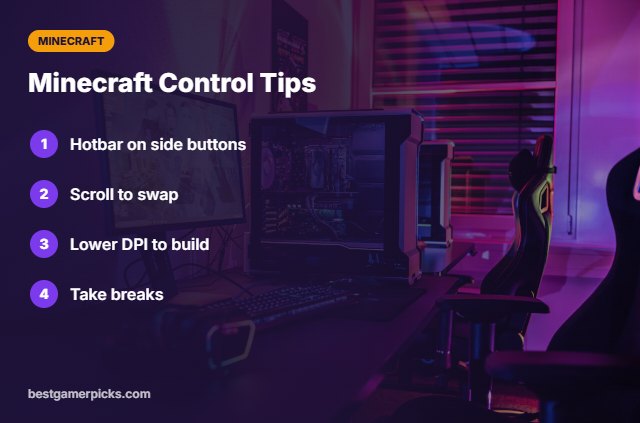
- Bind hotbar slots to side buttons.
- Use the scroll wheel for quick swaps.
- Lower DPI for precise building.
- Take breaks on long builds.
Here are quick answers about the best keyboard and mouse for minecraft.
Frequently Asked Questions
What is the best keyboard and mouse for Minecraft?
The Razer Basilisk V3 is the best mouse for Minecraft, and the Redragon S101-3 PRO is the best keyboard and mouse for Minecraft on a budget.
Does Minecraft on Xbox support keyboard and mouse?
Yes, Bedrock Edition on Xbox supports it.
Do I need a gaming mouse?
Side buttons and a good wheel help.
Is a quiet keyboard worth it?
Yes for long builds and shared rooms.
Final Verdict
Our final pick for the best keyboard and mouse for minecraft is the Razer Basilisk V3. Choose the Redragon S101-3 PRO Combo if you want a budget combo, or the SteelSeries Apex 3 for quiet keys.
Related Guides
More keyboard and mouse guides:
- Best Keyboard and Mouse for Xbox Call of Duty
- Best Keyboard and Mouse Combo for Steam Deck
- Best Keyboard and Mouse for Xbox Fortnite
- Best Keyboard and Mouse Combo for Switch 2
- Best Mini Keyboard and Mouse for TV
- Best Nanoleaf Alternative
Product details are based on manufacturer specifications at the time of writing. Prices and availability change often, so check Amazon for the latest price.










Write Your Review
No reviews yet. Be the first to share your experience!