

BestGamerPicks is reader-supported. As an Amazon Associate we earn from qualifying purchases. This does not change our recommendations. Learn more.
The best mechanical keyboard and mouse combo gives you crisp key feel, faster response and longer-lasting switches than membrane sets.
True mechanical combos are rare, so many great options pair a mechanical keyboard with a matching mouse. We compared switch type, build and value to find the best mechanical keyboard and mouse combo.
Quick Answer: The Best Mechanical Keyboard and Mouse Combo
- Best Mechanical Keyboard: Razer BlackWidow V4 X Mechanical Gaming Keyboard, Yellow Switches
- Best Mouse to Pair: Razer Basilisk V3 Ergonomic Wired Gaming Mouse
- Best Esports Keyboard: Logitech G PRO Mechanical TKL Gaming Keyboard (Clicky)
- Best Wireless Mouse to Pair: Logitech G502 Lightspeed Wireless Gaming Mouse
- Best Compact Mechanical: HyperX Alloy Origins 60 Mechanical Gaming Keyboard
- Best Budget Mechanical-Feel Set: Redragon S156 Wireless Keyboard and Mouse, Tri-Mode, Mechanical Feel
- Best Hall-Effect: Turtle Beach Vulcan II TKL Pro Hall-Effect Gaming Keyboard
The Razer BlackWidow V4 X with the Razer Basilisk V3 is the best mechanical keyboard and mouse combo for most players. The Logitech G PRO TKL paired with a G502 suits esports fans, and the Redragon S156 is the budget mechanical-feel set.
Best Mechanical Keyboard and Mouse Combo Comparison Table
| Product | Best For | Type | Key Feature | Buy |
|---|---|---|---|---|
| Razer BlackWidow V4 X | Best Mechanical Keyboard | Mechanical gaming keyboard | Linear yellow switches, 6 macro keys | Check Price |
| Razer Basilisk V3 | Best Mouse to Pair | Wired gaming mouse | 11 programmable buttons | Check Price |
| Logitech G PRO TKL | Best Esports Keyboard | Mechanical TKL keyboard | GX Blue clicky switches | Check Price |
| Logitech G502 Lightspeed | Best Wireless Mouse to Pair | Wireless gaming mouse | HERO sensor, tunable weights | Check Price |
| HyperX Alloy Origins 60 | Best Compact Mechanical | 60% mechanical keyboard | Aluminum body, PBT keycaps | Check Price |
| Redragon S156 Wireless Combo | Best Budget Mechanical-Feel Set | Wireless combo | Mechanical-feel keys, tri-mode | Check Price |
| Turtle Beach Vulcan II TKL Pro | Best Hall-Effect | Hall-effect keyboard | Rapid trigger, adjustable actuation | Check Price |
The 7 Best Mechanical Keyboard and Mouse Combos
Each best mechanical keyboard and mouse combo pick includes a mechanical or mechanical-feel keyboard.

Razer BlackWidow V4 X Mechanical Gaming Keyboard, Yellow Switches
1BlackWidow V4 X brings mechanical linear switches and macro keys for gaming and streaming.
👍 Pros & Cons
Pros
- Fast linear switches
- Macro keys for streaming
- Premium build
Cons
- Keyboard only
- Louder than membrane
📄 Detailed Review
- Switches: Razer Yellow linear
- Macros: 6 dedicated keys
- Lighting: Chroma RGB
Macro keys are handy for OBS scenes and shortcuts.
A mechanical upgrade.

Razer Basilisk V3 Ergonomic Wired Gaming Mouse
2Basilisk V3 is a highly rated ergonomic mouse with 11 programmable buttons.
👍 Pros & Cons
Pros
- Excellent ergonomics
- Free-spin scroll wheel
- Highly rated
Cons
- Mouse only
- Wired
📄 Detailed Review
- Buttons: 11 programmable
- Wheel: HyperScroll tilt
- Lighting: Chroma RGB
Its free-spin wheel is great for building games like Minecraft.
Top wired mouse.

Logitech G PRO Mechanical TKL Gaming Keyboard (Clicky)
3Logitech G PRO TKL is an esports-grade mechanical keyboard with a detachable cable.
👍 Pros & Cons
Pros
- Esports-grade
- Compact
- Detachable cable
Cons
- Clicky is loud
- Keyboard only
📄 Detailed Review
- Switches: GX Blue clicky
- Layout: Tenkeyless
- Cable: Detachable
Great for travel and LAN setups.
Pro mechanical pick.
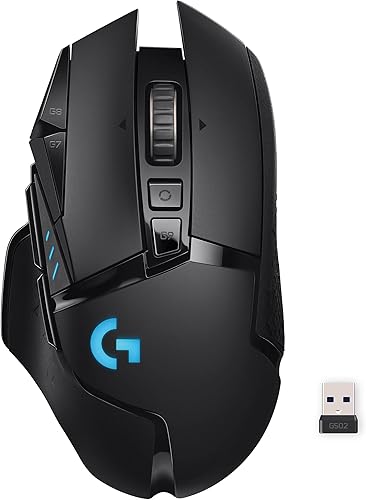
Logitech G502 Lightspeed Wireless Gaming Mouse
4G502 Lightspeed is a feature-packed wireless gaming mouse with adjustable weights.
👍 Pros & Cons
Pros
- Iconic shape
- Many buttons
- Highly rated
Cons
- Heavier
- Mouse only
📄 Detailed Review
- Connection: Lightspeed wireless
- Sensor: HERO
- Extras: Adjustable weights
A strong all-round pick.
Best feature-rich mouse.

HyperX Alloy Origins 60 Mechanical Gaming Keyboard
5Alloy Origins 60 is a tiny mechanical keyboard with an aluminum body.
👍 Pros & Cons
Pros
- Very compact
- Premium build
- Highly rated
Cons
- No arrows or F-row
- Keyboard only
📄 Detailed Review
- Layout: 60%
- Body: Aluminum
- Keycaps: Double-shot PBT
Ideal for small desks and lapboards.
Compact mechanical pick.

Redragon S156 Wireless Keyboard and Mouse, Tri-Mode, Mechanical Feel
6The Redragon S156 offers a mechanical-feel keyboard and mouse with tri-mode wireless.
👍 Pros & Cons
Pros
- Snappy key feel
- Tri-mode
- Affordable
Cons
- Not true mechanical
- Charging needed
📄 Detailed Review
- Connection: Wired, 2.4GHz, Bluetooth
- Keys: Mechanical-feel
- Lighting: RGB
Good for gamers who want snappy keys without a mechanical price.
A tactile wireless option.

Turtle Beach Vulcan II TKL Pro Hall-Effect Gaming Keyboard
7Vulcan II TKL Pro uses magnetic hall-effect switches with rapid trigger.
👍 Pros & Cons
Pros
- Adjustable actuation
- Rapid trigger
- Durable switches
Cons
- Pricier
- Keyboard only
📄 Detailed Review
- Switches: Hall-effect magnetic
- Feature: Rapid trigger
- Layout: TKL
Great for competitive shooters on PC.
Competitive pick.
How We Chose the Best Mechanical Keyboard and Mouse Combo
To choose the best mechanical keyboard and mouse combo, we compared true mechanical keyboards and mechanical-feel combos, and suggested mouse pairings.
For official guidance on keyboard height, wrist posture and placement, see the OSHA Computer Workstations eTool on keyboards.
Product details in this guide are based on manufacturer specifications and verified owner feedback, not in-house lab testing. Read more on our How We Test page.
Buying Guide: How to Choose the Best Mechanical Keyboard and Mouse Combo
Keep these factors in mind when shopping for the best mechanical keyboard and mouse combo.
Membrane, mechanical or mecha-membrane?
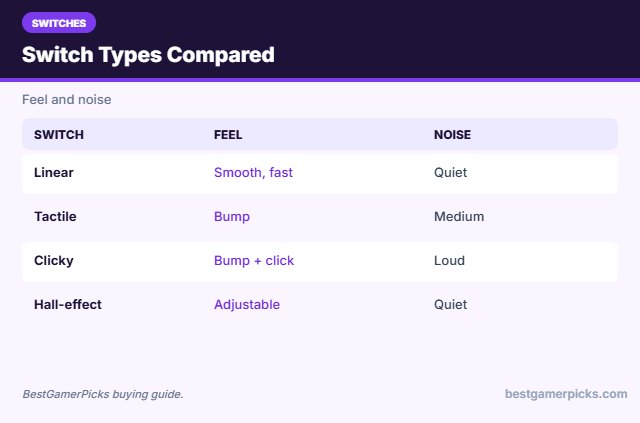
Membrane keys are quiet and cheap. Mechanical switches feel crisper and last longer but cost more and can be louder. Mecha-membrane designs, like Razer’s, sit in between with a clicky feel at a lower price.
Linear, tactile or clicky?
Linear switches are smooth and fast, tactile switches have a bump, and clicky switches add a loud click. Linear or tactile suits shared rooms better.
Keyboard size: full, TKL, 75% or 60%
Full-size keyboards keep the number pad. Tenkeyless (TKL) drops it for more mouse room. 75% layouts keep arrow keys in a smaller body, and 60% boards are the most compact but lose arrows and function keys.
Mouse sensor and DPI
Most players use 800 to 3200 DPI, so a huge DPI number matters less than a consistent sensor, a comfortable shape and good switches. Lighter mice help fast aim in shooters.
Mechanical Care Tips
Make it last:
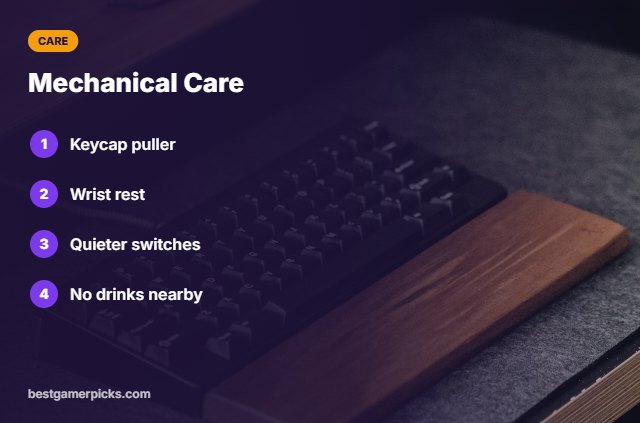
- Use a keycap puller to clean.
- Add a wrist rest.
- Choose quieter switches for roommates.
- Keep drinks away.
Here are quick answers about the best mechanical keyboard and mouse combo.
Frequently Asked Questions
What is the best mechanical keyboard and mouse combo?
The Razer BlackWidow V4 X with the Razer Basilisk V3 is the best mechanical keyboard and mouse combo for most players.
Are mechanical combos worth it?
Yes for feel and durability.
What is mechanical-feel?
Membrane keys tuned to feel snappier.
Are mechanical keyboards loud?
Clicky switches are; linear ones are quieter.
Final Verdict
Our final pick for the best mechanical keyboard and mouse combo is the Razer BlackWidow V4 X. Choose the Razer Basilisk V3 if you want esports performance, or the Logitech G PRO TKL on a budget.
Related Guides
More keyboard and mouse guides:
- Best RGB Keyboard and Mouse Combo
- Best Compact Keyboard and Mouse Combo
- Best RGB Gaming Keyboard and Mouse Combo
- Best Silent Keyboard and Mouse Combo
- Best RGB Soundbar for PC
- Best Triangle Light Panels
Product details are based on manufacturer specifications at the time of writing. Prices and availability change often, so check Amazon for the latest price.










Write Your Review
No reviews yet. Be the first to share your experience!