

BestGamerPicks is reader-supported. As an Amazon Associate we earn from qualifying purchases. This does not change our recommendations. Learn more.
The best monitor arm with laptop tray lifts your laptop to eye level, either on its own or beside an external monitor.
Gaming laptops run hot and heavy, so tray size and weight rating matter. We compared tray sizes, monitor support and owner feedback to find the best monitor arm with laptop tray.
Quick Answer: The Best Monitor Arm with Laptop Tray
- Best Overall: HUANUO Adjustable Monitor Arm with Laptop Tray, for 13-32″ Monitors up to 22 lbs, 14″ x 12″ Tray
- Best Monitor + Laptop: VIVO Fully Adjustable 13 to 32 inch Single Computer Monitor and Laptop Desk Mount Combo
- Best for 17″ Laptops: HUANUO Dual Monitor and Laptop Mount for Max 32″ Monitor and 17″ Laptop
- Best 2-in-1 Value: HUANUO 2 in 1 Laptop Mount with Tray, Fits 13-34″ Monitors & Up to 17″ Notebook
- Best Two Monitors + Laptop: MOUNTUP Dual Monitor and Laptop Mount for 2 Max 27″ Screens, Laptop Tray Fits 10-17in
The HUANUO Arm with Laptop Tray is the best monitor arm with laptop tray for most people at a low price. The VIVO Monitor and Laptop Mount holds both at once, and the HUANUO Monitor + Laptop Dual Mount fits 17-inch laptops.
Best Monitor Arm with Laptop Tray Comparison Table
| Product | Best For | Type | Key Feature | Buy |
|---|---|---|---|---|
| HUANUO Arm with Laptop Tray | Best Overall | Monitor + laptop arm | Interchangeable laptop tray | Check Price |
| VIVO Monitor and Laptop Mount | Best Monitor + Laptop | Monitor + laptop mount | Monitor and laptop at once | Check Price |
| HUANUO Monitor + Laptop Dual Mount | Best for 17″ Laptops | Monitor + laptop dual mount | Monitor and laptop side by side | Check Price |
| HUANUO 2-in-1 Laptop/Monitor Arm | Best 2-in-1 Value | Monitor + laptop arm | Monitor or 17″ laptop | Check Price |
| MOUNTUP Dual Monitor + Laptop Mount | Best Two Monitors + Laptop | Triple-position mount | Two monitors + laptop | Check Price |
The 5 Best Monitor Arms with Laptop Trays
Each best monitor arm with laptop tray pick includes a laptop tray.

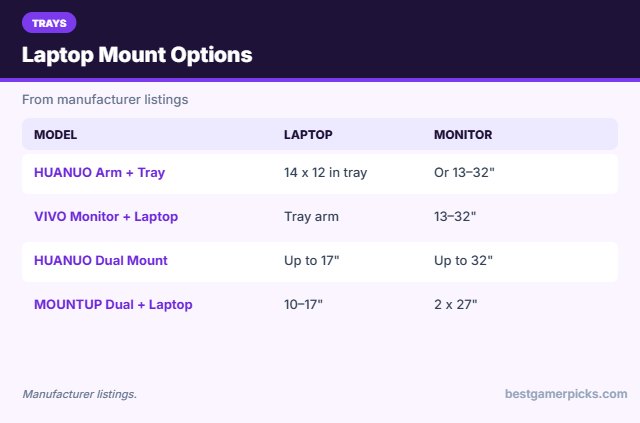
HUANUO Adjustable Monitor Arm with Laptop Tray, for 13-32″ Monitors up to 22 lbs, 14″ x 12″ Tray
1The HUANUO arm with laptop tray holds a 13 to 32-inch monitor or a laptop on its 14 x 12-inch tray.
👍 Pros & Cons
Pros
- Use with monitor or laptop
- Huge review base
- Low price
Cons
- One device at a time
- Tray is small for 17″ laptops
📄 Detailed Review
- Screen size: 13–32″
- Weight: Up to 22 lbs
- Tray: 14 x 12 in laptop tray
It is handy for laptop gamers who want eye-level screens.
Flexible laptop arm.

VIVO Fully Adjustable 13 to 32 inch Single Computer Monitor and Laptop Desk Mount Combo
2The VIVO Monitor and Laptop Desk Mount holds a 13 to 32-inch monitor and a laptop tray at the same time.
👍 Pros & Cons
Pros
- Monitor and laptop together
- Grommet option
- Proven
Cons
- Needs desk depth
- Heavier
📄 Detailed Review
- Monitor: 13–32″
- Laptop: Tray arm
- Mount: Clamp or grommet
It is a tidy way to run a laptop as a second screen.
Monitor + laptop combo.

HUANUO Dual Monitor and Laptop Mount for Max 32″ Monitor and 17″ Laptop
3The HUANUO dual mount holds a monitor up to 32 inches and a laptop up to 17 inches side by side.
👍 Pros & Cons
Pros
- Monitor and laptop together
- Fits 17-inch laptops
- Well reviewed
Cons
- Costs more
- Needs a deep desk
📄 Detailed Review
- Monitor: Up to 32″
- Laptop: Up to 17″
- Motion: Tilt, swivel, rotate
It is great for a laptop plus external screen gaming setup.
Laptop + monitor duo.

HUANUO 2 in 1 Laptop Mount with Tray, Fits 13-34″ Monitors & Up to 17″ Notebook
4The HUANUO 2-in-1 arm holds either a 13 to 34-inch monitor or a laptop up to 17 inches on its tray.
👍 Pros & Cons
Pros
- Fits larger laptops
- Swaps between monitor and tray
- Low price
Cons
- One device at a time
- Newer listing
📄 Detailed Review
- Monitor: 13–34″
- Laptop: Up to 17″
- Design: 2-in-1 arm
It suits gaming laptops that need to sit at eye level.
Bigger-laptop arm.

MOUNTUP Dual Monitor and Laptop Mount for 2 Max 27″ Screens, Laptop Tray Fits 10-17in
5The MOUNTUP mount holds two monitors up to 27 inches plus a 10 to 17-inch laptop tray.
👍 Pros & Cons
Pros
- Two screens plus laptop
- Good value
- Flexible layout
Cons
- 27-inch max
- Assembly time
📄 Detailed Review
- Monitors: 2 x up to 27″
- Laptop: 10–17″ tray
- Mount: Desk
It creates a three-screen setup from two monitors and a laptop.
Two monitors + laptop.
How We Chose the Best Monitor Arm with Laptop Tray
To choose the best monitor arm with laptop tray, we compared arms with laptop trays on tray size, monitor support and owner feedback.
For official guidance on monitor distance, height and viewing angle, see the OSHA Computer Workstations eTool on monitors.
Product details in this guide are based on manufacturer specifications and verified owner feedback, not in-house lab testing. Read more on our How We Test page.
Buying Guide: How to Choose the Best Monitor Arm with Laptop Tray
Keep these factors in mind when shopping for the best monitor arm with laptop tray.
Check VESA and weight
Most monitors use a 75×75 or 100×100 mm VESA pattern on the back. Confirm the arm’s weight range covers your monitor, including curved or OLED models that may be heavier than they look.
Laptop tray size and cooling
Check that your laptop fits the tray and that vents are not blocked. Vented or open trays help gaming laptops stay cool.
Set the right monitor height
Place the top of the screen at or slightly below eye level, about an arm’s length away. An arm makes it easy to adjust when you switch between gaming and work.
Cable management
Most arms have clips or channels to route cables. Leave enough slack for swivel and tilt before tightening the clips.
Laptop Tray Tips
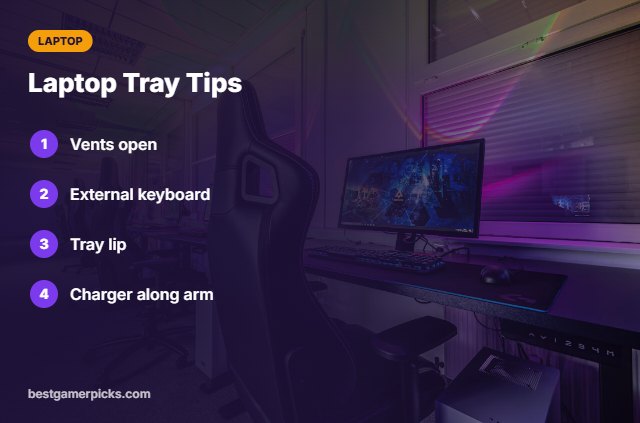
Game cooler:
- Leave intake vents open.
- Use an external keyboard and mouse.
- Secure the laptop with the tray lip.
- Route charger cable along the arm.
Here are quick answers about the best monitor arm with laptop tray.
Frequently Asked Questions
What is the best monitor arm with laptop tray?
The HUANUO Arm with Laptop Tray is the best monitor arm with laptop tray for most people, with the VIVO Monitor and Laptop Mount to hold both.
Will a 17-inch laptop fit?
Choose a tray listed for 17-inch laptops.
Is it safe for gaming laptops?
Yes if vents stay clear and weight is within limits.
Do I need a keyboard?
An external keyboard and mouse are best.
Final Verdict
Our final pick for the best monitor arm with laptop tray is the HUANUO Arm with Laptop Tray. Choose the VIVO Monitor and Laptop Mount if you want monitor and laptop together, or the HUANUO Monitor + Laptop Dual Mount for 17-inch laptops.
Related Guides
More monitor arm and stand guides:
- Best Monitor Arm with Grommet Mount
- Best Monitor Arm with USB Ports
- Best Monitor Arm under 100
- Best Monitor Height for Gaming
- Best RGB Neon Sign
- Best RGB Ceiling Lights for Gaming Room
Product details are based on manufacturer specifications at the time of writing. Prices and availability change often, so check Amazon for the latest price.









Write Your Review
No reviews yet. Be the first to share your experience!