

BestGamerPicks is reader-supported. As an Amazon Associate we earn from qualifying purchases. This does not change our recommendations. Learn more.
The best monitor stand with usb hub brings USB ports to the front of your desk for controllers, headsets, flash drives and phone charging.
Hubs in stands range from basic USB 2.0 charging to USB 3.0 data, USB-C and even HDMI. We compared ports, storage and owner feedback to find the best monitor stand with USB hub.
Quick Answer: The Best Monitor Stand with USB Hub
- Best Overall: Vaydeer All-in-One Dual Monitor Stand Riser with 2 Drawers, 8 USB Ports and Wireless Charging Pad with LED Light Strip
- Best Value: OImaster Monitor Stand Riser with USB 3.0 Hub & Type-C Port, Foldable, Storage Drawer
- Best Premium: Razer Monitor Stand Chroma, 4 Port Hub, USB-A, USB-C, HDMI, Aluminum, Supports up to 44 lbs
- Best Budget Dual: Simple Trending 2-Tier Metal Dual Monitor Stand with USB & 2 Drawers, 32″W
- Best Arm with USB: HUANUO Dual Monitor Stand for 13–40″, Premium Dual Monitor Mount with USB
- Best Ultrawide Arm with USB: ARES WING Ultrawide Monitor Desk Arm with USB A/C for 17 to 49 Inch Screens, Pro Gas Spring
- Best Aluminum Dual Arm: VIVO Premium Aluminum Full Motion Dual Monitor Desk Mount with Lift Engine Arm, Pole Extension, and USB Ports
The Vaydeer All-in-One Dual Riser is the best monitor stand with USB hub for maximum ports, with eight USB ports and wireless charging. The OImaster Riser is the value pick and the Razer Monitor Stand Chroma is the premium choice.
Best Monitor Stand with USB Hub Comparison Table
| Product | Best For | Type | Key Feature | Buy |
|---|---|---|---|---|
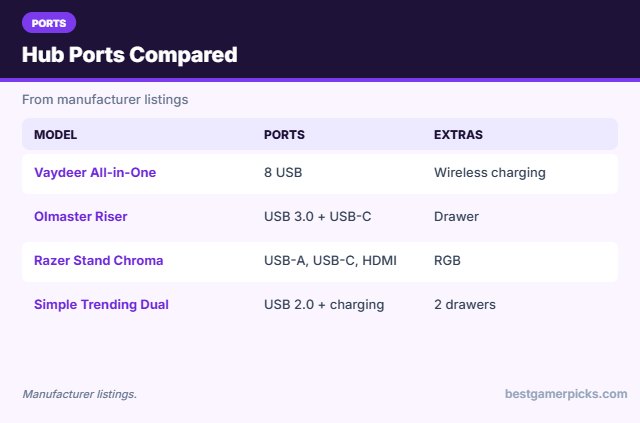
| Vaydeer All-in-One Dual Riser | Best Overall | Dual riser with hub | 8 USB ports, LED, charging | Check Price |
| OImaster Riser with USB Hub | Best Value | Riser with USB hub | USB 3.0 + Type-C + drawer | Check Price |
| Razer Monitor Stand Chroma | Best Premium | RGB monitor stand | Chroma RGB + USB hub | Check Price |
| Simple Trending Dual Stand with USB | Best Budget Dual | Dual riser with USB | 32″ wide, USB, 2 drawers | Check Price |
| HUANUO Premium Dual with USB | Best Arm with USB | Dual monitor arm | Up to 40″ + USB ports | Check Price |
| ARES WING Arm with USB | Best Ultrawide Arm with USB | Ultrawide arm with USB | USB-A and USB-C ports | Check Price |
| VIVO Premium Dual with USB | Best Aluminum Dual Arm | Dual arm with USB | Aluminum, USB ports | Check Price |
The 7 Best Monitor Stands with USB Hubs
Each best monitor stand with USB hub pick has built-in USB ports.

Vaydeer All-in-One Dual Monitor Stand Riser with 2 Drawers, 8 USB Ports and Wireless Charging Pad with LED Light Strip
1The Vaydeer All-in-One Dual Riser combines two drawers, eight USB ports, a wireless charging pad and an LED strip.
👍 Pros & Cons
Pros
- Everything built in
- Fits two monitors
- LED strip
Cons
- Expensive
- Large
📄 Detailed Review
- Ports: 8 USB
- Extras: Wireless charging, LED strip
- Storage: 2 drawers
It turns the monitor riser into a full desk hub.
All-in-one riser.

OImaster Monitor Stand Riser with USB 3.0 Hub & Type-C Port, Foldable, Storage Drawer
2The OImaster Monitor Stand Riser adds a USB 3.0 hub, a Type-C port and a drawer to a foldable riser.
👍 Pros & Cons
Pros
- USB hub built in
- Drawer storage
- Affordable
Cons
- Fewer reviews
- Single monitor size
📄 Detailed Review
- Ports: USB 3.0, USB-C
- Storage: Drawer
- Design: Foldable
It is a value way to bring ports to the front of your desk.
Value USB riser.

Razer Monitor Stand Chroma, 4 Port Hub, USB-A, USB-C, HDMI, Aluminum, Supports up to 44 lbs
3The Razer Monitor Stand Chroma is an aluminum stand with Chroma RGB lighting and a 4-port hub with USB-A, USB-C and HDMI.
👍 Pros & Cons
Pros
- Chroma RGB sync
- Built-in hub
- Premium aluminum
Cons
- Expensive
- Fewer reviews
📄 Detailed Review
- Lighting: Razer Chroma RGB
- Ports: USB-A, USB-C, HDMI
- Capacity: Up to 44 lbs
It syncs with other Razer Chroma gear for a matching desk.
Premium RGB stand.

Simple Trending 2-Tier Metal Dual Monitor Stand with USB & 2 Drawers, 32″W
4The Simple Trending Dual Monitor Stand is a 32-inch wide metal riser with USB ports and two drawers.
👍 Pros & Cons
Pros
- Wide enough for two monitors
- USB ports
- Two drawers
Cons
- USB 2.0 speeds
- Metal can scratch
📄 Detailed Review
- Width: 32 in
- Ports: USB 2.0 + charging
- Storage: 2 drawers
It holds two small monitors or one large one with storage underneath.
Budget dual riser with USB.
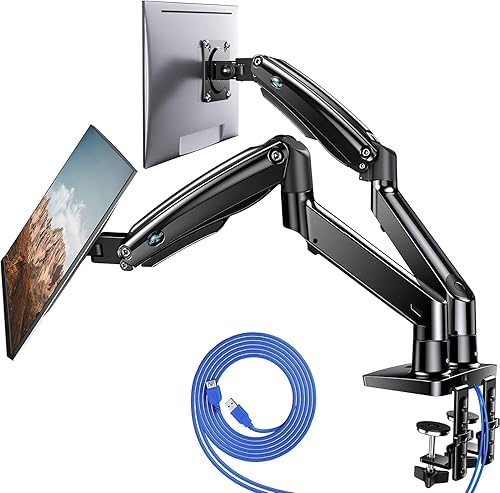
HUANUO Dual Monitor Stand for 13–40″, Premium Dual Monitor Mount with USB
5The HUANUO Premium Dual Monitor Stand fits two screens from 13 to 40 inches and adds USB ports.
👍 Pros & Cons
Pros
- Fits larger screens
- USB ports in the base
- Premium build
Cons
- Costs more
- Heavy
📄 Detailed Review
- Screens: 2 x 13–40″
- Ports: USB
- Spring: Gas spring
It handles bigger monitors than most budget dual arms.
Premium dual with USB.

ARES WING Ultrawide Monitor Desk Arm with USB A/C for 17 to 49 Inch Screens, Pro Gas Spring
6The ARES WING Ultrawide Monitor Arm adds USB-A and USB-C ports to a gas spring arm for 17 to 49-inch screens.
👍 Pros & Cons
Pros
- USB-A and USB-C ports
- Fits ultrawides
- Full motion
Cons
- Costs more than basic arms
- Bulky base
📄 Detailed Review
- Screen size: 17–49″
- Ports: USB-A and USB-C
- Spring: Gas spring
It puts charging and data ports right at the desk edge.
Ultrawide + USB.

VIVO Premium Aluminum Full Motion Dual Monitor Desk Mount with Lift Engine Arm, Pole Extension, and USB Ports
7The VIVO Premium Aluminum Dual Mount adds USB ports and a pole extension to a full-motion dual arm.
👍 Pros & Cons
Pros
- USB ports at the desk
- Premium aluminum
- Pole extension
Cons
- Costs more
- Assembly time
📄 Detailed Review
- Screens: Dual
- Ports: USB
- Material: Aluminum
It brings charging and data ports closer to your hands.
Premium dual with USB.
How We Chose the Best Monitor Stand with USB Hub
To choose the best monitor stand with usb hub, we compared stands and arms with USB hubs on port types, build and owner feedback.
For official guidance on monitor distance, height and viewing angle, see the OSHA Computer Workstations eTool on monitors.
Product details in this guide are based on manufacturer specifications and verified owner feedback, not in-house lab testing. Read more on our How We Test page.
Buying Guide: How to Choose the Best Monitor Stand with USB Hub
Keep these factors in mind when shopping for the best monitor stand with usb hub.
USB 2.0, 3.0 and USB-C ports
USB 2.0 ports are fine for controllers and charging. USB 3.0 or USB-C ports are better for flash drives and webcams. Check whether the hub needs its own power supply.
Arm or stand?
Monitor stands and risers are simple, need no clamp and often add storage. Arms free more desk space and adjust more, but need a compatible desk edge.
Cable management
Most arms have clips or channels to route cables. Leave enough slack for swivel and tilt before tightening the clips.
Set the right monitor height
Place the top of the screen at or slightly below eye level, about an arm’s length away. An arm makes it easy to adjust when you switch between gaming and work.
Hub Stand Tips
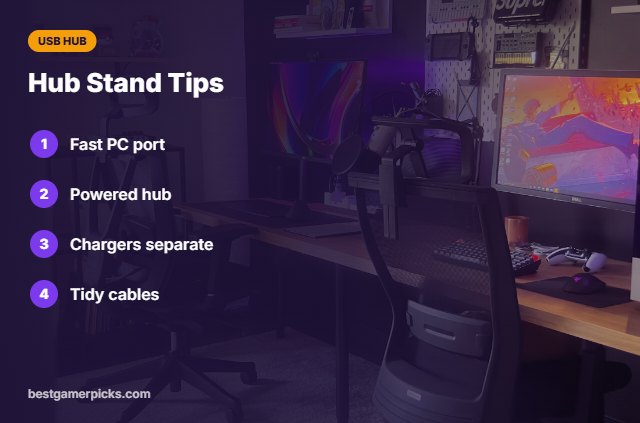
Get the most from ports:
- Connect the hub cable to a fast PC port.
- Use powered hubs for many devices.
- Keep chargers off data ports.
- Tidy cables behind the stand.
Here are quick answers about the best monitor stand with usb hub.
Frequently Asked Questions
What is the best monitor stand with USB hub?
The Vaydeer All-in-One Dual Riser is the best monitor stand with USB hub for maximum ports, with the OImaster Riser as the value pick.
Does the hub need power?
Some use the PC connection; others include a power adapter.
Is it fast enough for drives?
Use USB 3.0 or USB-C ports.
Can it charge a phone?
Yes, at basic speeds.
Final Verdict
Our final pick for the best monitor stand with usb hub is the Vaydeer All-in-One Dual Riser. Choose the OImaster Riser with USB Hub if you want a lower price, or the Razer Monitor Stand Chroma for premium build.
Related Guides
More monitor arm and stand guides:
- Best Monitor Stand with Drawer
- Best RGB Monitor Stand
- Best Monitor Stand for Two Monitors
- Best Small Gaming Desk with Monitor Stand
- Best Dac Amp Combo for Gaming
- Best Dongle Dac for Gaming
Product details are based on manufacturer specifications at the time of writing. Prices and availability change often, so check Amazon for the latest price.









Write Your Review
No reviews yet. Be the first to share your experience!