

BestGamerPicks is reader-supported. As an Amazon Associate we earn from qualifying purchases. This does not change our recommendations. Learn more.
The best studio monitors for gaming reproduce sound accurately, so footsteps, reloads and directional cues are easy to pick out.
Monitors are designed for flat response rather than hyped bass. They also suit streaming and music production. We compared size, inputs and tuning to find the best studio monitors for gaming.
Quick Answer: The Best Studio Monitors for Gaming
- Best Overall: PreSonus Eris 4.5BT Bluetooth Studio Monitors
- Best Value: Edifier MR4 Powered Studio Monitor Speakers 4″
- Best Pro Pick: JBL 305P MkII 5″ Powered Studio Monitor (Single)
- Best Compact: PreSonus Eris 3.5 Powered Studio Monitors (2nd Gen)
- Best Tone Control: Mackie CR4.5BT Powered Studio Monitors with Bluetooth
- Best Hi-Res Compact: Edifier MR3 Powered Studio Monitors with Bluetooth
- Best Starter: Mackie CR3.5 Studio Monitors (Pair)
The PreSonus Eris 4.5BT is the best studio monitors for gaming pick for balance and Bluetooth. The Edifier MR4 is the value choice and the JBL 305P MkII is the pro pick.
Best Studio Monitors for Gaming Comparison Table
| Product | Best For | Type | Key Feature | Buy |
|---|---|---|---|---|
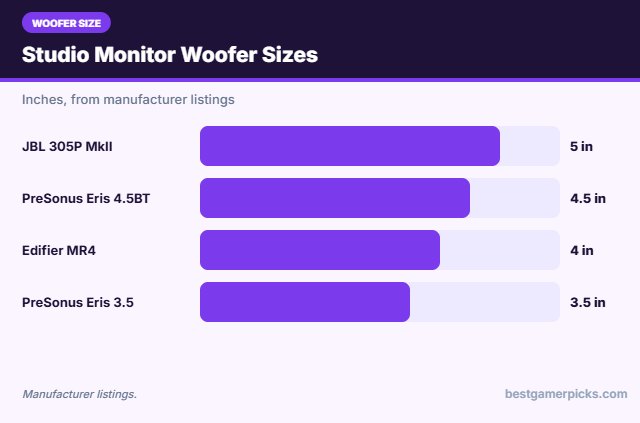
| PreSonus Eris 4.5BT | Best Overall | Bluetooth studio monitors | 4.5″ woofers, Class A/B | Check Price |
| Edifier MR4 | Best Value | Studio monitors | Flat tuning, front headphone out | Check Price |
| JBL 305P MkII | Best Pro Pick | Studio monitor (single) | 5″ woofer, boundary EQ | Check Price |
| PreSonus Eris 3.5 | Best Compact | Compact studio monitors | 50W, acoustic tuning | Check Price |
| Mackie CR4.5BT | Best Tone Control | Bluetooth studio monitors | Tone knob, Bluetooth | Check Price |
| Edifier MR3 | Best Hi-Res Compact | Compact studio monitors | Hi-Res, Bluetooth multipoint | Check Price |
| Mackie CR3.5 | Best Starter | Compact studio monitors | Tone knob, location switch | Check Price |
The 7 Best Studio Monitors for Gaming
Each best studio monitors for gaming pick offers accurate, detailed sound.

PreSonus Eris 4.5BT Bluetooth Studio Monitors
1The PreSonus Eris 4.5BT adds bigger 4.5-inch woofers and Bluetooth to an accurate monitor pair.
👍 Pros & Cons
Pros
- Bigger bass than 3.5
- Bluetooth
- Wide sweet spot
Cons
- Larger
- No USB
📄 Detailed Review
- Drivers: 4.5″ woofer + 1″ tweeter
- Power: 50W Class A/B
- Wireless: Bluetooth
Class A/B power gives clean volume.
A wide sweet spot suits gaming desks.

Edifier MR4 Powered Studio Monitor Speakers 4″
2The Edifier MR4 is an affordable studio monitor pair with flat tuning and a front headphone jack.
👍 Pros & Cons
Pros
- Accurate, flat sound
- Front headphone output
- Very affordable monitors
Cons
- Light bass
- No Bluetooth
📄 Detailed Review
- Drivers: 4″ woofer + 1″ silk tweeter
- Inputs: TRS, RCA, AUX
- Extras: Monitor/Music modes, headphone out
Monitor and Music modes switch between accurate and fuller sound.
Great for hearing detail like footsteps.

JBL 305P MkII 5″ Powered Studio Monitor (Single)
3The JBL 305P MkII is a pro studio monitor with a 5-inch woofer and boundary EQ, sold individually.
👍 Pros & Cons
Pros
- Pro-grade accuracy
- Wide sweet spot
- Boundary EQ for desks
Cons
- Sold individually
- Needs balanced cables
📄 Detailed Review
- Driver: 5″ woofer + tweeter
- Inputs: XLR and 1/4″ TRS
- Extras: Boundary EQ
Technology derived from JBL Master Reference monitors delivers accurate sound.
Buy two for stereo.

PreSonus Eris 3.5 Powered Studio Monitors (2nd Gen)
4The PreSonus Eris 3.5 is a compact studio monitor pair with accurate sound and tuning controls.
👍 Pros & Cons
Pros
- Accurate sound
- Small footprint
- Great value
Cons
- Light bass
- No Bluetooth (this model)
📄 Detailed Review
- Drivers: 3.5″ woofer + 1″ silk tweeter
- Power: 50W
- Tuning: High/low frequency controls
50W drives clear sound for games, music and streaming.
High and low tuning adapt to your room.

Mackie CR4.5BT Powered Studio Monitors with Bluetooth
5The Mackie CR4.5BT combines studio sound with Bluetooth and a tone knob.
👍 Pros & Cons
Pros
- Bluetooth
- Tone control
- Desktop/bookshelf mode
Cons
- Larger
- Light deep bass
📄 Detailed Review
- Drivers: 4.5″ woofers
- Inputs: TRS, RCA, Bluetooth
- Controls: Tone knob, location switch
TRS and RCA inputs connect interfaces and consoles.
Flip the location switch for desk or shelf.

Edifier MR3 Powered Studio Monitors with Bluetooth
6The Edifier MR3 is a compact Hi-Res studio monitor pair with Bluetooth multipoint and a headphone output.
👍 Pros & Cons
Pros
- Hi-Res certified
- Bluetooth multipoint
- Headphone output
Cons
- 3.5″ drivers limit bass
- Small for big rooms
📄 Detailed Review
- Output: 18W x 2 RMS
- Inputs: TRS, RCA, AUX, Bluetooth
- Certification: Hi-Res Audio
3.5-inch drivers and 1-inch tweeters cover 52Hz to 40kHz.
Music, Monitor and Custom modes adjust the sound.

7The Mackie CR3.5 is a compact monitor pair with a tone knob and isolation pads included.
👍 Pros & Cons
Pros
- Isolation pads included
- Tone control
- Compact
Cons
- Small drivers
- Wired only
📄 Detailed Review
- Drivers: 3.5″ woofers
- Controls: Tone knob, location switch
- Included: Isolation pads and cables
A location switch corrects bass near walls.
Everything you need is in the box.
How We Chose the Best Studio Monitors for Gaming
To choose the best studio monitors for gaming, we compared desktop studio monitors on accuracy, size, inputs and owner feedback from gamers and creators.
Loud gaming sessions add up, so keep safe listening levels in mind; read the NIDCD guide to noise-induced hearing loss.
Product details in this guide are based on manufacturer specifications and verified owner feedback, not in-house lab testing. Read more on our How We Test page.
Buying Guide: How to Choose the Best Studio Monitors for Gaming
Keep these factors in mind when shopping for the best studio monitors for gaming.
Studio monitors for gaming
Studio monitors aim for flat, accurate sound. They are great for hearing footsteps and detail, but sound less bass-heavy than gaming speakers.
Speaker placement on a desk
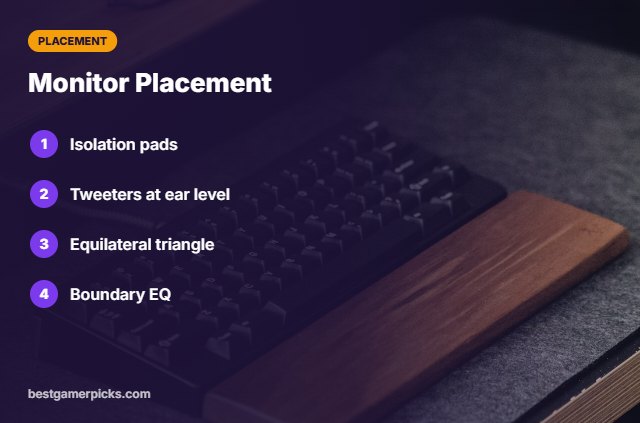
Place speakers at ear height, angled toward you, and away from the wall if they have rear ports. Desk stands or isolation pads tighten bass and clarity.
Balanced vs. unbalanced inputs
Pro monitors use balanced TRS or XLR inputs that reject noise over longer cables. For a PC, an audio interface or a TRS-to-3.5mm cable works.
2.0 vs. 2.1 speakers
2.0 speakers use two speakers only; 2.1 adds a subwoofer for deeper bass. A sub can sit under the desk, freeing space on top.
Monitor Placement Tips
Get accurate sound:
- Use isolation pads.
- Tweeters at ear level.
- Equilateral triangle layout.
- Use boundary EQ near walls.
Here are quick answers about the best studio monitors for gaming.
Frequently Asked Questions
What are the best studio monitors for gaming?
The PreSonus Eris 4.5BT is the best studio monitors for gaming pick, with the Edifier MR4 for value and the JBL 305P MkII for pros.
Are monitors good for gaming?
Yes, for detail and positional cues.
Do I need an audio interface?
Not with RCA/AUX models; it helps with balanced inputs.
Will they have enough bass?
Add a subwoofer for more low end.
Final Verdict
Our final pick for the best studio monitors for gaming is the PreSonus Eris 4.5BT. Choose the Edifier MR4 if you want great value, or the JBL 305P MkII for pro-grade accuracy.
Related Guides
More PC audio guides:
- Best Desktop Speakers for Gaming
- Best 2.1 Speakers for PC Gaming
- Best Budget Desktop Speakers for PC Gaming
- Best Computer Speakers under 100
- Best RGB Lights That Sync with Music
- Best RGB Neon Sign
Product details are based on manufacturer specifications at the time of writing. Prices and availability change often, so check Amazon for the latest price.









Write Your Review
No reviews yet. Be the first to share your experience!