

BestGamerPicks is reader-supported. As an Amazon Associate we earn from qualifying purchases. This does not change our recommendations. Learn more.
The best wireless earbuds for gaming low latency use 2.4GHz dongles or fast game modes to keep sound in sync without a cable.
Dual-mode earbuds with a 2.4GHz dongle are the fastest wireless option for PC, PS5 and handhelds, while Bluetooth game modes help on phones. We compared connection, platform support, battery and owner feedback to find the best wireless earbuds for gaming low latency.
Quick Answer: The Best Wireless Earbuds for Gaming Low Latency
- Best Overall: Razer Hammerhead V3 Wireless Multi-Platform ANC Gaming Earbuds, 2.4GHz & Bluetooth 6.0
- Best Battery: Sony INZONE Buds Wireless Noise Cancelling Gaming Earbuds
- Best Mic: ASUS ROG Cetra True Wireless SpeedNova Gaming Earbuds, Dual-Mode (BT, 2.4GHz), Bone-Conduction AI Mic, Adaptive ANC
- Best Premium ANC: SteelSeries Arctis GameBuds for Xbox – Black, Quick-Switch 2.4GHz + Bluetooth 5.3, Active Noise Cancelling
- Best Dual Source: JBL Quantum TWS True Wireless Noise Cancelling Gaming Earbuds
- Best for PlayStation: PlayStation Pulse Explore Wireless Earbuds – Midnight Black
- Best Budget 2.4GHz: AOC Wireless Gaming Earbuds for PS, 20ms Ultra-Low Latency, 2.4GHz Type-C Dongle + Bluetooth, Noise Cancelling
- Best Budget Bluetooth: Moondrop Space Travel 2 HiFi Noise-Canceling TWS Wireless Earphone Bluetooth 6.0 ANC Low-Latency Game Mode
The Razer Hammerhead V3 are the best wireless earbuds for gaming low latency for most players, with 2.4GHz HyperSpeed and Bluetooth 6.0. Sony INZONE Buds have the longest listed battery, and the AOC Wireless Gaming Earbuds are the budget pick.
Best Wireless Earbuds for Gaming Low Latency Comparison Table
| Product | Best For | Type | Key Feature | Buy |
|---|---|---|---|---|
| Razer Hammerhead V3 | Best Overall | 2.4GHz + Bluetooth gaming earbuds | HyperSpeed 2.4GHz + Bluetooth 6.0 | Check Price |
| Sony INZONE Buds | Best Battery | 2.4GHz gaming earbuds | PS5 on-screen status + LE Audio | Check Price |
| ASUS ROG Cetra TW SpeedNova | Best Mic | 2.4GHz gaming earbuds | Bone-conduction AI mic | Check Price |
| SteelSeries Arctis GameBuds (Xbox) | Best Premium ANC | Xbox 2.4GHz gaming earbuds | 2.4GHz for Xbox + Bluetooth 5.3 | Check Price |
| JBL Quantum TWS | Best Dual Source | 2.4GHz gaming earbuds | USB-C 2.4GHz dongle | Check Price |
| PlayStation Pulse Explore | Best for PlayStation | PS5 wireless earbuds | PlayStation Link + Bluetooth | Check Price |
| AOC Wireless Gaming Earbuds | Best Budget 2.4GHz | Budget 2.4GHz earbuds | USB-C 2.4GHz dongle | Check Price |
| Moondrop Space Travel 2 | Best Budget Bluetooth | Budget ANC earbuds | Low-latency game mode | Check Price |
The 8 Best Low-Latency Wireless Earbuds for Gaming
Each best wireless earbuds for gaming low latency pick has a 2.4GHz dongle or a game mode.

Razer Hammerhead V3 Wireless Multi-Platform ANC Gaming Earbuds, 2.4GHz & Bluetooth 6.0
1The Razer Hammerhead V3 pairs Razer’s 2.4GHz HyperSpeed wireless with Bluetooth 6.0, so you can game on a PC, PS5, phone or Steam Deck and still take calls.
👍 Pros & Cons
Pros
- Low-latency 2.4GHz for PC, PS5, phones and Steam Deck
- Case with removable dongle and play-while-charging
- Hybrid ANC
Cons
- Pricey
- Mixed early owner ratings
📄 Detailed Review
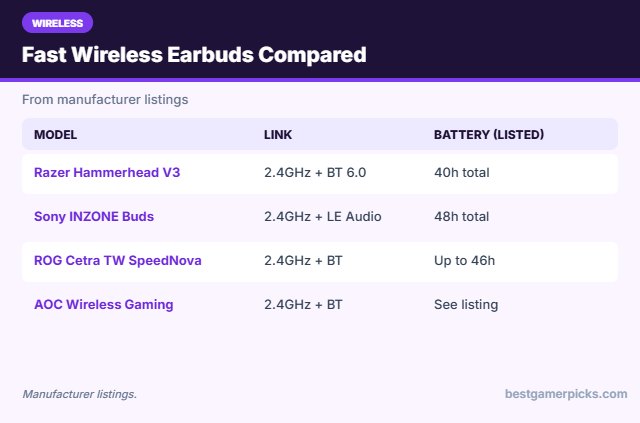
- Wireless: 2.4GHz HyperSpeed + Bluetooth 6.0
- Battery: Up to 10h buds, 40h with case (listed)
- Extras: Hybrid ANC, THX Spatial Audio on PC
It adds hybrid ANC, a case with a removable USB-C dongle and up to 40 hours of total battery, according to Razer’s listing.
Most versatile 2.4GHz earbuds.

Sony INZONE Buds Wireless Noise Cancelling Gaming Earbuds
2Sony’s INZONE Buds connect through a USB-C 2.4GHz dongle to PS5, PC, Switch and phones, and show volume and battery on the PS5 screen.
👍 Pros & Cons
Pros
- Made for PS5 with on-screen status
- Long battery life
- ANC and AI mic noise reduction
Cons
- LE Audio mode not for iPhone
- Pricey
📄 Detailed Review
- Wireless: 2.4GHz USB-C dongle + Bluetooth LE Audio
- Battery: Up to 12h buds, 48h with case (listed)
- Extras: ANC, AI noise-cancelling mic
They add ANC, a long listed battery life and an AI noise-cancelling mic for chat.
Best earbuds for PS5 owners.

ASUS ROG Cetra True Wireless SpeedNova Gaming Earbuds, Dual-Mode (BT, 2.4GHz), Bone-Conduction AI Mic, Adaptive ANC
3The ROG Cetra True Wireless SpeedNova uses a 2.4GHz dongle plus Bluetooth, and can connect to both at once.
👍 Pros & Cons
Pros
- Bone-conduction mic for clear chat
- Long battery life
- Dongle works with PC, PS5, Switch and Android
Cons
- Bulky case
- RGB drains battery
📄 Detailed Review
- Wireless: 2.4GHz SpeedNova + Bluetooth
- Battery: Up to 46h total in Bluetooth, RGB off (listed)
- Extras: Adaptive ANC, Dirac Opteo, RGB
Its bone-conduction AI mic is a big plus for clearer voice chat, and the listed battery life is among the longest here.
Best mic in gaming earbuds.

SteelSeries Arctis GameBuds for Xbox – Black, Quick-Switch 2.4GHz + Bluetooth 5.3, Active Noise Cancelling
4The Arctis GameBuds for Xbox use a 2.4GHz link for Xbox and console gaming plus Bluetooth 5.3 for phones.
👍 Pros & Cons
Pros
- Xbox-ready 2.4GHz
- Hybrid ANC and transparency
- 100+ game audio presets in the app
Cons
- Expensive
- Some owners report fit issues
📄 Detailed Review
- Wireless: 2.4GHz + Bluetooth 5.3
- Battery: 10h buds, up to 40h with Qi case (listed)
- Extras: 4-mic hybrid ANC, 100+ game presets
The Arctis Companion app has 100+ game presets that boost key sounds, and the Qi charging case extends battery to about 40 hours.
Premium Xbox earbuds.

JBL Quantum TWS True Wireless Noise Cancelling Gaming Earbuds
5The JBL Quantum TWS uses a USB-C 2.4GHz dongle for gaming, with Bluetooth for phones and calls at the same time.
👍 Pros & Cons
Pros
- Low-latency 2.4GHz dongle
- Take Bluetooth calls while on 2.4GHz
- Adaptive ANC
Cons
- Surround only on PC
- Older model
📄 Detailed Review
- Wireless: 2.4GHz USB-C dongle + Bluetooth
- Mics: 6 beamforming mics
- Extras: Adaptive ANC, QuantumSURROUND on PC
It has adaptive ANC, six beamforming mics and JBL QuantumSURROUND on PC.
Solid 2.4GHz option.

PlayStation Pulse Explore Wireless Earbuds – Midnight Black
6The Pulse Explore are Sony’s official PS5 earbuds, using PlayStation Link wireless for low-latency play on PS5 and PS Portal.
👍 Pros & Cons
Pros
- Official PS5 earbuds
- PlayStation Link low-latency wireless
- Planar drivers
Cons
- Expensive
- Limited outside the PlayStation ecosystem
📄 Detailed Review
- Wireless: PlayStation Link + Bluetooth
- Drivers: Planar magnetic
- Mic: AI-enhanced noise rejection
They also connect over Bluetooth to phones, and use planar magnetic drivers for detailed sound.
Official PlayStation earbuds.

AOC Wireless Gaming Earbuds for PS, 20ms Ultra-Low Latency, 2.4GHz Type-C Dongle + Bluetooth, Noise Cancelling
7The AOC wireless gaming earbuds include a USB-C 2.4GHz dongle and Bluetooth for everyday use.
👍 Pros & Cons
Pros
- Low price for a 2.4GHz dongle
- Works with PS5 and PC
- Good owner ratings
Cons
- Lesser-known for audio
- App features are limited
📄 Detailed Review
- Wireless: 2.4GHz USB-C dongle + Bluetooth
- Latency: 20ms in dongle mode (listed)
- Extras: Noise-cancelling mics
AOC lists 20ms latency in dongle mode, which makes them a budget way to get low-latency wireless audio on PS5 and PC.
Best budget 2.4GHz earbuds.

Moondrop Space Travel 2 HiFi Noise-Canceling TWS Wireless Earphone Bluetooth 6.0 ANC Low-Latency Game Mode
8The Moondrop Space Travel 2 are budget earbuds from a well-known IEM brand, with Bluetooth 6.0, ANC and a low-latency game mode.
👍 Pros & Cons
Pros
- Very cheap
- Low-latency game mode
- Tuned by an IEM brand
Cons
- Only SBC and AAC
- Basic app
📄 Detailed Review
- Wireless: Bluetooth 6.0 (SBC/AAC)
- Driver: 13mm dynamic
- Extras: ANC, game mode
They work with both iPhone (AAC) and Android, and sound better than most earbuds in their price range.
Best budget low-latency Bluetooth earbuds.
How We Chose the Best Wireless Earbuds for Gaming Low Latency
To choose the best wireless earbuds for gaming low latency, we compared wireless earbuds on connection type, platform support, battery and owner feedback.
Loud gaming sessions add up, so keep safe listening levels in mind; read the NIDCD guide to noise-induced hearing loss.
Product details in this guide are based on manufacturer specifications and verified owner feedback, not in-house lab testing. Read more on our How We Test page.
Buying Guide: How to Choose the Best Wireless Earbuds for Gaming Low Latency
Keep these factors in mind when shopping for the best wireless earbuds for gaming low latency.
2.4GHz dongle vs. Bluetooth
A 2.4GHz USB dongle creates a dedicated wireless link, so it is usually faster and more stable than Bluetooth for gaming. Dual-mode earbuds let you use the dongle on a PC, PS5 or Switch and switch to Bluetooth for your phone.
Why latency matters for gaming earbuds
Latency is the delay between a sound in the game and the moment you hear it. Wired earbuds add almost none. Standard Bluetooth often adds a noticeable delay, which you can hear as footsteps or gunshots arriving slightly late. Low-latency game modes cut that delay, and 2.4GHz dongles cut it further.
Battery life and charging
True wireless earbuds usually last 5 to 10 hours per charge, with more from the case. Game modes, ANC and 2.4GHz use can shorten battery life. Wired earbuds never need charging.
Earbuds on PS5, Xbox and Switch 2
PS5 does not support Bluetooth headphones on its own, so you need a USB-C 2.4GHz dongle or a wired 3.5mm connection to the controller. Xbox only works wirelessly with Xbox-licensed earbuds; otherwise plug wired earbuds into the controller jack. Switch 2 supports Bluetooth audio and USB-C dongles, though Bluetooth adds some delay.
Wireless Gaming Tips
Keep it fast:
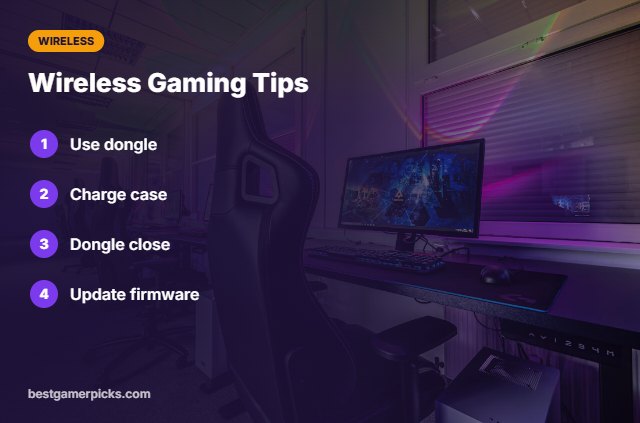
- Use the 2.4GHz dongle for games.
- Charge the case regularly.
- Keep the dongle close.
- Update firmware.
Here are quick answers about the best wireless earbuds for gaming low latency.
Frequently Asked Questions
What are the best wireless earbuds for gaming low latency?
The Razer Hammerhead V3 are the best wireless earbuds for gaming low latency for most players, with Sony INZONE Buds for battery life.
How low is 2.4GHz latency?
Much lower than standard Bluetooth; brands list figures around 20ms for some models.
Can I use these on Xbox?
Only Xbox-licensed versions.
Do they work with phones?
Yes, over Bluetooth or USB-C dongle.
Final Verdict
Our final pick for the best wireless earbuds for gaming low latency is the Razer Hammerhead V3. Choose the Sony INZONE Buds if you want longer battery, or the ASUS ROG Cetra TW SpeedNova for a better mic.
Related Guides
More gaming earbuds and IEM guides:
- Best Wired Gaming Earbuds with Mic
- Best Wireless Gaming Earbuds for PS5
- Best Wired Earbuds for Mobile Gaming
- Best Wireless Gaming Earbuds with Dongle for PC
- Best Wireless Keyboard and Mouse for Xbox
- Best Balanced Dac Amp
Product details are based on manufacturer specifications at the time of writing. Prices and availability change often, so check Amazon for the latest price.






Write Your Review
No reviews yet. Be the first to share your experience!