

BestGamerPicks is reader-supported. As an Amazon Associate we earn from qualifying purchases. This does not change our recommendations. Learn more.
The best compact gaming setup packs a full gaming experience into a small corner with slim furniture and space-saving gear.
Compact setups rely on small desks, vertical space and fewer cables. We compared furniture and peripherals to build the best compact gaming setup.
Quick Answer: The Best Compact Gaming Setup
- Best Small Desk: Lufeiya Small Desk with Power Outlets and LED Lights, 32 Inch
- Best Tiny Desk: Dripex Computer Desk for Small Spaces, 27.5 inch
- Best Monitor Arm: HUANUO FlowLift Single Monitor Mount, 13–32 Inch
- Best Compact Keyboard: HyperX Alloy Origins 60 Mechanical Gaming Keyboard
- Best Light Mouse: HyperX Pulsefire Haste 2 Wired Gaming Mouse, 53g
- Best Cable Tray: Univivi No Drill Under Desk Cable Management Tray, 36 inch
- Best Headset Stand: New Bee Headphone Stand Headset Holder
- Best Portable Monitor: ARZOPA 16.1″ 144Hz Portable Gaming Monitor
The Lufeiya 32″ Small Desk is the base of the best compact gaming setup, with built-in outlets and LEDs. Add a HUANUO monitor arm, a HyperX Alloy Origins 60 keyboard and a Univivi cable tray.
Best Compact Gaming Setup Comparison Table
| Product | Best For | Type | Key Feature | Buy |
|---|---|---|---|---|
| Lufeiya 32″ Small Desk | Best Small Desk | Small gaming desk | Outlets + LED, 32 inch | Check Price |
| Dripex 27.5″ Small Desk | Best Tiny Desk | Compact desk | 27.5-inch footprint | Check Price |
| HUANUO Single Monitor Arm | Best Monitor Arm | Monitor arm | Frees desk space | Check Price |
| HyperX Alloy Origins 60 | Best Compact Keyboard | 60% mechanical keyboard | Aluminum body, PBT keycaps | Check Price |
| HyperX Pulsefire Haste 2 | Best Light Mouse | Lightweight gaming mouse | 53g, 8000Hz polling | Check Price |
| Univivi Under-Desk Cable Tray | Best Cable Tray | Cable tray | No-drill clamp mount | Check Price |
| New Bee Headphone Stand | Best Headset Stand | Headset stand | Simple aluminum stand | Check Price |
| ARZOPA 16.1″ Portable Monitor | Best Portable Monitor | Portable monitor | 144Hz, portable | Check Price |
The 8 Best Compact Gaming Setup Picks
Each best compact gaming setup pick saves space.

Lufeiya Small Desk with Power Outlets and LED Lights, 32 Inch
1Lufeiya’s 32-inch desk adds outlets and LED lights to a tiny footprint.
👍 Pros & Cons
Pros
- Fits tiny rooms
- Built-in power
- LED lights
Cons
- Small surface
- Assembly
📄 Detailed Review
- Width: 32 in
- Extras: Power outlets, LED
- Use: Small rooms
Ideal for dorms and bedrooms.
Small desk pick.

Dripex Computer Desk for Small Spaces, 27.5 inch
2Dripex’s 27.5-inch desk fits into the smallest corners.
👍 Pros & Cons
Pros
- Very compact
- Sturdy
- Well rated
Cons
- Tight for big monitors
- No storage
📄 Detailed Review
- Width: 27.5 in
- Build: Steel frame
- Use: Small spaces
A strong compact setup base.
Tiny desk pick.

HUANUO FlowLift Single Monitor Mount, 13–32 Inch
3HUANUO’s gas-spring arm lifts your monitor and frees up desk space.
👍 Pros & Cons
Pros
- Frees desk space
- Smooth adjustment
- Huge review base
Cons
- Desk must suit clamp
- Install time
📄 Detailed Review
- Fits: 13–32 in
- Mount: Clamp/grommet
- Adjust: Gas spring
Essential for small desks.
Space-saving arm.

HyperX Alloy Origins 60 Mechanical Gaming Keyboard
4Alloy Origins 60 is a tiny mechanical keyboard with an aluminum body.
👍 Pros & Cons
Pros
- Very compact
- Premium build
- Highly rated
Cons
- No arrows or F-row
- Keyboard only
📄 Detailed Review
- Layout: 60%
- Body: Aluminum
- Keycaps: Double-shot PBT
Ideal for small desks and lapboards.
Compact mechanical pick.

HyperX Pulsefire Haste 2 Wired Gaming Mouse, 53g
5Pulsefire Haste 2 is an ultra-light 53g mouse for fast shooters.
👍 Pros & Cons
Pros
- Ultra light
- Fast polling
- Good value
Cons
- Mouse only
- Small for big hands
📄 Detailed Review
- Weight: 53g
- Polling: Up to 8000Hz
- Connection: Wired
Great for Fortnite and Call of Duty aim.
Light FPS mouse.
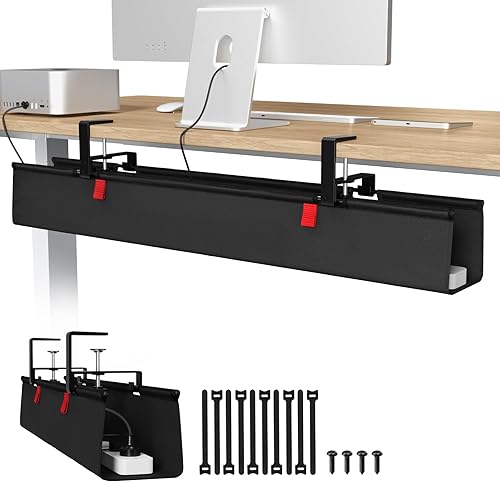
Univivi No Drill Under Desk Cable Management Tray, 36 inch
6Univivi’s no-drill tray hides power strips and cables under the desk.
👍 Pros & Cons
Pros
- Hides cables
- No drilling
- Highly rated
Cons
- Needs desk overhang
- Fills quickly
📄 Detailed Review
- Length: 36 in
- Mount: No drill
- Material: Metal
Essential for clean setups.
Clean setup pick.

New Bee Headphone Stand Headset Holder
7New Bee’s headphone stand keeps your headset tidy and off the desk.
👍 Pros & Cons
Pros
- Cheap
- Huge review base
- Sturdy
Cons
- No extras
- Takes desk space
📄 Detailed Review
- Material: Aluminum
- Base: Non-slip
- Price: Budget
A cheap organization win.
Organization pick.

ARZOPA 16.1″ 144Hz Portable Gaming Monitor
8ARZOPA’s portable 144Hz monitor turns any desk or bed into a gaming spot.
👍 Pros & Cons
Pros
- Portable
- Fast refresh
- Works with consoles
Cons
- Small
- Speakers weak
📄 Detailed Review
- Size: 16.1 in
- Refresh: 144Hz
- Input: USB-C, HDMI
Great for dorms and travel.
Portable pick.
How We Chose the Best Compact Gaming Setup
To choose the best compact gaming setup, we compared small-footprint furniture and compact peripherals.
For the neutral sitting and standing postures ergonomists recommend, see the OSHA guide to neutral working postures.
Product details in this guide are based on manufacturer specifications and verified owner feedback, not in-house lab testing. Read more on our How We Test page.
Buying Guide: How to Choose the Best Compact Gaming Setup
Keep these factors in mind when shopping for the best compact gaming setup.
Measure your space first
Measure the desk, wall and outlet positions before buying. Compact setups need slimmer gear, monitor arms and vertical storage.
Keyboard size: full, TKL, 75% or 60%
Full-size keyboards keep the number pad. Tenkeyless (TKL) drops it for more mouse room. 75% layouts keep arrow keys in a smaller body, and 60% boards are the most compact but lose arrows and function keys.
Cable management
A cable tray, clips and a power strip mounted under the desk keep things tidy and safer, especially in small rooms.
Go vertical
Monitor arms, headset hooks and wall shelves move gear off the desk surface, freeing room for your mouse.
Compact Setup Tips
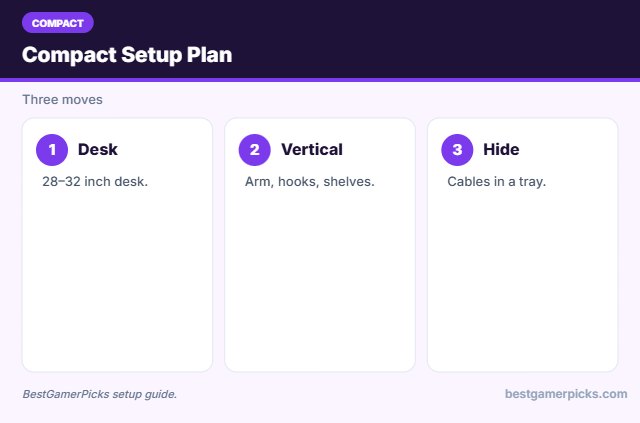
Save space:
- Mount the monitor.
- Hang the headset.
- Use a 60% keyboard.
- Hide cables under the desk.
Here are quick answers about the best compact gaming setup.
Frequently Asked Questions
What is the best compact gaming setup?
The best compact gaming setup uses a small desk like the Lufeiya 32″, a monitor arm, a 60% keyboard and a cable tray.
How small can a gaming desk be?
About 28 to 32 inches works for one monitor.
Do monitor arms save space?
Yes, they free the desk surface.
Is a 60% keyboard enough?
For gaming, yes.
Final Verdict
Our final pick for the best compact gaming setup is the Lufeiya 32″ Small Desk. Choose the Dripex 27.5″ Small Desk if you want an even smaller desk, or the HUANUO Single Monitor Arm for a monitor arm.
Related Guides
More gaming setup guides:
- Best Bed Gaming Setup
- Best Dorm Gaming Setup for Console
- Best Apartment Gaming Setup for Console
- Best Dorm Room Gaming Accessories
- Best Keyboard and Mouse Combo for Streaming
- Best Neon Signs for Gaming Room
Product details are based on manufacturer specifications at the time of writing. Prices and availability change often, so check Amazon for the latest price.









Write Your Review
No reviews yet. Be the first to share your experience!