

BestGamerPicks is reader-supported. As an Amazon Associate we earn from qualifying purchases. This does not change our recommendations. Learn more.
Our best handheld for game pass picks run Xbox Game Pass, either by installing PC games on a Windows handheld or by streaming through Xbox Cloud Gaming.
Windows handhelds can download PC Game Pass games; Android devices can only stream, so check which plan includes cloud gaming. We compared Game Pass access, performance, screen and battery to find the best handheld for game pass.
Quick Answer: The Best Handheld for Game Pass
- Best Overall: ASUS ROG Xbox Ally X 7-inch Gaming Handheld, FHD 120Hz Display, AMD Ryzen AI Z2 Extreme
- Best Value Windows: ASUS ROG Xbox Ally 7-inch 1080p 120Hz Touchscreen Gaming Handheld
- Best Big OLED: Lenovo Legion Go 2, 8.8-inch 144Hz 2K OLED Touch Handheld Gaming Console
- Best Intel: MSI Claw 8 AI+ A2VM PC Gaming Handheld, Intel Core Ultra 7 258V, 8-inch FHD 120Hz
- Best Cloud-Only: Logitech G Cloud Gaming Handheld Portable Console with Long Battery Life
The ASUS ROG Xbox Ally X is our top pick. Also consider the ASUS ROG Xbox Ally (Best Value Windows) and the Lenovo Legion Go 2 (Best Big OLED).
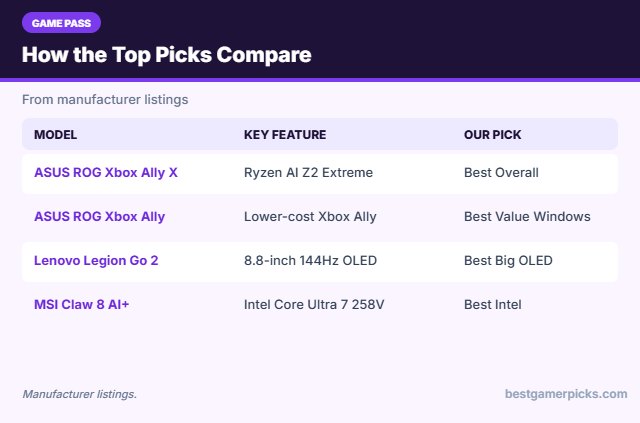
Best Handheld for Game Pass Comparison Table
| Product | Best For | Type | Key Feature | Buy |
|---|---|---|---|---|
| ASUS ROG Xbox Ally X | Best Overall | Windows handheld PC | Ryzen AI Z2 Extreme, Xbox full-screen experience | Check Price |
| ASUS ROG Xbox Ally | Best Value Windows | Windows handheld PC | Lower-cost Xbox Ally | Check Price |
| Lenovo Legion Go 2 | Best Big OLED | Windows handheld PC | 8.8-inch 144Hz OLED, detachable controllers | Check Price |
| MSI Claw 8 AI+ | Best Intel | Windows handheld PC | Intel Core Ultra 7 258V | Check Price |
| Logitech G Cloud | Best Cloud-Only | Cloud gaming handheld | Built for cloud gaming | Check Price |
The 5 Best Handhelds for Game Pass
Each best handheld for game pass pick below is a handheld that works with Game Pass.
ASUS ROG Xbox Ally X 7-inch Gaming Handheld, FHD 120Hz Display, AMD Ryzen AI Z2 Extreme
1The ASUS ROG Xbox Ally X is a 7-inch 1080p 120Hz Windows handheld powered by the AMD Ryzen AI Z2 Extreme with a full-screen Xbox experience.
👍 Pros & Cons
Pros
- Runs Steam, Xbox app and more
- Strong performance
- Comfortable grips
Cons
- Expensive
- Windows needs some tweaking
📄 Detailed Review
- Screen: 7 in 1080p 120Hz
- Chip: AMD Ryzen AI Z2 Extreme
- OS: Windows 11 with Xbox experience
It is the top pick for PC Game Pass and Steam on the go.
Best handheld PC.
ASUS ROG Xbox Ally 7-inch 1080p 120Hz Touchscreen Gaming Handheld
2The ASUS ROG Xbox Ally is a 7-inch 1080p 120Hz Windows handheld with a full-screen Xbox experience.
👍 Pros & Cons
Pros
- Cheaper than Ally X
- Xbox app built in
- Light
Cons
- Weaker chip for AAA games
- Less storage
📄 Detailed Review
- Screen: 7 in 1080p 120Hz touch
- Chip: AMD Ryzen Z2 A
- OS: Windows 11 with Xbox experience
It suits Game Pass, indie and older PC games.
Best value Windows handheld.
Lenovo Legion Go 2, 8.8-inch 144Hz 2K OLED Touch Handheld Gaming Console
3The Lenovo Legion Go 2 is a Windows handheld with an 8.8-inch 2K OLED 144Hz touchscreen and detachable controllers.
👍 Pros & Cons
Pros
- Big OLED screen
- Detachable controllers
- Strong performance
Cons
- Heavy
- Expensive
📄 Detailed Review
- Screen: 8.8 in 2K OLED 144Hz
- Controllers: Detachable
- OS: Windows 11
It is the best screen among handheld PCs.
Best big-screen handheld.
MSI Claw 8 AI+ A2VM PC Gaming Handheld, Intel Core Ultra 7 258V, 8-inch FHD 120Hz
4The MSI Claw 8 AI+ is an 8-inch 120Hz Windows handheld with an Intel Core Ultra 7 258V processor.
👍 Pros & Cons
Pros
- Strong efficiency
- Large screen
- Comfortable grip
Cons
- Expensive
- Some games run better on AMD
📄 Detailed Review
- Screen: 8 in FHD 120Hz
- Chip: Intel Core Ultra 7 258V
- OS: Windows 11
It is a strong Intel-based alternative to AMD handhelds.
Best Intel handheld.
Logitech G Cloud Gaming Handheld Portable Console with Long Battery Life
5The Logitech G Cloud is an Android handheld with a 7-inch 1080p touchscreen designed for cloud gaming.
👍 Pros & Cons
Pros
- Long battery life (listed)
- Light
- Simple cloud gaming
Cons
- Needs good Wi-Fi
- Weak for local games
📄 Detailed Review
- Screen: 7 in 1080p 60Hz touch
- OS: Android
- Focus: Cloud gaming
It is the simplest dedicated cloud gaming handheld.
Best for cloud gaming.
How We Chose the Best Handheld for Game Pass
To choose the best handheld for game pass, we compared Game Pass access, performance, screen and battery.
For official advice on staying safe on hotel and public networks, see the FTC guide to public Wi-Fi safety.
Product details in this guide are based on manufacturer specifications and Amazon listing details as of November 2026, not in-house lab testing. Check the current Amazon listing for price and availability. Read more on our How We Test page.
Buying Guide: How to Choose the Best Handheld for Game Pass
Keep these factors in mind when shopping for the best handheld for game pass.
Playing Xbox Game Pass on a handheld
Windows handhelds can download PC Game Pass games through the Xbox app and also stream games through Xbox Cloud Gaming. Android handhelds and devices like the Logitech G Cloud play Game Pass through cloud streaming only. Check which Game Pass plan includes cloud gaming before you pick a device.
How much performance do you need?
Indie games, retro games and streaming run on almost anything. Recent AAA PC games need a Ryzen Z2 Extreme, Intel Core Ultra or similar chip, and even then often run at lower settings. More RAM and storage help with big game libraries.
Cloud gaming and streaming basics
Cloud gaming runs games on remote servers and streams the video to your handheld, so the device itself does not need to be powerful. You need a fast, stable connection; 5GHz Wi-Fi close to your router works best. Remote Play streams from your own console at home instead of a data center.
Battery life in the real world
Battery life depends far more on the game than on the battery size. Demanding PC games can drain a handheld in one to two hours, while indie games, retro games and streaming can last much longer. Lower brightness, frame-rate caps and power modes help.
Handheld setup tips
Get the most from it:
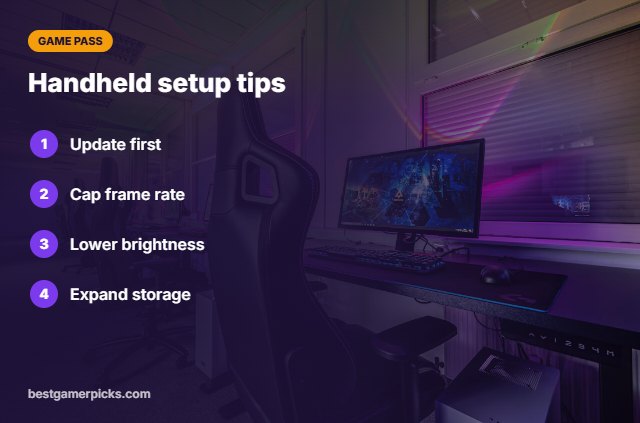
- Update the system and drivers before your first session.
- Cap the frame rate to save battery in demanding games.
- Lower screen brightness when you are on battery.
- Add a microSD card or bigger SSD for large libraries.
Here are quick answers about the best handheld for game pass.
Frequently Asked Questions
What is the best handheld for game pass?
Our pick for the best handheld for game pass is the ASUS ROG Xbox Ally X, followed by the ASUS ROG Xbox Ally (Best Value Windows).
Can I download Game Pass games on a handheld?
Yes on Windows handhelds with PC Game Pass titles.
Does Steam Deck run Game Pass?
Only through cloud streaming in a browser, not natively.
Which Game Pass plan do I need?
Check current plans; cloud gaming and PC access vary by tier.
Final Verdict
Our final pick for the best handheld for game pass is the ASUS ROG Xbox Ally X. Choose the ASUS ROG Xbox Ally if you want a lower-cost Xbox handheld, or the Lenovo Legion Go 2 if you want an 8.8-inch OLED.
Related Guides
More handheld gaming guides:
- Best Handheld for Xbox Game Pass Ultimate
- Best Handheld for Steam Games
- Best Handheld for PC Games on the Go
- Best Handheld for Retro and PC Games
- Best Monitor Light Bar
- Best Headset Amp for Xbox Controller
Product details are based on manufacturer specifications at the time of writing. Prices and availability change often, so check Amazon for the latest price.






Write Your Review
No reviews yet. Be the first to share your experience!