

BestGamerPicks is reader-supported. As an Amazon Associate we earn from qualifying purchases. This does not change our recommendations. Learn more.
The best monitor light bar sits on top of your screen and lights your desk without reflecting on the display.
Light bars differ in brightness, fit for curved screens, controls and extras like RGB backlights. We compared popular models to find the best monitor light bar for gaming and work.
Quick Answer: The Best Monitor Light Bar
- Best Overall: BenQ ScreenBar Halo 2 LED Monitor Light Bar with Wireless Controller
- Best Value: Quntis Computer Monitor Lamp, Eye-Care USB Light Bar
- Best Wide Coverage: BenQ ScreenBar Pro LED Monitor Light Bar, Ultrawide Lighting, Motion Sensor
- Best RGB Backlight: Quntis ScreenLinear RGB Monitor Light Bar with Remote
- Best Minimal Design: Xiaomi Mi Computer Monitor Light Bar
- Best for Curved: ONWAY Curved Monitor Light Bar with Wireless Remote and Auto-Dimming
- Best Smart Home: YEELIGHT Monitor Light Bar with RGB Backlight, Ra98, Works with Matter
- Best Budget: YEELIGHT Monitor Light Bar, 250lm Eye-Care Computer Lamp
The BenQ ScreenBar Halo 2 is the best monitor light bar overall, with a backlight and wireless controller. The Quntis Monitor Light Bar is the value pick and the BenQ ScreenBar Pro covers wide desks.
Best Monitor Light Bar Comparison Table
| Product | Best For | Type | Key Feature | Buy |
|---|---|---|---|---|
| BenQ ScreenBar Halo 2 | Best Overall | Premium monitor light bar | Front light + backlight + motion sensor | Check Price |
| Quntis Monitor Light Bar | Best Value | Budget monitor light bar | Auto-dimming, flicker-free | Check Price |
| BenQ ScreenBar Pro | Best Wide Coverage | Wide-coverage monitor light bar | 1000+ lx center, fits 1000–1800R curves | Check Price |
| Quntis ScreenLinear RGB | Best RGB Backlight | RGB monitor light bar | 4 color temps + RGB backlight | Check Price |
| Xiaomi Mi Monitor Light Bar | Best Minimal Design | Minimal monitor light bar | Magnetic mount, wireless dial | Check Price |
| ONWAY Curved Monitor Light Bar | Best for Curved | Curved monitor light bar | Touch remote, auto-dimming | Check Price |
| Yeelight RGB Monitor Light Bar (Matter) | Best Smart Home | Smart RGB monitor bar | Matter support + RGB backlight | Check Price |
| Yeelight Monitor Light Bar | Best Budget | Budget monitor light bar | Stepless dimming and color temp | Check Price |
The 8 Best Monitor Light Bars
Each best monitor light bar pick lights the desk without screen glare.

BenQ ScreenBar Halo 2 LED Monitor Light Bar with Wireless Controller
1The ScreenBar Halo 2 lights your desk without glare and adds a backlight to soften screen contrast.
👍 Pros & Cons
Pros
- No screen glare
- Backlight reduces contrast
- Motion sensor auto on/off
Cons
- Premium price
- No RGB colors
📄 Detailed Review
- Front light: ASYM-Light, 18° anti-glare
- Backlight: Wide adjustable ambient
- Control: Wireless controller, motion sensor
BenQ’s asymmetric optics aim light at the desk, not the screen, and the wireless dial controller makes adjustments easy.
The best eye-comfort monitor light.

Quntis Computer Monitor Lamp, Eye-Care USB Light Bar
2Quntis’s USB light bar is the most popular budget monitor light, with auto-dimming and no screen glare.
👍 Pros & Cons
Pros
- Huge review base
- No screen glare
- Affordable
Cons
- No remote
- Not ideal for very curved screens
📄 Detailed Review
- Power: USB
- Features: Auto-dimming sensor
- Certifications: IEC/TR 62778, IEC/EN 62471
It is certified flicker-free and blue-light safe, and asymmetric optics keep light off the screen.
The value pick for any desk.

BenQ ScreenBar Pro LED Monitor Light Bar, Ultrawide Lighting, Motion Sensor
3The ScreenBar Pro lights a wide desk area and fits curved monitors, a strong choice for ultrawides.
👍 Pros & Cons
Pros
- Very wide, bright coverage
- Fits curved monitors
- Ultrasonic motion sensor
Cons
- No backlight
- Premium price
📄 Detailed Review
- Brightness: 1000+ lx center
- Coverage: 33″ × 20″ area
- Fit: Flat and 1000–1800R curved
Its clamp handles monitors 0.17 to 2.56 inches thick and curvatures from 1000R to 1800R.
Great for wide desks.

Quntis ScreenLinear RGB Monitor Light Bar with Remote
4Quntis ScreenLinear RGB combines task lighting with an RGB backlight for larger monitors.
👍 Pros & Cons
Pros
- RGB backlight
- Fits many monitor types
- Premium aluminum
Cons
- Larger bar
- RGB modes are basic
📄 Detailed Review
- Fit: Flat, curved, ultrawide
- Control: Remote, 100 brightness levels
- Build: Aluminum alloy
The remote adjusts four color temperatures and brightness, while the backlight adds gaming ambiance.
A good mix of work and play lighting.

Xiaomi Mi Computer Monitor Light Bar
5Xiaomi’s light bar is a clean, minimalist way to light your desk without screen glare.
👍 Pros & Cons
Pros
- Clean minimalist design
- No screen glare
- Easy install
Cons
- No backlight
- Not for heavy curves
📄 Detailed Review
- Mount: Magnetic clip
- Optics: Asymmetric
- Control: Wireless dial
A magnetic mount and wireless dial make it simple to install and adjust.
A design-focused pick.

ONWAY Curved Monitor Light Bar with Wireless Remote and Auto-Dimming
6ONWAY’s curved bar is built for curved gaming monitors, with a touch remote and auto-dimming.
👍 Pros & Cons
Pros
- Designed for curves
- Auto-dimming
- Camera base
Cons
- No RGB
- Remote needs charging/batteries
📄 Detailed Review
- Fit: Curved monitors
- Color temp: 3000–6500K stepless
- Control: Wireless touch remote
A camera base lets you mount a webcam on top.
A solid curved-screen choice.

YEELIGHT Monitor Light Bar with RGB Backlight, Ra98, Works with Matter
7Yeelight’s RGB bar adds Matter support and an RGB backlight to an accurate Ra98 front light.
👍 Pros & Cons
Pros
- Matter smart home support
- RGB backlight with sync features
- High color accuracy
Cons
- Pricier than basic bars
- App setup needed
📄 Detailed Review
- Front light: Ra98 color rendering
- Backlight: RGB
- Smart home: Matter, Alexa
It works with Alexa and other Matter platforms, so you can include it in room scenes.
Best smart-home monitor bar.
Check Yeelight RGB Monitor Light Bar (Matter) Price on Amazon

YEELIGHT Monitor Light Bar, 250lm Eye-Care Computer Lamp
8Yeelight’s monitor bar is an affordable, glare-free desk light with stepless control.
👍 Pros & Cons
Pros
- Affordable
- Stepless adjustment
- Good eye-care design
Cons
- No backlight
- Basic controls
📄 Detailed Review
- Brightness: 250 lm
- Control: Stepless dimming
- Glare: Asymmetric, no glare
It is a simple upgrade for a home office or gaming desk.
Good value.
How We Chose the Best Monitor Light Bar
To choose the best monitor light bar, we compared light bars on optics, brightness, monitor fit, controls and owner feedback.
For advice on screen lighting and eye strain from eye doctors, see the American Academy of Ophthalmology guide to computers and eye strain.
Product details in this guide are based on manufacturer specifications and verified owner feedback, not in-house lab testing. Read more on our How We Test page.
Buying Guide: How to Choose the Best Monitor Light Bar
Keep these factors in mind when shopping for the best monitor light bar.
How monitor light bars work
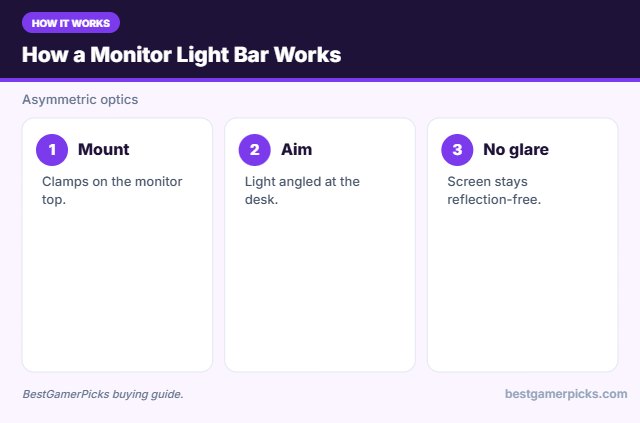
Monitor light bars use asymmetric optics to aim light down at your desk, not at the screen, so you get task lighting without glare.
Avoid screen glare
Position lights behind or above your screen, not in front of it. Light that shines on the display causes reflections that wash out the image.
Fit: monitor thickness and curve
Check the clamp range for your monitor’s top edge and whether the bar supports curved screens such as 1000R–1800R.
Brightness and color temperature
Lumens measure total light output. For ambiance, a few hundred lumens is plenty; for a main room light, look for 800 lumens or more. Warm white (2700–3000K) feels cozy; cool white (5000K+) feels alert.
Light Bar Setup Tips
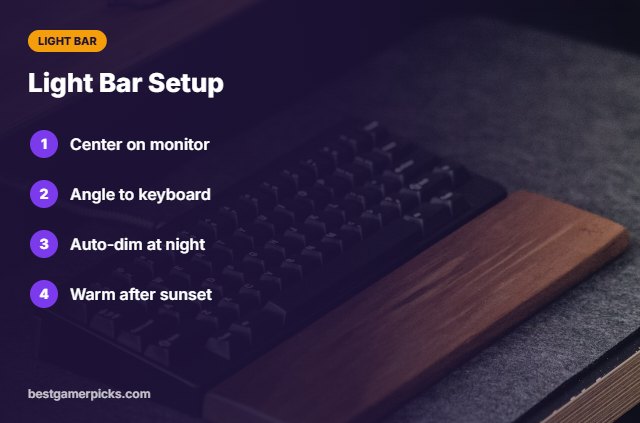
Get it right:
- Center the bar on the monitor.
- Angle light toward the keyboard.
- Use auto-dimming at night.
- Warm tones after sunset.
Here are quick answers about the best monitor light bar.
Frequently Asked Questions
What is the best monitor light bar?
The BenQ ScreenBar Halo 2 is the best monitor light bar overall, with the Quntis Monitor Light Bar as the value pick.
Do light bars cause glare?
Good ones use asymmetric optics to avoid it.
Do they fit curved monitors?
Check the clamp; some models support curves.
USB powered?
Most run from USB.
Final Verdict
Our final pick for the best monitor light bar is the BenQ ScreenBar Halo 2. Choose the Quntis Monitor Light Bar if you want great value, or the BenQ ScreenBar Pro for wide desks.
Related Guides
More desk lighting guides:
- Best Budget Monitor Light Bar
- Best Monitor Light Bar for Curved Monitor
- Best Monitor Light Bar for Eye Strain
- Best Monitor Light Bar for Ultrawide
- Best Desktop Speakers with Headphone Jack
- Best Ambilight Alternative
Product details are based on manufacturer specifications at the time of writing. Prices and availability change often, so check Amazon for the latest price.


Write Your Review
No reviews yet. Be the first to share your experience!