

BestGamerPicks is reader-supported. As an Amazon Associate we earn from qualifying purchases. This does not change our recommendations. Learn more.
The best smart lights for gaming setup builds combine voice control, scenes and game or screen sync with everyday usefulness.
We looked across brands for the best smart light in each role, from desk to room, and compared ecosystems to find the best smart lights for gaming setup builds.
Quick Answer: The Best Smart Lights for Gaming Setup
- Best Premium: Philips Hue Play Smart Light Bar Base Kit, 2-Pack
- Best Value Bars: Govee RGBIC Gaming Light Bars H6047 with Smart Controller
- Best Desk Light: BenQ ScreenBar Halo 2 LED Monitor Light Bar with Wireless Controller
- Best Wall: Govee Glide Hexa Light Panels, RGBIC Hexagon LED Wall Lights
- Best Console Sync: Govee HDMI 2.1 AI Sync Box 2, 8K/4K@144Hz, for 55-65″ TVs
- Best Hub-Free Bulbs: WiZ Connected Smart Light Bulbs, 2-Pack
- Best Touch Panels: Nanoleaf Shapes Triangle Smarter Kit with 2 Expansions
- Best Matter Light Bar: YEELIGHT Monitor Light Bar with RGB Backlight, Ra98, Works with Matter
Philips Hue Play bars are the best smart lights for gaming setup builds in a premium ecosystem. Govee Gaming Light Bars H6047 are the value pick and the BenQ ScreenBar Halo 2 handles desk lighting.
Best Smart Lights for Gaming Setup Comparison Table
| Product | Best For | Type | Key Feature | Buy |
|---|---|---|---|---|
| Philips Hue Play Light Bar (2-Pack) | Best Premium | Hue light bars | Hue Sync with PC, TV and games | Check Price |
| Govee Gaming Light Bars H6047 | Best Value Bars | RGBIC gaming light bars | Razer Chroma sync support | Check Price |
| BenQ ScreenBar Halo 2 | Best Desk Light | Premium monitor light bar | Front light + backlight + motion sensor | Check Price |
| Govee Glide Hexa Light Panels | Best Wall | RGBIC hexagon panels | Each edge lights in different colors | Check Price |
| Govee AI Sync Box 2 | Best Console Sync | HDMI sync box kit | HDMI 2.1 passthrough up to 4K 144Hz | Check Price |
| WiZ Smart Color Bulbs (2-Pack) | Best Hub-Free Bulbs | Wi-Fi smart bulbs | SpaceSense motion detection | Check Price |
| Nanoleaf Shapes Triangles | Best Touch Panels | Premium triangle panels | Modular, touch-reactive | Check Price |
| Yeelight RGB Monitor Light Bar (Matter) | Best Matter Light Bar | Smart RGB monitor bar | Matter support + RGB backlight | Check Price |
The 8 Best Smart Lights for Gaming Setups
Each best smart lights for gaming setup pick fills a role.
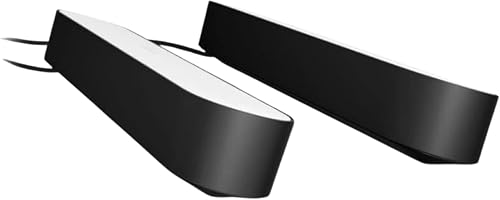
Philips Hue Play Smart Light Bar Base Kit, 2-Pack
1Hue Play bars are the classic premium gaming light bars, syncing to PC screens and HDMI sources in the Hue ecosystem.
👍 Pros & Cons
Pros
- Excellent color quality
- Hue Sync for PC games and movies
- Stand or mount behind screens
Cons
- Bridge required for sync
- Expensive
📄 Detailed Review
- Pack: 2 light bars + power
- Lighting: White and color ambiance
- Needs: Hue Bridge for full features
Place them behind a monitor or TV for bias lighting, or on shelves for wall washes. With a Bridge, Hue Sync matches them to on-screen action.
The premium standard for synced light bars.

Govee RGBIC Gaming Light Bars H6047 with Smart Controller
2Govee’s H6047 bars are built for desks and sync with Razer Chroma for in-game lighting.
👍 Pros & Cons
Pros
- Syncs with Razer Chroma
- Gaming-focused design
- Smart controller
Cons
- Requires PC software for Chroma
- Pricier than plain bars
📄 Detailed Review
- Lighting: RGBIC
- Sync: Razer Synapse 3 / Chroma
- Control: Smart controller + app
Pair them with Razer Synapse 3 to react to supported games alongside your keyboard and mouse.
The best gaming light bars for Razer users.

BenQ ScreenBar Halo 2 LED Monitor Light Bar with Wireless Controller
3The ScreenBar Halo 2 lights your desk without glare and adds a backlight to soften screen contrast.
👍 Pros & Cons
Pros
- No screen glare
- Backlight reduces contrast
- Motion sensor auto on/off
Cons
- Premium price
- No RGB colors
📄 Detailed Review
- Front light: ASYM-Light, 18° anti-glare
- Backlight: Wide adjustable ambient
- Control: Wireless controller, motion sensor
BenQ’s asymmetric optics aim light at the desk, not the screen, and the wireless dial controller makes adjustments easy.
The best eye-comfort monitor light.

Govee Glide Hexa Light Panels, RGBIC Hexagon LED Wall Lights
4Govee Glide Hexa panels are the most popular Nanoleaf alternative for hexagon wall lights.
👍 Pros & Cons
Pros
- Iconic gaming room look
- Layout designer in app
- Lower price than Nanoleaf
Cons
- Adhesive mounting needs prep
- Layout planning takes time
📄 Detailed Review
- Shape: Hexagon panels
- Lighting: RGBIC
- Music: 6 music modes
Design a layout in the app, and RGBIC edges create smooth flows between panels.
The best-value hexagon panels.

Govee HDMI 2.1 AI Sync Box 2, 8K/4K@144Hz, for 55-65″ TVs
5Govee’s AI Sync Box 2 reads the HDMI signal directly for precise lighting with 4K 144Hz passthrough.
👍 Pros & Cons
Pros
- No camera on the TV
- Supports high refresh gaming
- Very accurate sync
Cons
- Only syncs HDMI devices, not TV apps
- Pricier than camera kits
📄 Detailed Review
- HDMI: 2.1, 8K / 4K 144Hz
- Strip: RGBWIC
- TV size: 55–65 in
Plug consoles or a PC into the box, and it analyzes the video to drive the RGBWIC strip. There is no camera to mount.
Best for console gamers who want accurate sync.

WiZ Connected Smart Light Bulbs, 2-Pack
6WiZ bulbs use SpaceSense to detect motion via Wi-Fi and turn lights on automatically.
👍 Pros & Cons
Pros
- Motion detection via Wi-Fi
- No hub needed
- Affordable
Cons
- Wi-Fi only
- Smaller effect library
📄 Detailed Review
- Control: WiZ app, Alexa, Google
- Feature: SpaceSense motion
- Pack: 2 bulbs
They are made by the same group as Philips Hue but need no hub.
Good for motion automations.

Nanoleaf Shapes Triangle Smarter Kit with 2 Expansions
7Nanoleaf Shapes Triangles are the original premium triangle wall lights, with touch and rhythm features.
👍 Pros & Cons
Pros
- Premium modular design
- Touch reactive panels
- Large ecosystem
Cons
- Expensive
- Few reviews on this bundle
📄 Detailed Review
- Bundle: Smarter Kit + 2 expansions
- Lighting: RGBW, 16M+ colors
- Features: Touch, Rhythm, screen mirror
The modular design lets you build symmetrical or abstract layouts, and Nanoleaf’s desktop app can mirror your screen.
The premium triangle pick.

YEELIGHT Monitor Light Bar with RGB Backlight, Ra98, Works with Matter
8Yeelight’s RGB bar adds Matter support and an RGB backlight to an accurate Ra98 front light.
👍 Pros & Cons
Pros
- Matter smart home support
- RGB backlight with sync features
- High color accuracy
Cons
- Pricier than basic bars
- App setup needed
📄 Detailed Review
- Front light: Ra98 color rendering
- Backlight: RGB
- Smart home: Matter, Alexa
It works with Alexa and other Matter platforms, so you can include it in room scenes.
Best smart-home monitor bar.
Check Yeelight RGB Monitor Light Bar (Matter) Price on Amazon
How We Chose the Best Smart Lights for Gaming Setup
To choose the best smart lights for gaming setup, we compared smart lights across brands for each role and ecosystem.
For background on LED efficiency and lifespan, see the U.S. Department of Energy guide to LED lighting.
Product details in this guide are based on manufacturer specifications and verified owner feedback, not in-house lab testing. Read more on our How We Test page.
Buying Guide: How to Choose the Best Smart Lights for Gaming Setup
Keep these factors in mind when shopping for the best smart lights for gaming setup.
Wi-Fi, Bluetooth and Matter
Bluetooth-only lights work from nearby phones. Wi-Fi lights add voice control and schedules. Matter support lets lights work across Apple Home, Google Home and Alexa.
Camera sync vs. HDMI sync
Camera kits watch the screen, so they work with every source, including TV apps. HDMI sync boxes read the video signal directly, which is more accurate, but only for devices plugged into the box.
Automations for gamers
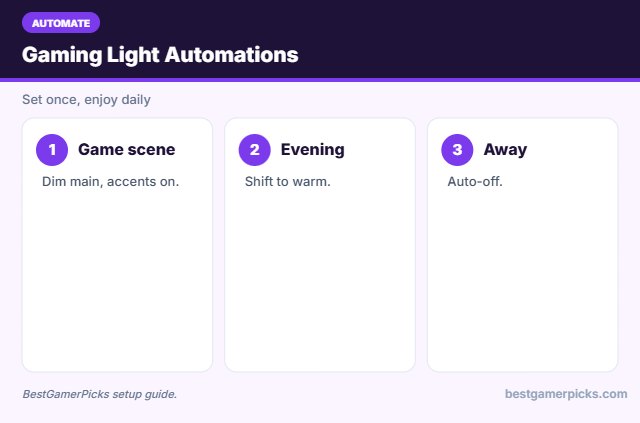
Set a gaming scene that dims main lights and turns on accents, schedule warm light at night, and use motion or presence to switch lights off.
Warm light for evening play
Warm, dim light in the evening feels more relaxing than bright cool light. Many smart lights let you schedule a shift to warm tones after sunset.
Smart Setup Tips
Make it seamless:
- Create a “Game” scene.
- Use voice for quick changes.
- Schedule warm light.
- Group lights by room.
Here are quick answers about the best smart lights for gaming setup.
Frequently Asked Questions
What are the best smart lights for gaming setup builds?
Philips Hue Play bars are the best smart lights for gaming setup builds in a premium ecosystem, with Govee H6047 bars for value.
Which ecosystem should I choose?
Pick based on your voice assistant and sync needs.
Is Matter important?
It future-proofs cross-platform control.
Can smart lights save energy?
Schedules and auto-off help.
Final Verdict
Our final pick for the best smart lights for gaming setup is the Philips Hue Play Light Bar (2-Pack). Choose the Govee Gaming Light Bars H6047 if you want value, or the BenQ ScreenBar Halo 2 for desk lighting.
Related Guides
More gaming room lighting guides:
- Best RGB Lights for TV
- Best RGB Lights for Gaming Room
- Best RGB Wall Lights for Gaming Room
- Best RGB Wall Panels
- Best Light Strips for Gaming Desk Edge
- Best Neon Sign for Streaming Background
Product details are based on manufacturer specifications at the time of writing. Prices and availability change often, so check Amazon for the latest price.









Write Your Review
No reviews yet. Be the first to share your experience!