

BestGamerPicks is reader-supported. As an Amazon Associate we earn from qualifying purchases. This does not change our recommendations. Learn more.
Our best external gpu for laptop picks pair an enclosure with a desktop graphics card so your laptop can game faster at a desk.
You buy the enclosure and the graphics card separately in most cases. We compared laptop compatibility, connection speed, power supply and owner feedback to find the best external gpu for laptop.
Quick Answer: The Best External GPU for Laptop
- Best Overall: Razer Core X V2 External Graphics Enclosure (eGPU), Thunderbolt 5, Compatible with Windows 11 Thunderbolt 4/5 and USB4
- Best Value: AOOSTAR AG02 OCuLink eGPU Dock with 800W PSU and USB4 Port, External GPU Docking Station
- Best Flexible Dock: MINISFORUM DEG2 USB4 V2 (TBT5 Compatible) and OCuLink eGPU Dock, 80Gbps, M.2 NVMe Slot
- Best Premium: Sonnet Breakaway Box 850 T5 Thunderbolt 5 USB4 eGPU Enclosure, 850W
- Best Budget: MINISFORUM DEG1 Docking Station, OCuLink 4i (PCIe4.0x4), Force Power On, ATX/SFX Power Supply
- Best Thunderbolt 5 Budget: AOOSTAR EG02 External GPU Docking Station, Dual Thunderbolt 5 + OCuLink (PCIe4.0x4), ATX/SFX Power Supply
- Best for Older Laptops: Sonnet Breakaway Box 750ex Thunderbolt 3 eGPU Enclosure 750W
The Razer Core X V2 is our top pick. Also consider the AOOSTAR AG02 (Best Value) and the Minisforum DEG2 (Best Flexible Dock).
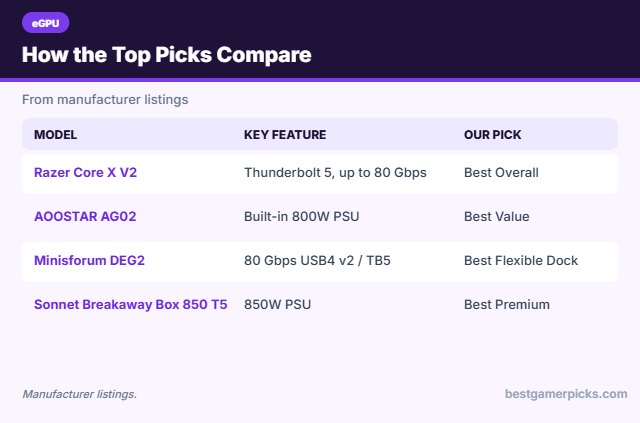
Best External GPU for Laptop Comparison Table
| Product | Best For | Type | Key Feature | Buy |
|---|---|---|---|---|
| Razer Core X V2 | Best Overall | Thunderbolt 5 eGPU enclosure | Thunderbolt 5, up to 80 Gbps (listed) | Check Price |
| AOOSTAR AG02 | Best Value | OCuLink + USB4 eGPU dock | Built-in 800W PSU | Check Price |
| Minisforum DEG2 | Best Flexible Dock | USB4 v2 + OCuLink dock | 80 Gbps USB4 v2 / TB5 compatible | Check Price |
| Sonnet Breakaway Box 850 T5 | Best Premium | Premium Thunderbolt 5 eGPU | 850W PSU and built-in dock ports | Check Price |
| Minisforum DEG1 | Best Budget | OCuLink eGPU dock | OCuLink PCIe 4.0 x4 | Check Price |
| AOOSTAR EG02 | Best Thunderbolt 5 Budget | Thunderbolt 5 + OCuLink dock | Dual Thunderbolt 5 ports | Check Price |
| Sonnet Breakaway Box 750ex | Best for Older Laptops | Thunderbolt 3 eGPU | 750W PSU, proven design | Check Price |
The 7 Best External GPUs for Laptops
Each best external gpu for laptop pick below works with laptops over Thunderbolt, USB4 or OCuLink.

Razer Core X V2 External Graphics Enclosure (eGPU), Thunderbolt 5, Compatible with Windows 11 Thunderbolt 4/5 and USB4
1The Razer Core X V2 is a Thunderbolt 5 eGPU enclosure that fits desktop graphics cards up to four slots wide.
👍 Pros & Cons
Pros
- Thunderbolt 5 bandwidth
- Fits large desktop cards
- Tool-free GPU install
Cons
- Expensive
- Check what PSU is included before buying
📄 Detailed Review
- Link: Thunderbolt 5 (TB4/USB4 compatible)
- GPU size: Up to 4 slots wide (listed)
- Power: ATX PSU, swappable (see listing)
It works with Thunderbolt 4 and 5 laptops and USB4 handhelds, and the included Thunderbolt 5 cable gives up to 80 Gbps on supported laptops.
Best plug-and-play eGPU enclosure.

AOOSTAR AG02 OCuLink eGPU Dock with 800W PSU and USB4 Port, External GPU Docking Station
2The AOOSTAR AG02 is an eGPU dock with a built-in 800W power supply, a PCIe x16 slot and both OCuLink and USB4 connections.
👍 Pros & Cons
Pros
- Power supply included
- OCuLink for higher bandwidth
- USB4 option too
Cons
- OCuLink is not hot-pluggable
- Large high-end cards may need adapters
📄 Detailed Review
- Links: OCuLink + USB4
- PSU: 800W built in
- Power: 3 x 8-pin GPU connectors
OCuLink gives a faster PCIe link if your laptop or handheld has the port, while USB4 covers more devices.
Best value eGPU with built-in PSU.

MINISFORUM DEG2 USB4 V2 (TBT5 Compatible) and OCuLink eGPU Dock, 80Gbps, M.2 NVMe Slot
3The Minisforum DEG2 adds an 80 Gbps USB4 v2 link that works with Thunderbolt 5, plus OCuLink and an M.2 storage slot.
👍 Pros & Cons
Pros
- Thunderbolt 5 class speed
- OCuLink option
- Built-in M.2 slot
Cons
- PSU not included
- Open frame needs care
📄 Detailed Review
- Links: USB4 v2 (TB5 compatible) + OCuLink
- Extras: M.2 2280 slot
- PSU: ATX/SFX (not included)
One cable can carry data, display and laptop charging in USB4 mode.
Best flexible eGPU dock.
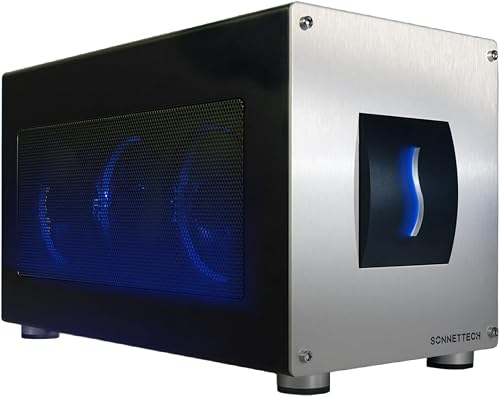
Sonnet Breakaway Box 850 T5 Thunderbolt 5 USB4 eGPU Enclosure, 850W
4The Sonnet Breakaway Box 850 T5 is a Thunderbolt 5 enclosure with an 850W power supply and room for triple-wide cards.
👍 Pros & Cons
Pros
- Big built-in power supply
- Fits triple-wide cards
- Doubles as a dock
Cons
- Very expensive
- Large enclosure
📄 Detailed Review
- Link: Thunderbolt 5, 80 Gbps
- PSU: 850W built in
- Extras: TB5 port, 3x USB-A, 5GbE
It also adds a Thunderbolt 5 port, USB-A ports and 5 Gigabit Ethernet, so it doubles as a desk dock.
Best premium eGPU.

MINISFORUM DEG1 Docking Station, OCuLink 4i (PCIe4.0x4), Force Power On, ATX/SFX Power Supply
5The Minisforum DEG1 is a compact open dock that connects a desktop GPU over OCuLink with a PCIe 4.0 x4 link.
👍 Pros & Cons
Pros
- Cheapest way into eGPU
- Fast OCuLink link
- Tiny, open design
Cons
- Needs an OCuLink port
- PSU and cables not included
📄 Detailed Review
- Link: OCuLink 4i (PCIe 4.0 x4)
- PSU: ATX/SFX (not included)
- Size: About 14 cm long (listed)
It is very cheap, but you supply your own power supply and need a device with an OCuLink port.
Best budget OCuLink dock.

AOOSTAR EG02 External GPU Docking Station, Dual Thunderbolt 5 + OCuLink (PCIe4.0x4), ATX/SFX Power Supply
6The AOOSTAR EG02 adds Thunderbolt 5 and OCuLink connections to an open eGPU dock that uses your own ATX or SFX power supply.
👍 Pros & Cons
Pros
- Thunderbolt 5 and OCuLink
- Affordable for TB5
- Open-frame design
Cons
- Power supply sold separately
- Few reviews so far
📄 Detailed Review
- Links: Thunderbolt 5 + OCuLink
- PSU: ATX/SFX (not included)
- Use: Laptops and mini PCs
It is a budget route to Thunderbolt 5 eGPU speeds.
Budget Thunderbolt 5 eGPU dock.

Sonnet Breakaway Box 750ex Thunderbolt 3 eGPU Enclosure 750W
7The Breakaway Box 750ex is an older Thunderbolt 3 enclosure with a 750W supply for cards up to 312mm long.
👍 Pros & Cons
Pros
- Power supply included
- Proven enclosure
- Works with older Thunderbolt laptops
Cons
- Thunderbolt 3 bandwidth
- Older design
📄 Detailed Review
- Link: Thunderbolt 3
- PSU: 750W built in
- GPU length: Up to 312mm (listed)
It suits Thunderbolt 3 and 4 laptops that cannot use Thunderbolt 5.
Proven Thunderbolt 3 option.
How We Chose the Best External GPU for Laptop
To choose the best external gpu for laptop, we compared laptop compatibility, connection speed, power supply and owner feedback.
For the official Thunderbolt 4 and Thunderbolt 5 speed and charging specs, see the Intel Thunderbolt overview.
Product details in this guide are based on manufacturer specifications and verified owner feedback, not in-house lab testing. Read more on our How We Test page.
Buying Guide: How to Choose the Best External GPU for Laptop
Keep these factors in mind when shopping for the best external gpu for laptop.
What is an eGPU?
An external GPU enclosure holds a desktop graphics card and connects to a laptop over Thunderbolt, USB4 or OCuLink. It can add a lot of graphics power at a desk, but the link is slower than a desktop PCIe slot, so you lose some performance.
Thunderbolt vs. OCuLink
Thunderbolt 3/4 and USB4 are the most compatible, but bandwidth limits GPU performance. Thunderbolt 5 doubles the link speed. OCuLink gives a faster direct PCIe connection, but few laptops have the port and it does not carry USB or charging.
Thunderbolt 4, Thunderbolt 5 and USB-C docks
Thunderbolt docks offer the most bandwidth for multiple monitors and fast storage. Thunderbolt 5 doubles bandwidth over Thunderbolt 4. Plain USB-C docks are cheaper and work with more laptops, but display and data limits are lower.
Power supplies and card size
Some enclosures include a power supply and others need an ATX or SFX unit you buy separately. Check the maximum card length and the wattage your GPU needs before you buy.
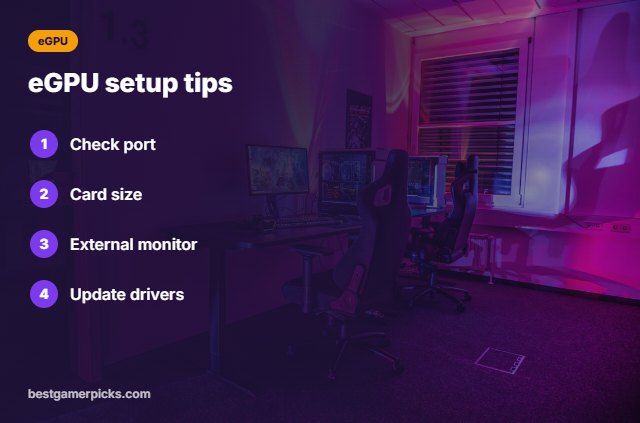
eGPU setup tips
Before you buy:
- Check your laptop’s port: Thunderbolt, USB4 or OCuLink.
- Check the card length and power needs.
- Use an external monitor for the best speed.
- Update the laptop BIOS and GPU drivers.
Here are quick answers about the best external gpu for laptop.
Frequently Asked Questions
What is the best external gpu for laptop?
Our pick for the best external gpu for laptop is the Razer Core X V2, followed by the AOOSTAR AG02 (Best Value).
Can any laptop use an external GPU?
It needs Thunderbolt, USB4 or an OCuLink port.
How much performance do you lose?
It depends on the link; Thunderbolt 3/4 loses the most.
Can I use the laptop screen?
Yes, but an external monitor is faster.
Final Verdict
Our final pick for the best external gpu for laptop is the Razer Core X V2. Choose the AOOSTAR AG02 if you want more value with a power supply included, or the Minisforum DEG2 if your laptop has USB4 v2 or OCuLink.
Related Guides
More gaming laptop accessory guides:
- Best Egpu Enclosure
- Best Laptop Dock for Gaming Laptop
- Best Laptop Docking Station for Dual Monitors
- Best Thunderbolt 5 Dock
- Best Compact Soundbar for PC
- Best Travel Router for Gaming Laptop
Product details are based on manufacturer specifications at the time of writing. Prices and availability change often, so check Amazon for the latest price.









Write Your Review
No reviews yet. Be the first to share your experience!