

BestGamerPicks is reader-supported. As an Amazon Associate we earn from qualifying purchases. This does not change our recommendations. Learn more.
Our best laptop dock for gaming laptop picks connect your monitor, keyboard, mouse, Ethernet and storage with one cable when you sit down at your desk.
Most gaming laptops still need their own charger for full speed, so dock charging is a bonus. We compared connection type, display support, ports and owner feedback to find the best laptop dock for gaming laptop.
Quick Answer: The Best Laptop Dock for Gaming Laptop
- Best Overall: CalDigit TS4 18 Port Thunderbolt 4 Dock, 98W Charging, 2.5GbE LAN, 8K
- Best Value Thunderbolt: Plugable Thunderbolt 4 Dock with 100W Charging, Dual Monitor, Thunderbolt Certified
- Best Thunderbolt 5: CalDigit TS5 Thunderbolt 5 Dock, 15 Ports, 140W Host Charging, 2.5Gb LAN
- Best USB-C Dock: Anker Prime Docking Station, 14-in-1 Laptop Docking Station Dual Monitor, 160W Max Output
- Best for High-Refresh Monitors: Kensington SD5010T5 Thunderbolt 5 Docking Station with 140W PD, Three 4K Displays
- Best High-Power Charging: Lenovo ThinkPad Thunderbolt 5 Smart Dock 7500, 120Gbps, 180W Power Delivery
- Best Budget: Anker Laptop Docking Station Dual Monitor, 8-in-1 USB C Hub with Dual 4K HDMI, 85W PD, Ethernet
- Best for Dell Laptops: Dell WD19S 180W Docking Station (130W Power Delivery) USB-C, HDMI, Dual DisplayPort
The CalDigit TS4 is our top pick. Also consider the Plugable Thunderbolt 4 Dock (Best Value Thunderbolt) and the CalDigit TS5 (Best Thunderbolt 5).
Best Laptop Dock for Gaming Laptop Comparison Table
| Product | Best For | Type | Key Feature | Buy |
|---|---|---|---|---|
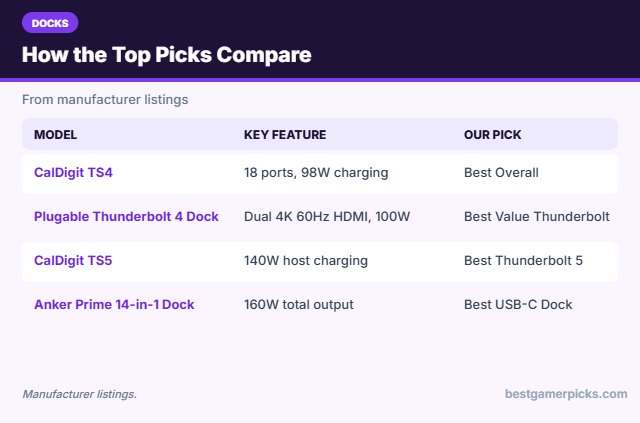
| CalDigit TS4 | Best Overall | Thunderbolt 4 dock | 18 ports, 98W charging | Check Price |
| Plugable Thunderbolt 4 Dock | Best Value Thunderbolt | Thunderbolt 4 dock | Dual 4K 60Hz HDMI, 100W | Check Price |
| CalDigit TS5 | Best Thunderbolt 5 | Thunderbolt 5 dock | 140W host charging, 3 downstream TB5 | Check Price |
| Anker Prime 14-in-1 Dock | Best USB-C Dock | USB-C dock | 160W total output | Check Price |
| Kensington SD5010T5 | Best for High-Refresh Monitors | Thunderbolt 5 dock | 3x 4K 144Hz on Windows (listed) | Check Price |
| Lenovo ThinkPad Thunderbolt 5 Smart Dock 7500 | Best High-Power Charging | Thunderbolt 5 dock | 180W power delivery | Check Price |
| Anker 8-in-1 Dual HDMI Dock | Best Budget | Budget dual-monitor dock | Dual HDMI with Ethernet | Check Price |
| Dell WD19S | Best for Dell Laptops | USB-C business dock | 130W power delivery | Check Price |
The 8 Best Laptop Docks for Gaming Laptops
Each best laptop dock for gaming laptop pick below turns a gaming laptop into a one-cable desk setup.

CalDigit TS4 18 Port Thunderbolt 4 Dock, 98W Charging, 2.5GbE LAN, 8K
1The CalDigit TS4 is an 18-port Thunderbolt 4 dock with 98W charging, 2.5GbE and support for a single 8K or dual 6K displays.
👍 Pros & Cons
Pros
- 18 ports
- 2.5GbE Ethernet
- Works with TB3, TB4, USB4 and USB-C
Cons
- Expensive
- 98W is not enough for full gaming laptop power
📄 Detailed Review
- Link: Thunderbolt 4
- Charging: 98W (listed)
- Displays: Single 8K or dual 6K (listed)
It is a long-time favorite for a clean single-cable desk setup.
Best Thunderbolt 4 dock.

Plugable Thunderbolt 4 Dock with 100W Charging, Dual Monitor, Thunderbolt Certified
2The Plugable Thunderbolt 4 dock offers dual 4K 60Hz HDMI outputs, 100W charging and 13 ports without drivers.
👍 Pros & Cons
Pros
- Driverless dual 4K on Windows
- Intel certified
- Good value
Cons
- macOS dual display limited
- 100W charging only
📄 Detailed Review
- Link: Thunderbolt 4 (TB5/USB4 compatible)
- Displays: Dual 4K 60Hz or single 8K (listed)
- Charging: 100W (listed)
It is a strong value Thunderbolt dock for Windows gaming laptops.
Best value Thunderbolt dock.

CalDigit TS5 Thunderbolt 5 Dock, 15 Ports, 140W Host Charging, 2.5Gb LAN
3The CalDigit TS5 is a 15-port Thunderbolt 5 dock with 140W host charging and three downstream Thunderbolt 5 ports.
👍 Pros & Cons
Pros
- Thunderbolt 5 speed
- 140W host charging
- Three downstream TB5 ports
Cons
- Needs TB5 host for full speed
- Pricey
📄 Detailed Review
- Link: Thunderbolt 5 / USB4 v2
- Charging: 140W host (listed)
- Ports: 15, incl. 3 downstream TB5
It is a strong upgrade for Thunderbolt 5 laptops that want fast storage and multiple displays.
Best Thunderbolt 5 dock.

Anker Prime Docking Station, 14-in-1 Laptop Docking Station Dual Monitor, 160W Max Output
4The Anker Prime 14-in-1 dock offers 160W of total output, dual HDMI and many 10Gbps ports.
👍 Pros & Cons
Pros
- Lots of ports
- High total charging output
- Works with USB-C and Thunderbolt laptops
Cons
- Dual display limited to 2K or 1080p on many laptops
- Not a Thunderbolt dock
📄 Detailed Review
- Link: USB-C / USB4 / Thunderbolt
- Displays: Dual HDMI (resolution depends on laptop)
- Charging: 160W total (listed)
Dual-screen resolution depends on your laptop’s DisplayPort version, so check the listing details.
Best high-power USB-C dock.

Kensington SD5010T5 Thunderbolt 5 Docking Station with 140W PD, Three 4K Displays
5The Kensington SD5010T5 is a 13-in-1 Thunderbolt 5 dock that can drive three 4K monitors at 144Hz on Windows.
👍 Pros & Cons
Pros
- High-refresh triple 4K
- SD card readers
- 140W charging
Cons
- Fewer reviews so far
- Pricey
📄 Detailed Review
- Link: Thunderbolt 5
- Charging: 140W PD (listed)
- Displays: 3x 4K 144Hz or 2x 8K (Windows, listed)
It suits gamers who want high-refresh external displays from one cable.
Best Thunderbolt 5 dock for high-refresh monitors.

Lenovo ThinkPad Thunderbolt 5 Smart Dock 7500, 120Gbps, 180W Power Delivery
6Lenovo’s Thunderbolt 5 Smart Dock 7500 offers up to 180W of PD 3.1 charging, HDMI 2.1, DisplayPort 2.1 and 2.5GbE.
👍 Pros & Cons
Pros
- 180W charging, high for a dock
- HDMI 2.1 and DP 2.1
- High-refresh multi-monitor support
Cons
- Business-focused features
- Pricey
📄 Detailed Review
- Link: Thunderbolt 5 (up to 120 Gbps listed)
- Charging: 180W PD 3.1 (listed)
- Displays: Up to four monitors (listed)
Its higher charging limit helps gaming laptops that support USB-C power.
Highest-power Thunderbolt 5 dock.
Check Lenovo ThinkPad Thunderbolt 5 Smart Dock 7500 Price on Amazon

Anker Laptop Docking Station Dual Monitor, 8-in-1 USB C Hub with Dual 4K HDMI, 85W PD, Ethernet
7The Anker 8-in-1 dock adds two HDMI outputs, Ethernet, SD slots and 85W pass-through charging.
👍 Pros & Cons
Pros
- Huge owner base
- Cheap dual-monitor option
- Ethernet port
Cons
- macOS mirrors only
- Dual screens at 30Hz
📄 Detailed Review
- Displays: Dual HDMI (4K30 each, 4K60 single, listed)
- Charging: 85W pass-through (listed)
- Extras: Ethernet, SD
It is the cheapest reliable way to add two monitors to a Windows laptop, though dual 4K runs at 30Hz.
Best budget dual-monitor dock.

Dell WD19S 180W Docking Station (130W Power Delivery) USB-C, HDMI, Dual DisplayPort
8The Dell WD19S is a USB-C dock with HDMI, two DisplayPort outputs and up to 130W delivery to Dell laptops.
👍 Pros & Cons
Pros
- Higher charging for Dell laptops
- DisplayPort outputs
- Common in offices
Cons
- Best with Dell laptops
- Mixed owner ratings
📄 Detailed Review
- Charging: 130W to Dell laptops (listed)
- Displays: HDMI + dual DisplayPort
- Link: USB-C
It is a good match for Dell and Alienware owners who want DisplayPort monitors.
Best for Dell gaming laptops.
How We Chose the Best Laptop Dock for Gaming Laptop
To choose the best laptop dock for gaming laptop, we compared connection type, display support, ports and owner feedback.
For the official Thunderbolt 4 and Thunderbolt 5 speed and charging specs, see the Intel Thunderbolt overview.
Product details in this guide are based on manufacturer specifications and verified owner feedback, not in-house lab testing. Read more on our How We Test page.
Buying Guide: How to Choose the Best Laptop Dock for Gaming Laptop
Keep these factors in mind when shopping for the best laptop dock for gaming laptop.
Thunderbolt 4, Thunderbolt 5 and USB-C docks
Thunderbolt docks offer the most bandwidth for multiple monitors and fast storage. Thunderbolt 5 doubles bandwidth over Thunderbolt 4. Plain USB-C docks are cheaper and work with more laptops, but display and data limits are lower.
Charging gaming laptops from a dock
Most gaming laptops need their barrel or high-wattage charger for full performance. A dock’s USB-C power delivery (often 85 to 140W) can top up the battery or run light tasks, but plug in the original charger for gaming.
Dual monitors from one port
Windows laptops can run two screens from one USB-C port using MST or DisplayLink docks. Macs do not support MST, so they need Thunderbolt or DisplayLink for two external screens. Check your laptop’s port supports DisplayPort Alt Mode.
Hub or dock?
A hub is small and bus-powered, good for travel. A dock has its own power supply, more ports and better multi-monitor support, which suits a permanent desk setup.
Dock setup tips
Get a clean setup:
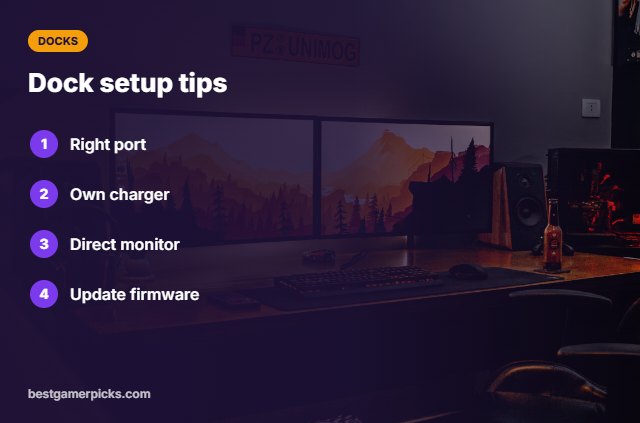
- Use the port marked with a Thunderbolt or DisplayPort icon.
- Keep the laptop’s own charger plugged in for gaming.
- Connect your main gaming monitor directly to the laptop’s HDMI or DP port if possible.
- Update the dock firmware and laptop drivers.
Here are quick answers about the best laptop dock for gaming laptop.
Frequently Asked Questions
What is the best laptop dock for gaming laptop?
Our pick for the best laptop dock for gaming laptop is the CalDigit TS4, followed by the Plugable Thunderbolt 4 Dock (Best Value Thunderbolt).
Can a dock charge a gaming laptop?
Some can top up the battery, but use the original charger for gaming.
Will a dock add lag?
Not for USB devices; connect your main monitor directly for the lowest latency.
Thunderbolt or USB-C dock?
Thunderbolt offers more bandwidth if your laptop supports it.
Final Verdict
Our final pick for the best laptop dock for gaming laptop is the CalDigit TS4. Choose the Plugable Thunderbolt 4 Dock if you want Thunderbolt for less, or the CalDigit TS5 if your laptop has Thunderbolt 5.
Related Guides
More gaming laptop accessory guides:
- Best External Gpu for Laptop
- Best Laptop Docking Station for Dual Monitors
- Best Egpu Enclosure
- Best Thunderbolt 5 Dock
- Best Wireless Rear Speakers for Gaming
- Best Monitor Light Bar for Eye Strain
Product details are based on manufacturer specifications at the time of writing. Prices and availability change often, so check Amazon for the latest price.









Write Your Review
No reviews yet. Be the first to share your experience!