

BestGamerPicks is reader-supported. As an Amazon Associate we earn from qualifying purchases. This does not change our recommendations. Learn more.
The best monitor light bar with RGB backlight lights your desk for work and adds colorful bias lighting behind the screen for gaming.
RGB backlights range from basic preset modes to smart-home sync. We compared front light quality, RGB features and fit to find the best monitor light bar with RGB backlight.
Quick Answer: The Best Monitor Light Bar with RGB Backlight
- Best Overall: Quntis ScreenLinear RGB Monitor Light Bar with Remote
- Best Smart Home: YEELIGHT Monitor Light Bar with RGB Backlight, Ra98, Works with Matter
- Best Budget: Quntis 15.7″ Monitor Light Bar with 24 RGB Modes
- Best for Ultrawides: Quntis ScreenLinear Curved Monitor Light Bar with RGB Backlight for 34″+
- Best White Backlight: BenQ ScreenBar Halo 2 LED Monitor Light Bar with Wireless Controller
- Best Synced Alternative: Govee Gaming Light for Monitor G1, RGBIC Backlight for 27-34″ PC Monitors
The Quntis ScreenLinear RGB is the best monitor light bar with RGB backlight for most desks. The Yeelight RGB bar adds Matter support and the Quntis 15.7″ RGB is the budget option.
Best Monitor Light Bar with RGB Backlight Comparison Table
| Product | Best For | Type | Key Feature | Buy |
|---|---|---|---|---|
| Quntis ScreenLinear RGB | Best Overall | RGB monitor light bar | 4 color temps + RGB backlight | Check Price |
| Yeelight RGB Monitor Light Bar (Matter) | Best Smart Home | Smart RGB monitor bar | Matter support + RGB backlight | Check Price |
| Quntis 15.7″ RGB Light Bar | Best Budget | Compact RGB monitor bar | Front light + independent RGB backlight | Check Price |
| Quntis ScreenLinear Curved RGB | Best for Ultrawides | Ultrawide curved light bar | Extends to 26″ with RGB backlight | Check Price |
| BenQ ScreenBar Halo 2 | Best White Backlight | Premium monitor light bar | Front light + backlight + motion sensor | Check Price |
| Govee Gaming Light G1 | Best Synced Alternative | Monitor sync backlight | Reads on-screen pixels via PC app | Check Price |
The 6 Best Monitor Light Bars with RGB Backlights
Each best monitor light bar with RGB backlight pick combines task and ambient light.

Quntis ScreenLinear RGB Monitor Light Bar with Remote
1Quntis ScreenLinear RGB combines task lighting with an RGB backlight for larger monitors.
👍 Pros & Cons
Pros
- RGB backlight
- Fits many monitor types
- Premium aluminum
Cons
- Larger bar
- RGB modes are basic
📄 Detailed Review
- Fit: Flat, curved, ultrawide
- Control: Remote, 100 brightness levels
- Build: Aluminum alloy
The remote adjusts four color temperatures and brightness, while the backlight adds gaming ambiance.
A good mix of work and play lighting.

YEELIGHT Monitor Light Bar with RGB Backlight, Ra98, Works with Matter
2Yeelight’s RGB bar adds Matter support and an RGB backlight to an accurate Ra98 front light.
👍 Pros & Cons
Pros
- Matter smart home support
- RGB backlight with sync features
- High color accuracy
Cons
- Pricier than basic bars
- App setup needed
📄 Detailed Review
- Front light: Ra98 color rendering
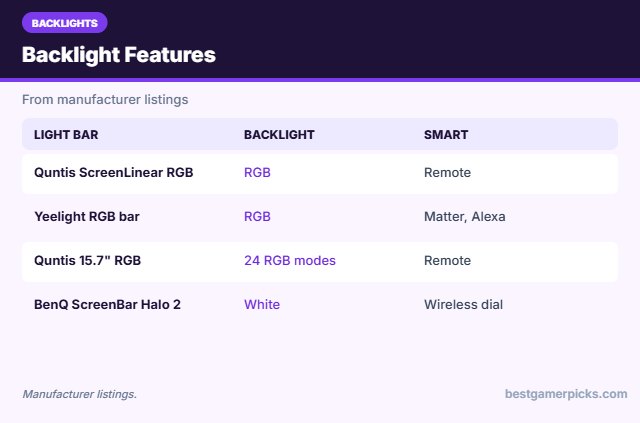
- Backlight: RGB
- Smart home: Matter, Alexa
It works with Alexa and other Matter platforms, so you can include it in room scenes.
Best smart-home monitor bar.
Check Yeelight RGB Monitor Light Bar (Matter) Price on Amazon

Quntis 15.7″ Monitor Light Bar with 24 RGB Modes
3This compact Quntis bar adds an RGB backlight to a high-CRI front light, at a low price.
👍 Pros & Cons
Pros
- Affordable RGB backlight
- High CRI front light
- Compact
Cons
- Short for big monitors
- Basic controls
📄 Detailed Review
- Length: 15.7 in
- Front light: 3000–6500K, CRI ≥ 95
- Backlight: 24 RGB modes
It suits 24 to 27-inch monitors on smaller desks.
The budget RGB light bar.

Quntis ScreenLinear Curved Monitor Light Bar with RGB Backlight for 34″+
4This Quntis bar is designed for large curved ultrawides, with front lighting plus RGB backlighting.
👍 Pros & Cons
Pros
- Covers ultrawide desks
- RGB backlight
- Foldable dual bar
Cons
- Large for small monitors
- Pricier than basic bars
📄 Detailed Review
- Fit: 34″+ curved ultrawides
- Length: Up to 26 in
- Lighting: Front light + RGB backlight
The foldable dual-bar design lets you angle light where you need it.
A strong ultrawide pick.

BenQ ScreenBar Halo 2 LED Monitor Light Bar with Wireless Controller
5The ScreenBar Halo 2 lights your desk without glare and adds a backlight to soften screen contrast.
👍 Pros & Cons
Pros
- No screen glare
- Backlight reduces contrast
- Motion sensor auto on/off
Cons
- Premium price
- No RGB colors
📄 Detailed Review
- Front light: ASYM-Light, 18° anti-glare
- Backlight: Wide adjustable ambient
- Control: Wireless controller, motion sensor
BenQ’s asymmetric optics aim light at the desk, not the screen, and the wireless dial controller makes adjustments easy.
The best eye-comfort monitor light.

Govee Gaming Light for Monitor G1, RGBIC Backlight for 27-34″ PC Monitors
6Govee’s G1 is a monitor backlight that syncs to your PC screen through software.
👍 Pros & Cons
Pros
- Syncs to PC screen without a camera
- Even, dense lighting
- DreamView with other Govee lights
Cons
- PC-only sync (needs app)
- Not for consoles
📄 Detailed Review
- Monitor size: 27–34 in
- Sync: VibraMatch PC color matching
- Lighting: RGBIC
VibraMatch reads screen pixels, so the light matches games without a camera.
Best Ambilight-style option for PC monitors.
How We Chose the Best Monitor Light Bar with RGB Backlight
To choose the best monitor light bar with rgb backlight, we compared bars with backlights on task light quality, RGB modes and smart features.
For advice on screen lighting and eye strain from eye doctors, see the American Academy of Ophthalmology guide to computers and eye strain.
Product details in this guide are based on manufacturer specifications and verified owner feedback, not in-house lab testing. Read more on our How We Test page.
Buying Guide: How to Choose the Best Monitor Light Bar with RGB Backlight
Keep these factors in mind when shopping for the best monitor light bar with rgb backlight.
How monitor light bars work
Monitor light bars use asymmetric optics to aim light down at your desk, not at the screen, so you get task lighting without glare.
Why bias lighting helps
A soft light behind your screen reduces the contrast between a bright display and a dark wall. Many players find this more comfortable for long evening sessions.
RGB vs. RGBIC
Basic RGB strips show one color at a time along the whole strip. RGBIC strips have independent chips, so different segments can show different colors at once for flowing rainbow and gradient effects.
Avoid screen glare
Position lights behind or above your screen, not in front of it. Light that shines on the display causes reflections that wash out the image.
RGB Backlight Tips
Balance work and play:
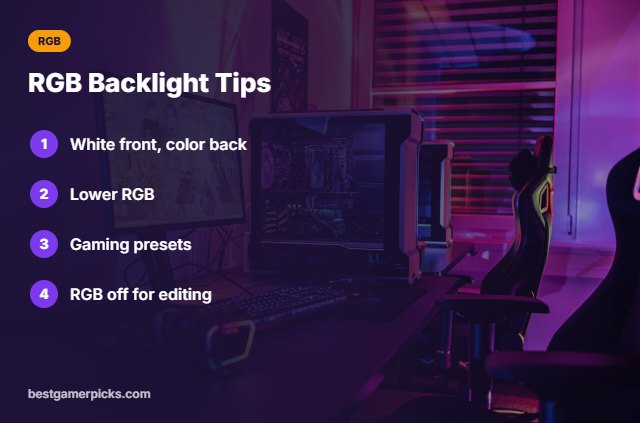
- White front, color back.
- Lower RGB brightness.
- Use presets for gaming.
- Turn RGB off for color work.
Here are quick answers about the best monitor light bar with rgb backlight.
Frequently Asked Questions
What is the best monitor light bar with RGB backlight?
The Quntis ScreenLinear RGB is the best monitor light bar with RGB backlight for most desks, with the Yeelight RGB bar for smart homes.
Does RGB affect color accuracy?
Strong colors can shift perception; use white for editing.
Can it sync with games?
Some smart bars offer sync features.
Is BenQ Halo RGB?
Its backlight is white, not RGB.
Final Verdict
Our final pick for the best monitor light bar with rgb backlight is the Quntis ScreenLinear RGB. Choose the Yeelight RGB Monitor Light Bar (Matter) if you want smart-home control, or the Quntis 15.7″ RGB Light Bar on a budget.
Related Guides
More desk lighting guides:
- Best Monitor Light Bar
- Best Budget Monitor Light Bar
- Best Monitor Light Bar for Curved Monitor
- Best Monitor Light Bar for Eye Strain
- Best LED Strip with Sync Box
- Best Home Theater in a Box for Gaming
Product details are based on manufacturer specifications at the time of writing. Prices and availability change often, so check Amazon for the latest price.
Write Your Review
No reviews yet. Be the first to share your experience!