

BestGamerPicks is reader-supported. As an Amazon Associate we earn from qualifying purchases. This does not change our recommendations. Learn more.
The best ergonomic desk setup for gamers puts your screen at eye level, your keyboard at elbow height and your feet flat, so you can play longer without neck, shoulder or wrist strain.
This guide walks through each part of the desk and the product we recommend to fix it. Together they make up the best ergonomic desk setup for gamers, whether you sit, stand or both.
Quick Answer: The Best Ergonomic Desk Setup for Gamers
- Best Monitor Mount: HUANUO FlowLift Dual Monitor Stand for 13–32″ Screens
- Best Keyboard Tray: HUANUO Under Desk Keyboard Tray, 25 x 9.8 Inch, Height and Tilt Adjustable
- Best Footrest: HUANUO Under Desk Foot Rest, 17.1″ Massage Footrest, Adjustable and Tilt
- Best Wrist Rest: Glorious Gaming Keyboard Wrist Rest, Compact 12x4x1 in
- Best Standing Mat: Ergodriven Topo Standing Desk Mat (Not-Flat Terrain)
- Best Chair Mat: Baroyal Office Chair Mat for Hardwood Floor, Anti-Slip PVC, 36 x 48
- Best Budget Monitor Mount: VIVO Dual Monitor Desk Mount, Up to 30″ and 22 lbs Each
For the best ergonomic desk setup for gamers, mount your screens on the HUANUO Dual Monitor Stand, drop typing height with the HUANUO Adjustable Keyboard Tray, support your feet with the HUANUO Footrest and protect the floor with a Baroyal mat.
Best Ergonomic Desk Setup for Gamers Comparison Table
| Product | Best For | Type | Key Feature | Buy |
|---|---|---|---|---|
| HUANUO Dual Monitor Stand | Best Monitor Mount | Dual monitor arm | Fully adjustable for 13–32″ screens | Check Price |
| HUANUO Adjustable Keyboard Tray | Best Keyboard Tray | Adjustable keyboard tray | Swivels 180°, 6.3″ height adjustment | Check Price |
| HUANUO Adjustable Footrest | Best Footrest | Adjustable rocking footrest | 3 heights, free rocking ±30° | Check Price |
| Glorious Compact Wrist Rest | Best Wrist Rest | Keyboard wrist rest | Fits 60%/65% keyboards, 1″ thick | Check Price |
| Ergodriven Topo | Best Standing Mat | Terrain standing desk mat | Calculated terrain encourages movement | Check Price |
| Baroyal Hard Floor Mat | Best Chair Mat | Woven PVC hard-floor mat | Rubber backing, quiet glide | Check Price |
| VIVO Dual Monitor Mount | Best Budget Monitor Mount | Dual monitor mount | Holds two 30″ screens up to 22 lb each | Check Price |
The 7 Best Products for an Ergonomic Gaming Desk Setup
Each product in our best ergonomic desk setup for gamers fixes one part of the desk.

HUANUO FlowLift Dual Monitor Stand for 13–32″ Screens
1HUANUO’s dual monitor stand holds two 13–32 inch screens on fully adjustable arms, freeing up desk space.
👍 Pros & Cons
Pros
- Frees desk space
- Raises monitors to eye level
- Very popular
Cons
- Check VESA compatibility
- Clamp needs a sturdy desk
📄 Detailed Review
- Type: Dual monitor desk mount
- Screens: 13 to 32 in
- Adjustment: Fully adjustable arms
HUANUO’s FlowLift stand mounts two monitors from 13 to 32 inches and lets you set each to eye level.
Check your monitors’ VESA pattern before buying.

HUANUO Under Desk Keyboard Tray, 25 x 9.8 Inch, Height and Tilt Adjustable
2HUANUO’s keyboard tray adjusts height by 6.3 inches, tilts and swivels 180°, making it the most adjustable tray here.
👍 Pros & Cons
Pros
- Height and tilt adjustable
- Swivels 180°
- Works sitting or standing
Cons
- Check crossbar clearance
- More complex install
📄 Detailed Review
- Type: Height, tilt and swivel adjustable tray
- Platform: 25 x 9.84 in with wrist rest
- Height: 6.3 in adjustment
HUANUO’s tray holds a full-size keyboard on a 25 x 9.84 inch platform with a wrist rest. It swivels 180 degrees for corner desks.
Confirm there is no crossbar under your desk, or allow 14.17 inches of clearance.

HUANUO Under Desk Foot Rest, 17.1″ Massage Footrest, Adjustable and Tilt
3HUANUO’s adjustable footrest offers three heights and free rocking up to ±30°, a great all-round pick for gaming desks.
👍 Pros & Cons
Pros
- Three heights
- Free-rocking keeps legs moving
- Massage texture
Cons
- Plastic build
- Rocking may distract some users
📄 Detailed Review
- Type: Adjustable rocking footrest
- Heights: 4.3, 5.5 and 6.7 in
- Tilt: Free rocking -30° to +30°
HUANUO makes the height manually adjustable to 4.3, 5.5 or 6.7 inches. The platform rocks freely from -30° to +30° to keep your legs moving.
The massage surface stimulates your feet during long sessions.
Glorious Gaming Keyboard Wrist Rest, Compact 12x4x1 in
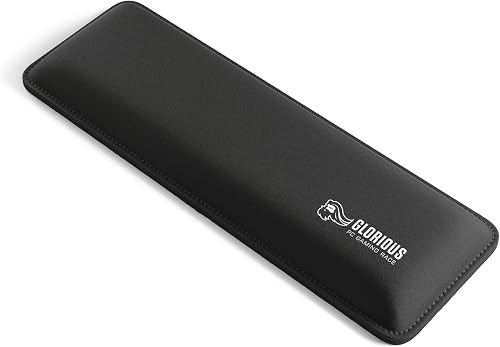
4Glorious’ compact wrist rest is 1 inch thick to match mechanical keyboard height, a favorite with 60% and 65% keyboard gamers.
👍 Pros & Cons
Pros
- Perfect height for mechanical keyboards
- Anti-fray stitched edges
- Nonskid rubber base
Cons
- Compact size only in this listing
- Fabric can stain
📄 Detailed Review
- Type: Keyboard wrist rest
- Size: 12 x 4 in, 25 mm thick
- Fits: Compact 60%/65% keyboards
Glorious sized this rest at 12 x 4 inches and 25 mm thick for compact 60% and 65% keyboards. The dual-lock anti-fraying stitched frame increases lifespan.
A nonskid rubber base keeps it locked in place.

Ergodriven Topo Standing Desk Mat (Not-Flat Terrain)
5Ergodriven’s Topo uses calculated terrain instead of a flat surface, so you naturally shift and move while standing.
👍 Pros & Cons
Pros
- Encourages you to shift and move
- First mat designed for standing desks
- Ultra-thick comfort
Cons
- Premium price
- Takes up more floor space
📄 Detailed Review
- Type: Not-flat anti-fatigue mat
- Design: Calculated terrain with ridges and slopes
- Made for: Standing desks
Ergodriven says Topo was the first mat designed specifically for standing desks. Its ridges and slopes encourage movement without you thinking about it.
It is our premium pick for standing desk gamers.

Baroyal Office Chair Mat for Hardwood Floor, Anti-Slip PVC, 36 x 48
6Baroyal’s woven PVC surface and rubber backing make it a quiet, stable mat for hardwood and tile.
👍 Pros & Cons
Pros
- Quiet, smooth glide
- Rubber backing stays put
- Tested for 10,000 uses by the maker
Cons
- Opaque look
- Not for carpet
📄 Detailed Review
- Floor: Hardwood, tile, laminate
- Size: 36 x 48 in
- Build: Woven PVC surface, rubber backing
Baroyal uses a precision-woven PVC surface so chairs glide smoothly and quietly. The upgraded rubber backing was put through more than 10,000 durability tests by the maker.
It is a great middle ground between a clear mat and a rug-style mat.

VIVO Dual Monitor Desk Mount, Up to 30″ and 22 lbs Each
7VIVO’s dual mount holds two screens up to 30 inches and 22 lb each and is one of the most reviewed monitor mounts.
👍 Pros & Cons
Pros
- Huge review base
- Holds heavier monitors
- Fully adjustable
Cons
- 30-inch limit
- Manual tension adjustment
📄 Detailed Review
- Type: Dual monitor desk mount
- Screens: Up to 30 in
- Capacity: 22 lb per screen
VIVO’s heavy-duty mount is fully adjustable and holds two screens up to 30 inches and 22 lb each.
It is a proven, budget-friendly choice.
How We Chose the Best Ergonomic Desk Setup for Gamers
To choose the best ergonomic desk setup for gamers, we followed OSHA workstation guidance for monitor, keyboard, chair and foot position, then chose a top-rated product for each.
For desk height, legroom and layout guidance, see the OSHA Computer Workstations eTool on desks.
Product details in this guide are based on manufacturer specifications and verified owner feedback, not in-house lab testing. Read more on our How We Test page.
Buying Guide: How to Choose the Best Ergonomic Desk Setup for Gamers
Keep these factors in mind when shopping for the best ergonomic desk setup for gamers.
Monitor height and distance
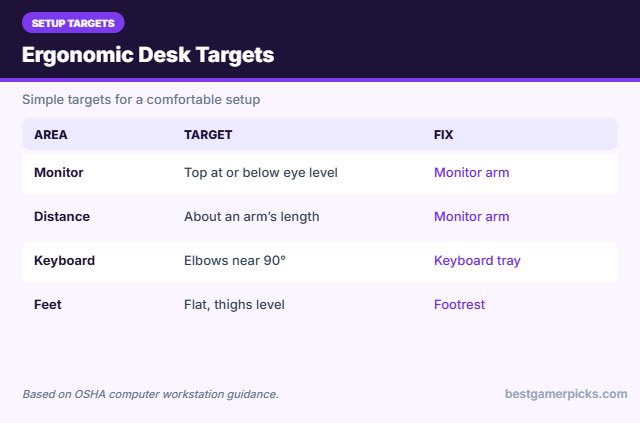
The top of your screen should sit at or slightly below eye level, about an arm’s length away. Monitor arms make this easy and free up desk space.
Keyboard and mouse height
Your elbows should sit at roughly 90 degrees with relaxed shoulders. If your desk is too high, a keyboard tray drops typing height without changing the desk.
Feet and legs
Your feet should rest flat on the floor or a footrest with thighs roughly level.
Sit-stand variety
If you have a standing desk, alternate between sitting and standing. An anti-fatigue mat and footrest make standing more comfortable.
Cable and space planning
Monitor arms and keyboard trays free desk space. Route cables along the arm and desk legs so they do not snag your chair or feet.
Ergonomic Desk Setup Checklist
Check these every time you rearrange:
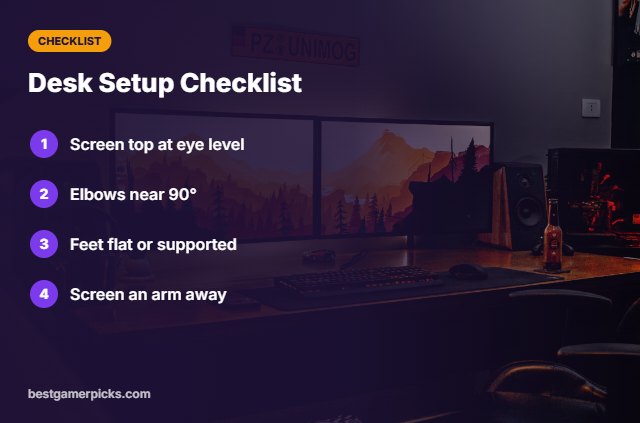
- Top of screen at or below eye level.
- Elbows near 90 degrees.
- Feet flat on floor or footrest.
- Screen about an arm’s length away.
Here are quick answers about the best ergonomic desk setup for gamers.
Frequently Asked Questions
What is the best ergonomic desk setup for gamers?
The best ergonomic desk setup for gamers places the monitor at eye level, keyboard at elbow height and feet flat, using a monitor arm, keyboard tray and footrest.
How high should my gaming desk be?
So your elbows rest near 90 degrees with relaxed shoulders; a keyboard tray helps if the desk is too high.
Is a standing desk better for gaming?
Alternating sitting and standing helps many people; use a mat when standing.
Do I need two monitors?
Not for ergonomics, but a dual arm keeps both screens at the right height.
Final Verdict
Our final pick for the best ergonomic desk setup for gamers is the HUANUO Dual Monitor Stand. Choose the HUANUO Adjustable Keyboard Tray if you want an adjustable keyboard tray, or the HUANUO Adjustable Footrest if your feet do not reach the floor.
Related Guides
Dive deeper into each upgrade:
- Best Keyboard Tray under Desk
- Best Laptop Stand for Ergonomic Gaming
- Best Anti Fatigue Mat for Standing Desk
- Best Ergonomic Setup Accessories for Gamers
- Best Seat Cushion for Tailbone Pain
- Best Gaming Chair Armrest Pads
Product details are based on manufacturer specifications at the time of writing. Prices and availability change often, so check Amazon for the latest price.










Write Your Review
No reviews yet. Be the first to share your experience!