

BestGamerPicks is reader-supported. As an Amazon Associate we earn from qualifying purchases. This does not change our recommendations. Learn more.
The best ergonomic setup accessories for gamers fix the small mismatches between your body, chair and desk that cause aches after long sessions.
Instead of buying a new chair or desk, the right add-ons can make your current setup much more comfortable. We picked one standout product for each part of your setup, from lumbar support to monitor height. These are the best ergonomic setup accessories for gamers in 2026.
Quick Answer: The Best Ergonomic Setup Accessories for Gamers
- Best Lumbar Support: Everlasting Comfort The Original Lumbar Support Pillow
- Best Seat Cushion: Everlasting Comfort Memory Foam Seat Cushion
- Best Footrest: HUANUO Under Desk Foot Rest, 17.1″ Massage Footrest, Adjustable and Tilt
- Best Monitor Arm: HUANUO FlowLift Dual Monitor Stand for 13–32″ Screens
- Best Keyboard Wrist Rest: Glorious Gaming Keyboard Wrist Rest, Compact 12x4x1 in
- Best Mouse Wrist Rest: DELTAHUB Carpio 2.0 Ergonomic Wrist Rest for Mouse (Right-Handed)
- Best Keyboard Tray: VIVO Clamp-on 27 x 11 in Keyboard Tray, MOUNT-KB05E
- Best Casters: Lifelong Office Chair Wheels Replacement, Heavy Duty, 5-Pack
Start with the Everlasting Comfort Lumbar Pillow and HUANUO Footrest. Then add the HUANUO Dual Monitor Stand and a Glorious Wrist Rest. These are the best ergonomic setup accessories for gamers to buy first.
Best Ergonomic Setup Accessories for Gamers Comparison Table
| Product | Best For | Type | Key Feature | Buy |
|---|---|---|---|---|
| Everlasting Comfort Lumbar Pillow | Best Lumbar Support | Memory foam lumbar pillow | Dual adjustable straps with extenders | Check Price |
| Everlasting Comfort Seat Cushion | Best Seat Cushion | Memory foam seat cushion | U-shaped cutout, washable cover | Check Price |
| HUANUO Adjustable Footrest | Best Footrest | Adjustable rocking footrest | 3 heights, free rocking ±30° | Check Price |
| HUANUO Dual Monitor Stand | Best Monitor Arm | Dual monitor arm | Fully adjustable for 13–32″ screens | Check Price |
| Glorious Compact Wrist Rest | Best Keyboard Wrist Rest | Keyboard wrist rest | Fits 60%/65% keyboards, 1″ thick | Check Price |
| DELTAHUB Carpio 2.0 | Best Mouse Wrist Rest | Gliding mouse wrist rest | Glides with your hand on PTFE feet | Check Price |
| VIVO Clamp-on Keyboard Tray | Best Keyboard Tray | Clamp-on keyboard tray | No drilling, 26.8 x 11 in platform | Check Price |
| Lifelong Chair Wheels | Best Casters | Rollerblade-style casters (5) | Heavy duty, universal fit | Check Price |
The 8 Best Ergonomic Setup Accessories for Gamers
Each of the best ergonomic setup accessories for gamers below solves a specific problem.

Everlasting Comfort The Original Lumbar Support Pillow
1The Everlasting Comfort Original is the safest all-round lumbar pillow: dense memory foam, two adjustable straps with extenders, and one of the largest owner review bases in the category.
👍 Pros & Cons
Pros
- Dense foam that holds its shape
- Two straps keep it from sliding down
- Huge owner review base
Cons
- Firm feel takes a few days to get used to
- Contoured shape may be too thick for small chairs
📄 Detailed Review
- Type: High-density memory foam lumbar pillow
- Straps: Two adjustable straps plus extension pieces
- Fits: Office chairs, gaming chairs and car seats
Everlasting Comfort balances firm posture support with long-lasting comfort by using a high-density memory foam core that does not collapse during long sessions. The contoured shape fills the gap between your lower back and the backrest, which is exactly what most gaming chairs leave empty.
Dual straps with extension pieces let it fit wide racing-style backrests as well as office chairs and car seats, so it works if you move between setups.

Everlasting Comfort Memory Foam Seat Cushion
2The Everlasting Comfort seat cushion is the benchmark: memory foam, a U-shaped tailbone cutout and a washable cover, backed by an enormous review base.
👍 Pros & Cons
Pros
- One of the most reviewed seat cushions on Amazon
- U-cutout relieves tailbone pressure
- Washable breathable cover
Cons
- Raises your seat height
- Firm at first
📄 Detailed Review
- Type: Memory foam seat cushion
- Shape: Ergonomic U-shaped cutout
- Cover: Breathable, machine washable
Everlasting Comfort uses an ergonomic U-shaped cutout to take pressure off the tailbone and lower back while supporting spinal alignment. The memory foam conforms to you without bottoming out on a hard gaming chair seat.
The breathable cover is machine washable, which is a real plus for daily use.

HUANUO Under Desk Foot Rest, 17.1″ Massage Footrest, Adjustable and Tilt
3HUANUO’s adjustable footrest offers three heights and free rocking up to ±30°, a great all-round pick for gaming desks.
👍 Pros & Cons
Pros
- Three heights
- Free-rocking keeps legs moving
- Massage texture
Cons
- Plastic build
- Rocking may distract some users
📄 Detailed Review
- Type: Adjustable rocking footrest
- Heights: 4.3, 5.5 and 6.7 in
- Tilt: Free rocking -30° to +30°
HUANUO makes the height manually adjustable to 4.3, 5.5 or 6.7 inches. The platform rocks freely from -30° to +30° to keep your legs moving.
The massage surface stimulates your feet during long sessions.

HUANUO FlowLift Dual Monitor Stand for 13–32″ Screens
4HUANUO’s dual monitor stand holds two 13–32 inch screens on fully adjustable arms, freeing up desk space.
👍 Pros & Cons
Pros
- Frees desk space
- Raises monitors to eye level
- Very popular
Cons
- Check VESA compatibility
- Clamp needs a sturdy desk
📄 Detailed Review
- Type: Dual monitor desk mount
- Screens: 13 to 32 in
- Adjustment: Fully adjustable arms
HUANUO’s FlowLift stand mounts two monitors from 13 to 32 inches and lets you set each to eye level.
Check your monitors’ VESA pattern before buying.
Glorious Gaming Keyboard Wrist Rest, Compact 12x4x1 in
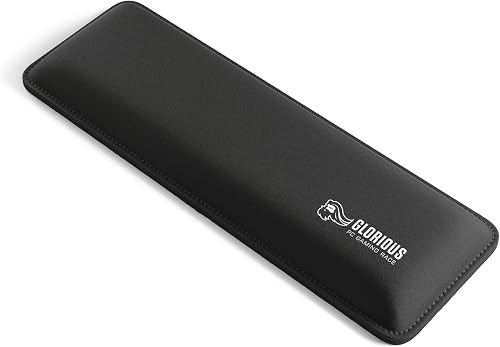
5Glorious’ compact wrist rest is 1 inch thick to match mechanical keyboard height, a favorite with 60% and 65% keyboard gamers.
👍 Pros & Cons
Pros
- Perfect height for mechanical keyboards
- Anti-fray stitched edges
- Nonskid rubber base
Cons
- Compact size only in this listing
- Fabric can stain
📄 Detailed Review
- Type: Keyboard wrist rest
- Size: 12 x 4 in, 25 mm thick
- Fits: Compact 60%/65% keyboards
Glorious sized this rest at 12 x 4 inches and 25 mm thick for compact 60% and 65% keyboards. The dual-lock anti-fraying stitched frame increases lifespan.
A nonskid rubber base keeps it locked in place.

DELTAHUB Carpio 2.0 Ergonomic Wrist Rest for Mouse (Right-Handed)
6DELTAHUB’s Carpio 2.0 glides with your hand on PTFE feet instead of staying fixed, the best wrist rest for fast mouse movements.
👍 Pros & Cons
Pros
- Moves with your wrist
- Designed with medical experts
- Ideal for low-sens gamers
Cons
- Right-handed only
- Premium price
📄 Detailed Review
- Type: Gliding wrist rest, right-handed
- Pads: Silicone
- Feet: PTFE glides
DELTAHUB developed Carpio with medical experts in reconstructive surgery. Silicone pads cushion the wrist while PTFE feet let it glide with your hand.
Because it moves with you, it does not create a pivot point that limits aim.

VIVO Clamp-on 27 x 11 in Keyboard Tray, MOUNT-KB05E
7VIVO’s clamp-on tray adds a 26.8 x 11 inch slide-out platform without drilling into your desk.
👍 Pros & Cons
Pros
- No drilling needed
- Wide platform fits keyboard and mouse
- Slides in and out
Cons
- Desk must be 1.25 in or thinner
- Not height adjustable
📄 Detailed Review
- Type: Clamp-on sliding keyboard tray
- Platform: 26.8 x 11 in (32.5 in with clamps)
- Desk limit: Up to 1.25 in thick
VIVO’s tray clamps on and slides in and out, holding your keyboard and mouse at a lower typing height. Make sure your desk is no thicker than 1.25 inches.
It is our top pick for renters.

Lifelong Office Chair Wheels Replacement, Heavy Duty, 5-Pack
8Lifelong’s heavy-duty rollerblade wheels are among the highest-rated chair casters on Amazon and roll safely on hardwood.
👍 Pros & Cons
Pros
- Huge, highly rated review base
- Safe on hardwood
- Universal fit
Cons
- Very smooth rolling may feel slippery
- Check stem size on rare chairs
📄 Detailed Review
- Type: Rollerblade-style casters, 5 pack
- Fit: Universal fit for most chairs
- Floors: Will not scratch hard floors
Lifelong says its heavy-duty wheels will not scratch or damage hard floors, often replacing the need for a chair mat. They fit almost any office chair.
It is our top pick for most gaming chairs.
How We Chose the Best Ergonomic Setup Accessories for Gamers
To choose the best ergonomic setup accessories for gamers, we picked one top-rated product per area of a gaming setup, prioritizing the upgrades that fix the most common discomfort for the money.
To audit your whole setup step by step, use the OSHA computer workstation evaluation checklist.
Product details in this guide are based on manufacturer specifications and verified owner feedback, not in-house lab testing. Read more on our How We Test page.
Buying Guide: How to Choose the Best Ergonomic Setup Accessories for Gamers
Keep these factors in mind when shopping for the best ergonomic setup accessories for gamers.
Chair support comes first
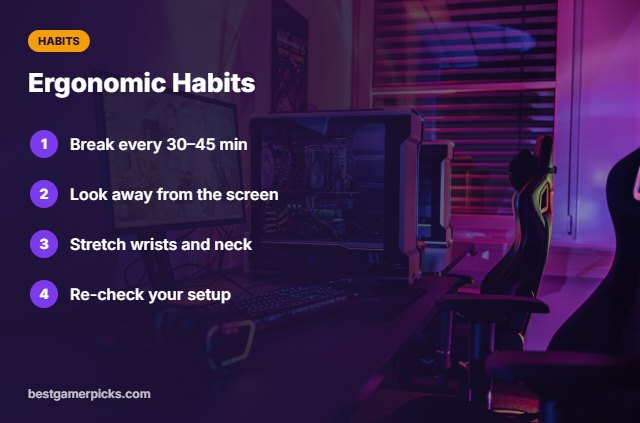
Start with your chair: lumbar support, seat comfort and armrests at desk height. Everything else builds on a good sitting position.
Feet and legs
Your feet should rest flat on the floor or a footrest with thighs roughly level.
Monitor height and distance
The top of your screen should sit at or slightly below eye level, about an arm’s length away. Monitor arms make this easy and free up desk space.
Keyboard and mouse height
Your elbows should sit at roughly 90 degrees with relaxed shoulders. If your desk is too high, a keyboard tray drops typing height without changing the desk.
Upgrade in the right order
Start with lumbar support and seat comfort, then fix feet, monitor height and wrist position. Small fixes in this order usually help more than one expensive purchase.
Ergonomic Habits for Gamers
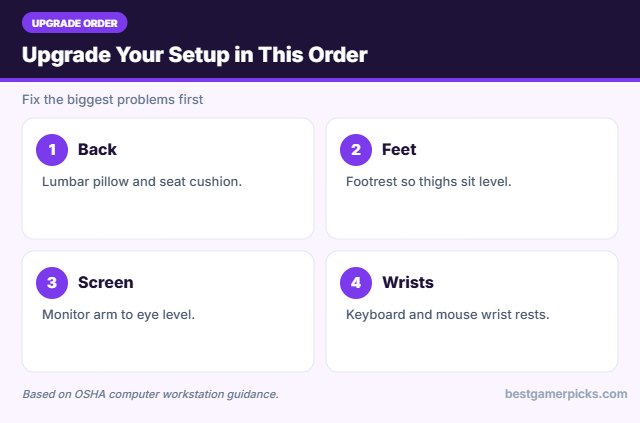
Accessories work best with these habits:
- Take a short break every 30 to 45 minutes.
- Look away from the screen regularly.
- Stretch wrists, neck and hips.
- Re-check your setup after any change.
Here are quick answers about the best ergonomic setup accessories for gamers.
Frequently Asked Questions
What are the best ergonomic setup accessories for gamers?
The best ergonomic setup accessories for gamers start with a lumbar pillow and footrest, then a monitor arm and wrist rests.
What should I upgrade first?
Lumbar support and seat comfort usually make the biggest difference first.
Do I need a new chair?
Often not. Add-ons can fix many problems with an existing chair.
Are monitor arms worth it?
Yes, if your screen is too low or too close; they also free desk space.
Final Verdict
Our final pick for the best ergonomic setup accessories for gamers is the Everlasting Comfort Lumbar Pillow. Choose the Everlasting Comfort Seat Cushion if you want a cushion for a firm seat, or the HUANUO Adjustable Footrest if your feet do not rest flat.
Related Guides
Dive deeper into each upgrade:
- Best Keyboard Tray under Desk
- Best Laptop Stand for Ergonomic Gaming
- Best Anti Fatigue Mat for Standing Desk
- Best Ergonomic Desk Setup for Gamers
- Best Wedge Seat Cushion
- Best Gaming Chair Armrest Pads
Product details are based on manufacturer specifications at the time of writing. Prices and availability change often, so check Amazon for the latest price.










Write Your Review
No reviews yet. Be the first to share your experience!